
Data Protection
Scope
This chapter covers backup and disaster recovery for workloads running on Kubernetes, their configuration and deployed state and persistent storage - so that a cluster loss or data corruption event is recoverable. It is distinct from Chapter 2 (section 2.6), which addresses backup of the Portainer management plane itself.
The primary consumers are platform engineers and infrastructure architects responsible for business continuity.
Five tooling scenarios are covered: GitOps-first recovery (no dedicated backup tooling - appropriate for stateless workloads only), Velero (open-source baseline, use when no commercial alternative is available), CloudCasa (commercial management layer on top of Velero), Veeam Kasten K10 (enterprise-grade, policy-driven, application-aware), and Air-gapped edge (self-sustaining protection for disconnected environments).
11.1 Data Protection Architecture Principles
Scope boundary: Portainer state vs. cluster workload state. The Portainer Control Plane holds its own state - environment definitions, RBAC assignments, audit logs, GitOps configuration - in an embedded bboltDB database on the management cluster. This state is backed up via Portainer's built-in backup feature or platform-level volume snapshots, as described in Chapter 2. Additionally, it can also be backed up using the solutions described in this chapter.
What needs protecting. This chapter covers protecting the applications and data running on Kubernetes. Both must be protected independently; restoring one without the other leaves applications in an inconsistent state.
- Kubernetes resource state - namespaces, Deployments, StatefulSets, ConfigMaps, Secrets, RBAC bindings, CRDs, and all other API objects - can be reconstructed from a GitOps repository for stateless workloads, but stateful workloads and runtime state must be explicitly backed up.
- Persistent Volume data - the actual data written by applications to block or file storage - requires snapshot or streaming backup independent of the resource definitions that reference it.
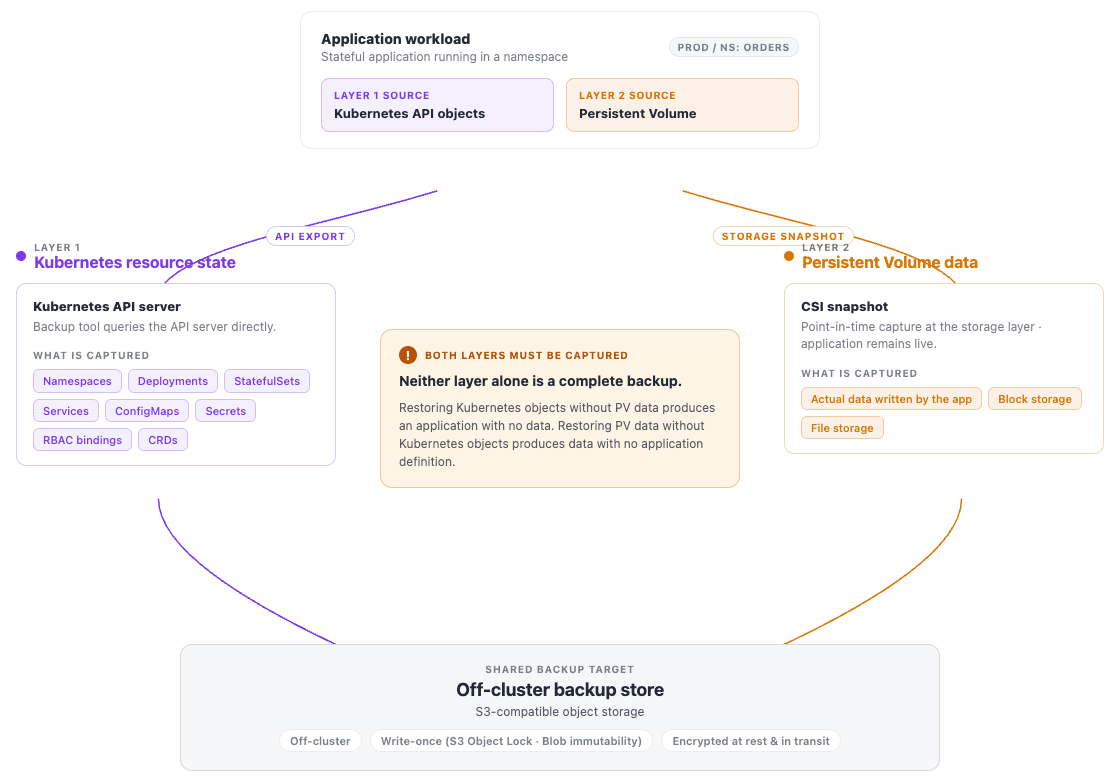
API Objects and Persistent storage
By capturing the application’s state in Kubernetes and all persistent volume data, the need for a complete back-up of a cluster’s control plane state (stored in etcd) becomes less relevant: this information is captured per application by the backup software, and a cluster can be re-deployed through the desired-state configuration mechanisms discussed in Chapter 3.
RPO and RTO requirements by tier. Production workloads processing transactions, user data, or regulated information require the tightest protection: RPO measured in minutes to low hours, RTO sufficient to satisfy SLA obligations. Non-production workloads - development, staging, testing - typically tolerate a multi-hour RPO and an RTO measured in hours. Edge clusters hosting operational or industrial workloads may have stricter RTO requirements (site cannot operate without the workload) but limited connectivity to central backup targets. Define tier-specific RPO and RTO requirements before selecting tooling - the requirements drive the architecture, not the other way around.
Granular, application-level Kubernetes-native backup. Solutions must capture an application’s Kubernetes API objects (the resource definitions) and the persistent volume data they reference. When dealing with databases, backups should be able to quiesce databases before creating a backup.
3-2-1 Backup rule. Maintain at least three copies of data: the live application data on cluster storage, a backup in a local or regional object store, and a cross-region or off-site replicated copy. All backup copies must be stored off-cluster - a backup that exists only on the same cluster as the data it protects provides no recovery capability against cluster-level failures.
Incremental and storage-integrated. Persistent storage should be backed up through CSI snapshot integration to minimise backup window duration and reduce load on running workloads. Incremental backups - capturing only changed data since the last backup - should be the default schedule, with periodic full backups as the baseline recovery point. Note that full support for changed-block tracking (CBT) in Kubernetes is still under active development.
Restore flexibility. Backup tooling must support restoring to the original cluster, a different cluster, a different namespace, or a different cloud provider. Heterogeneous restore - recovery to a dissimilar cluster - is as important as in-place restore, and is the primary mechanism for DR scenarios where the original cluster is unavailable.
Test Restoring. The value of a backup is determined entirely by whether it can be restored. Scheduled restore drills to isolated environments, validated against documented RTO targets, are as important as the backup schedule itself. Every production workload must have at least one documented, tested restore procedure before its backup can be considered operationally valid. The most mature backup solutions provide native isolated recovery environments for automated restore verification, spinning up a restore and validating that the application starts successfully without touching production.
Ransomware protection and data integrity. Ransomware and insider threats make backup data itself a target - an attacker who can delete or encrypt backups removes the last line of defence against data loss. Apply write-once semantics (S3 Object Lock in COMPLIANCE mode, Azure Blob immutability with policy lock enabled) to all production backup targets, not only regulated workloads. Air-gapping backup data - storing it in a location not accessible via normal cluster credentials - provides a further level of isolation. For environments with active security operations, backup tools that integrate with SIEM platforms (Chapter 10) and can detect anomalies (unexpected backup size changes, deletion patterns) provide earlier warning of potential compromise.
Backup multitenancy. The reference architecture uses namespace-based multi-tenancy (Chapter 3). Backup tooling should map to this model if self-service restores by teams is desirable: policies should be definable at the namespace level, restore access should be scoped by Kubernetes RBAC, and self-service recovery at the namespace level should allow application teams to manage their own restores without requiring platform engineering involvement. Application teams should not need access to cluster-wide backup configuration to protect or restore their namespaces.
11.2 Backup Tooling
Velero (Open-Source Baseline)
Velero is the OSS Kubernetes backup tool originally developed by Heptio and now maintained by the VMware/Broadcom community. It backs up Kubernetes API objects by querying the API server and captures persistent volume data via CSI snapshot integration or file-system-level backup. Backups are stored in any S3-compatible object store (AWS S3, Azure Blob, GCS, MinIO). It is free, widely supported across cloud providers, and forms the underlying engine for several commercial products including CloudCasa.
Velero is the open-source foundation on which several commercial Kubernetes backup tools are built. In isolation, it is operationally demanding and lacks the reliability and operational completeness expected of a production backup system. There is no management UI, no policy automation, no application consistency, and no native validation that backups are restorable. Teams that deploy bare Velero in production should treat it as a lower-level building block requiring significant operational investment - not a complete backup solution. Use Velero in isolation only when budget constraints rule out commercial alternatives; otherwise use it as the engine beneath CloudCasa (Scenario B), which addresses most of its operational gaps.
What Velero provides: API object backup and restore at the namespace or cluster level, CSI snapshot integration for PV data capture, backup schedules via CronJob, TTL-based retention, and basic restore filtering by resource type or label.
What Velero does not provide: a management UI, application-consistent backup (no database quiescing), a policy engine for automatic coverage of new workloads, backup verification or restore testing automation, multi-cluster management from a single pane, or meaningful compliance reporting. Restore operations are entirely CLI-driven and require careful flag management to avoid unintended resource conflicts.
Deployment: Velero is deployed to each cluster as a server-side component via Helm, with a BackupStorageLocation pointing to the S3 target and a VolumeSnapshotLocation for CSI snapshots. Deploy via Portainer's Helm repository integration or GitOps pipeline (Chapter 6) for consistent configuration across the fleet. It has no central management component.
CloudCasa by Catalogic Software (Velero + Commercial Layer)
CloudCasa is a commercial Kubernetes data protection platform from Catalogic Software, available as SaaS (default) or self-hosted. It can operate as a management layer over existing Velero deployments or independently, and integrates natively with major cloud providers for cluster and storage autodiscovery. Catalogic Software positions CloudCasa as the operational and commercial answer to bare Velero's gaps.
What CloudCasa adds over bare Velero: a full web UI for backup management across multiple clusters, automated scheduling and retention policy configuration without YAML authorship, multi-cluster visibility from a single console, support for heterogeneous restores including automatic cloud cluster creation for disaster recovery workflows, and cloud database backup support (AWS RDS and Aurora). CloudCasa integrates with cloud provider APIs to capture cluster and networking configuration in EKS, AKS, and GKE, enabling recovery or migration workflows that restore the full cluster environment, not just application data.
Strengths: Strong heterogeneous recoverability and cluster-level DR workflows. Cloud database (RDS, Aurora) backup support without additional tooling. Operational simplicity compared to bare Velero. Solid RBAC, SSO, MFA, and encryption controls for access management. Available as SaaS (no infrastructure to manage for the control plane) with a self-hosted option for environments that cannot use SaaS.
Limitations: Does not support air-gapping backup data - a constraint for highly regulated or disconnected environments. Does not support customer-managed encryption keys (bring-your-own-key). Backup verification and restore testing automation are limited. Cloud database backup support is currently limited to AWS (RDS, Aurora); extending to other databases requires other Catalogic products. Pricing is per worker node, which scales with fleet size.
When to use CloudCasa: Organisations that want a commercially supported, multi-cluster backup management UI without the operational burden of bare Velero, particularly where existing Velero deployments need centralised management. Well-suited to cloud-hosted or hybrid environments, smaller-to-medium complexity workloads, and teams that need Velero's broad storage target support with commercial tooling on top. Less appropriate for highly regulated environments requiring air-gapped backup storage, BYOK encryption, or formal backup verification workflows.
Kasten K10 by Veeam (Enterprise, Policy-Driven)
Kasten K10 is Veeam's cloud-native data management platform for Kubernetes, acquired from Kasten in 2020. It provides backup, restore, disaster recovery, and application migration for container-based workloads and KubeVirt-based virtual machines. Kasten is the market-leading enterprise Kubernetes backup solution and is particularly strong in regulated, government, and large-scale environments.
Application-aware backup via Kanister: Kasten natively discovers data services - MySQL, MongoDB, PostgreSQL, Amazon RDS, Kafka, Cassandra - within the application context, and uses Kanister (an open-source data management framework) to apply application-specific policies including database quiescing during backup to ensure data consistency. Kanister blueprints are maintained by Veeam and the community and are expanded continuously. This is Kasten's most significant architectural differentiator: backup is application-aware rather than storage-layer-aware.
Policy-driven automation: Kasten's backup model is declarative and label/namespace-driven. Backup policies are defined once and automatically applied to any workload matching their selector - a new stateful application deployed into a protected namespace is automatically covered without manual intervention. This is the correct model for large fleets where manual per-workload backup configuration does not scale.
Compliance and governance: Kasten provides backup coverage reports showing which workloads are protected, their last backup status, and RPO compliance. This is essential for regulated environments where backup coverage must be demonstrable to auditors. Kasten holds ISO 27001 certification and is available on DoD Platform One for government deployments.
Strengths: Industry-leading application-consistent backup via Kanister. Policy-driven automation scales to large, complex fleets. Strong compliance reporting and regulatory positioning. Verified recoverability in isolated recovery environments. Edge architecture support with centralised policy management and low per-cluster resource footprint.
When to use Kasten: Regulated and government environments with formal compliance requirements, complex stateful applications requiring application-consistent backup, large fleets requiring policy-driven automatic coverage, organisations with existing Veeam investments seeking to unify VM and container backup, and edge deployments requiring centralised policy management across many small clusters.
Application migration as a secondary use case. The snapshot, replication, and application-aware capture mechanisms that enable DR can also orchestrate cluster-to-cluster application migration: moving applications between Kubernetes distributions, from on-premises to cloud, between cloud providers, or from VMware virtualisation to KubeVirt. CloudCasa supports automatic cluster creation for migration scenarios on EKS, AKS, and GKE. Kasten provides migration workflows with application consistency. Velero supports basic namespace export but lacks orchestrated migration workflows. Migration is not backup’s primary purpose, but selecting tooling that supports it avoids the need for separate migration tooling when the platform evolves or workloads must be relocated.
11.3 Cluster backups
When application-level backup tools (Velero, CloudCasa, Kasten) capture application-level Kubernetes resource definitions alongside persistent volume data, a dedicated etcd backup becomes largely redundant. The backup tooling captures per-application Kubernetes state by querying the API server directly - namespaces, Deployments, StatefulSets, ConfigMaps, Secrets, RBAC bindings, and CRDs are all included in the application backup. The cluster itself can be reprovisioned from its cluster profile (Chapter 3) using the desired-state configuration mechanisms described there. A new cluster provisioned from the profile plus application restores from backup recovers both the platform and the workloads without requiring a separate etcd restore procedure.
This is the recovery model this reference architecture uses. It is operationally simpler than etcd snapshot management and avoids the version-compatibility constraints of etcd restores (an etcd snapshot is only restorable to a cluster running the same Kubernetes version). It also aligns naturally with the GitOps model: cluster state is authoritative in Git, not in etcd.
11.4 Storage-Level Protection and the Role of CSI
The Container Storage Interface (CSI) is the standardised Kubernetes abstraction layer for interacting with storage systems, and it is what makes production-grade Kubernetes backup practical. All three backup tools covered in this chapter - Velero, CloudCasa, and Kasten - integrate with storage through CSI. CSI makes interacting with the plethora of storage solutions easier through a standardized API. In the context of backups, this enables storage-native snapshot operations to support the backup process, resulting in quicker backups with less impact on the storage system.
The specific benefits CSI brings to backup:
- Snapshots without application downtime. CSI snapshots are taken at the storage layer in seconds, without stopping the application or mounting an agent into the pod. The backup window is minimised and applications remain live throughout.
- True incremental backups. Some CSI drivers are starting to support changed-block tracking - only blocks that changed since the last snapshot are transferred to the backup target. This reduces backup duration, network bandwidth, and storage cost dramatically compared to copying entire volumes.
- Kubernetes-native snapshot management. CSI exposes VolumeSnapshot and VolumeSnapshotContent as first-class Kubernetes API objects. Snapshots can be created, listed, and deleted via kubectl, protected by RBAC, and managed through GitOps pipelines - they are part of the cluster’s desired state, not an out-of-band operation.
- Standardised restore path. A PVC can be provisioned directly from a VolumeSnapshot via the dataSource field, restoring data to a new volume with a single manifest change. This works consistently across any CSI-compliant storage provider and is how Velero, CloudCasa, and Kasten all perform volume-level restores.
- Storage-vendor agnostic tooling. Because backup tools integrate through CSI rather than vendor APIs, the same backup policy works whether clusters run on cloud-managed storage or self-hosted storage - critical for hybrid and multi-cloud fleets.
Object storage is a backup gap. Applications increasingly use object storage as a primary data tier alongside block and file PVs. This data is not captured by CSI-based PV backup and requires separate protection. While Container Object Storage Interface (COSI) is the emerging Kubernetes standard for provisioning object storage, it’s not widely adopted, leaving a large visibility gap for object storage backup: Kubernetes nor the backup solution know about which application uses object storage.
Until this matures, cloud-provider native protection or manual bucket replication or backups must be configured outside of the backup solution to account for object storage state alongside Kubernetes resources and PV data.
11.5 Disaster Recovery Patterns
Disaster Recovery scenarios and tooling alignment. Recovery requirements vary significantly by failure type. A single namespace loss (operator error, application bug) requires namespace-level restore from the most recent backup - a capability all four scenarios provide. A full cluster loss (hardware failure, control plane corruption, accidental deletion) requires rebuilding the cluster from its profile (Chapter 3) and restoring all workloads from backup - this is the standard DR scenario. This includes recovering from the loss of a management cluster, uses the same mechanisms but can be more complex since various low-level dependencies (such as identity) may not be available during restores. Architect the backup solutions to not be dependent on any service provided by the management cluster, or any other clusters it’s protecting.
A regional loss requires replicated backup data in a different region and - for zero-RPO requirements - synchronous data replication at the storage or database layer, which backup tools do not provide, and are outside the scope of this guide.
Independent-cluster DR topology. Chapter 3 (section 3.11) establishes that this reference architecture uses only the independent-cluster DR topology and explicitly rejects stretched-cluster configurations. In this model, each cluster is self-contained; DR is achieved by restoring workloads from backup onto a separately provisioned cluster in a different zone or region. The trade-off is an RTO measured in the time required to provision the recovery cluster plus the time to restore from backup. This must be validated against SLA commitments before go-live.
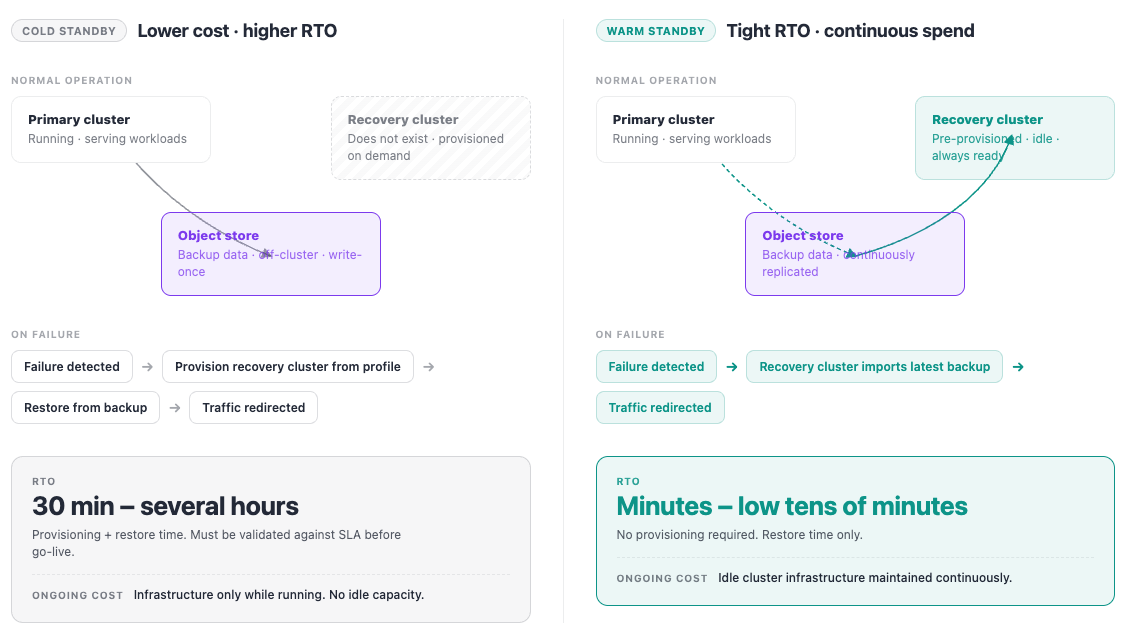
Cold vs. Warm Standby
Cold standby. A recovery cluster is provisioned from the cluster profile on demand when a failure occurs. This is the simplest DR model: no ongoing infrastructure cost, no replication to maintain. RTO is higher - provisioning plus restore time, typically 30 minutes to several hours depending on workload size. Appropriate for non-production tiers and production workloads where the SLA permits this RTO.
Warm standby. A recovery cluster is pre-provisioned and maintained idle (or lightly loaded), with backup data continuously replicated to an object store accessible from the standby cluster. When a failure occurs, the standby cluster imports and restores the latest backup. RTO is lower - minutes to low tens of minutes - at the cost of ongoing infrastructure for the idle cluster. Appropriate for production workloads with tight RTO requirements.
DR drills. A disaster recovery procedure that has never been executed is an assumption, not a capability. Scheduled DR drills - full restore to an isolated cluster, validated against documented RTO and RPO targets - are mandatory for all production workloads covered by a recovery SLA. Drills must be documented, outcomes reviewed, and runbooks updated when procedures change. Kasten provides isolated recovery environments for drill execution without affecting production; Velero and CloudCasa require a separate cluster for DR validation.
11.6 Integration with Portainer
Portainer's role in data protection is indirect: it manages the clusters that backup tooling protects. Portainer does not initiate or manage backups directly, and backup tooling operates independently of Portainer's availability - a Portainer outage must not affect running backup schedules.
Deployment via GitOps. Velero, CloudCasa's Velero components, and Kasten are deployed to each managed cluster via Portainer's GitOps engine (Chapter 6) as part of the cluster profile or as a post-onboarding stack. Helm chart values - backup storage location credentials, schedule configuration, retention policies - are version-controlled in Git and applied consistently across the fleet. This ensures that every cluster onboarded to Portainer governance automatically receives the correct backup configuration for its environment tier.
Monitoring backup job outcomes. Backup job success and failure must be monitored via the Chapter 9 observability stack. Velero exposes Prometheus metrics (backup success/failure count, last backup time, backup size) via its server endpoint; configure a ServiceMonitor to scrape these and alert via the Chapter 9, section 9.5 alerting pipeline when a backup job fails or exceeds the RPO window. Kasten and CloudCasa both provide metrics endpoints and webhook notifications that integrate with the same alerting pipeline.
Backup coverage as a fleet governance metric. The platform engineering team should maintain visibility into which environments have active, tested backup policies - not just which environments have backup tooling installed. Kasten's compliance reporting surfaces this directly. For Velero and CloudCasa deployments, a custom Prometheus metric or a periodic audit job can report backup schedule status per cluster. Environments without active backup coverage should surface as a governance finding in the Portainer UI or a SIEM alert.
11.7 Non-Functional Considerations
Encryption at rest and in transit. All backup data must be encrypted in transit (TLS to the object storage endpoint) and at rest (object storage server-side encryption or client-side encryption before upload). For regulated environments, prefer customer-managed encryption keys (CMEK/BYOK) where the tooling supports it - Kasten supports BYOK; CloudCasa does not at this time.
Access control for backup storage. Backup storage credentials must be separate from cluster credentials, granted minimum permissions (write to backup bucket, read for restore), and rotated independently. Never use a cluster's primary IAM role or service account for backup storage access - a compromised cluster credential must not grant access to the backup archive.
Backup storage sizing and cost management. Storage cost is driven by full backup size, incremental backup frequency, retention window, and replication factor. Enable object storage lifecycle policies to transition older backup data to cheaper storage tiers (S3 Intelligent-Tiering, Azure Cool/Archive, GCS Nearline) after the operational retention window closes. Monitor backup storage growth and alert on unexpected spikes - sudden backup size increases may indicate data corruption or unintended inclusion of high-volume ephemeral data.
Compliance retention. PCI-DSS Requirement 9 mandates backup retention aligned with the organisation's defined retention schedule; the most recent backup must be immediately restorable and older backups retained for the required period. HIPAA requires backup data retention for 6 years. SOC 2 auditors expect evidence that backup procedures are operating as documented. Configure retention policies in the backup tool and object storage lifecycle policies together - the backup tool's TTL and the object storage lifecycle rule must agree, or one will delete data the other expects to retain.
Air-gapped backup storage. For clusters without outbound internet connectivity, backup data cannot be shipped to a cloud object store. Deploy a local MinIO instance (S3-compatible) on the management cluster or on dedicated local infrastructure as the backup target. For truly isolated edge clusters, backup data accumulates locally until a connectivity window allows synchronisation to the central store. Size local storage accordingly and alert when local backup storage approaches capacity.
Backup Service independence. The backup solution should not be dependent on any service provided by the clusters it’s protecting, including the management cluster. This includes identity and secrets management.
Scenarios
No dedicated backup tooling is deployed. Recovery relies exclusively on two mechanisms: reprovisioning the cluster from its profile (Chapter 3), and redeploying all workloads from the GitOps repository (Chapter 6). Persistent volume data is not independently backed up. This approach is valid only for fully stateless applications with no PVs, or for workloads where data can be reconstructed entirely from an external canonical source (for example, an application seeded from an object store or database that is itself backed up outside the cluster). RPO is effectively the last Git commit; RTO is cluster provisioning time plus GitOps reconciliation time - typically 30–90 minutes for a full re-provision-and-redeploy cycle.
Appropriate for development clusters, non-production environments, PoC workloads, and any workload that genuinely has no persistent state. Not acceptable for any workload with a PVC containing data that cannot be reconstructed from Git or an external source. The presence of a single stateful workload with irreplaceable data is sufficient to require moving to Level 2.
Velero is deployed to each managed cluster via Portainer's Helm repository integration, configured with a BackupStorageLocation pointing to an S3-compatible object store and a VolumeSnapshotLocation for CSI snapshot integration. Backup schedules are defined as YAML resources in Git and applied via GitOps (Chapter 6). Backups run on a schedule, capture all API objects in protected namespaces plus CSI snapshots of referenced PVs, and ship the results to S3.
This is the open-source baseline - viable and cost-free, but operationally demanding, since every cluster needs its own deployment and individual configuration. There is no management UI, no application consistency, no policy engine to automatically cover new workloads, and no built-in backup verification. Restore operations require careful CLI execution. Teams operating bare Velero in production must invest significant operational effort to compensate for what the tool does not provide: documentation of restore procedures for each workload type, manual coverage audits to confirm all stateful workloads are scheduled, and periodic restore drills executed via CLI.
Use Velero in isolation only when a commercial alternative cannot be justified. If budget permits, CloudCasa (Scenario B) addresses most of Velero's operational gaps at a moderate cost, while Veeam Kasten K10 is the standard choice for regulated organisations demanding enterprise-grade backup and recovery.
CloudCasa is deployed as the management control plane over existing or new Velero installations. Velero runs on each managed cluster as the backup engine; CloudCasa connects to each cluster, manages Velero configuration centrally, provides a web UI for backup policy management, and adds multi-cluster visibility, automated scheduling, and heterogeneous restore workflows. For organisations already running Velero, CloudCasa can adopt existing installations without disruption.
CloudCasa's SaaS control plane (or self-hosted option for regulated environments) eliminates the need to operate Velero configuration individually per cluster. Backup policies, schedules, and retention are configured once and propagated across the fleet. Cloud provider autodiscovery (EKS, AKS, GKE) automatically registers new clusters and their storage. For DR workflows, CloudCasa can spin up replacement cloud clusters from captured runtime configuration, accelerating recovery from total cluster loss.
Credentials for the CloudCasa agent are stored in the platform’s secrets store (Chapter 8). Backup job outcomes are forwarded to the Chapter 9, section 9.5 alerting pipeline via CloudCasa's webhook notification capability. CloudCasa is not appropriate for environments requiring compliance regulation, broad enterprise features, air-gapped backup storage or customer-managed encryption keys - use Scenario D (Kasten) for those requirements.
Kasten K10 runs on the central management cluster, with a small cluster-side component for each protected cluster. Backup policies are defined centrally using Kasten's policy engine, scoped by namespace label selectors. Any workload deployed into a labelled namespace is automatically covered by the corresponding policy - no per-workload backup configuration is required. Kanister blueprints handle application-consistent backup for stateful data services (databases are quiesced before the PV snapshot is captured).
Backup data is shipped to an immutable object store (S3 Object Lock COMPLIANCE mode, Azure Blob immutability, or equivalent) to satisfy the tamper-evidence requirements of regulated frameworks. Kasten's compliance reporting provides backup coverage evidence for SOC 2, PCI-DSS, and HIPAA audits. DR drills are run in Kasten's isolated recovery environment, validating restore procedures without touching production resources.
For organisations with an existing Veeam Backup and Replication investment, Kasten integrates incrementally - shipping backups to Veeam Backup and Replication unifies container and VM backup under a single platform. Kasten's edge architecture (low per-cluster resource footprint, centralised policy management) also makes it appropriate for Scenario D where the complexity budget allows a single commercial tool across the fleet.
Air-gapped or intermittently connected edge clusters cannot ship backup data to a cloud object store in real time. The backup architecture must be self-sustaining: backup data accumulates locally during disconnected periods and is synchronised to the central store during scheduled connectivity windows.
Deploy a local MinIO instance on the management cluster or on dedicated local infrastructure as the primary S3-compatible backup target. Velero (Scenario B), CloudCasa with a self-hosted agent (Scenario C), or Kasten (Scenario D) are all viable backup engines - the choice depends on operational complexity tolerance and the presence of a commercial tool elsewhere in the fleet. Use the same backup tool across the fleet wherever possible to avoid fragmented operational expertise and tooling.
During connectivity windows, backup data is replicated from the local MinIO instance to the central object store using MinIO's replication feature or rclone. Size local MinIO storage to hold at least two full backups plus all incremental backups generated during the maximum expected disconnection period. Alert when local storage utilisation exceeds 70% - unexpectedly large backups can exhaust local storage before the next connectivity window.
Kasten is particularly well-suited to edge scenarios: its centralised policy management allows backup policies to be defined once on the management cluster and propagated to all edge clusters, its low per-cluster resource footprint is viable on constrained hardware, and its policy engine automatically covers new workloads without per-cluster intervention.
Key Decisions Addressed
- Ch11-D-01 - Backup Tooling Selection: Choose the backup tool based on operational capacity and compliance requirements. Velero alone only when no commercial alternative can be justified - it is a lower-level building block, not a complete backup solution. CloudCasa on top of Velero for organisations requiring multi-cluster management, a UI, and commercial support without Kasten's complexity. Kasten for regulated environments, large fleets requiring policy-driven automation, or applications requiring application-consistent (database-aware) backup. - see section 11.2
- Ch11-D-02 - Kubernetes-Native Backup Required: VM-level or storage-only backup tools do not understand Kubernetes application topology and cannot provide namespace-level or application-level restore. Kubernetes-native backup tooling (Velero, CloudCasa, Kasten) is required for all cluster workload data protection. - see section 11.1
- Ch11-D-03 - RPO and RTO Must Be Defined Per Workload Tier Before Tooling Is Selected: Backup tooling selection, schedule frequency, standby topology (cold vs. warm), and DR drill frequency are all downstream of the RPO and RTO commitments for each workload tier. These commitments must be defined, documented, and agreed with workload owners before the backup architecture is finalised. - see section 11.1
- Ch11-D-04 - Application-Consistent Backup for Stateful Workloads: Crash-consistent snapshots (point-in-time volume captures without database quiescing) may produce recoverable data for simple stateful workloads but are unreliable for transactional databases. Stateful workloads running databases must use application-consistent backup - either via Kasten's Kanister framework or via pre/post-backup hooks in Velero. - see section 11.2
- Ch11-D-05 - Backup Data Must Be Stored Off-Cluster with Write-Once Semantics: Backup data stored on the same cluster it protects provides no recovery capability for cluster-level failures. All backup data must be stored off-cluster. For regulated workloads, object storage must be configured with write-once semantics (S3 Object Lock COMPLIANCE mode, Azure Blob immutability with policy lock) to satisfy tamper-evidence requirements. - see sections 11.1 and 11.7
- Ch11-D-06 - Backup Storage Credentials Are Separate from Cluster Credentials: Backup storage access credentials must be scoped to minimum permissions, stored in the platform secrets store (Chapter 8), and rotated independently from cluster credentials. A compromised cluster credential must not grant access to the backup archive. - see section 11.7
- Ch11-D-07 - Independent-Cluster DR Topology: This reference architecture uses the independent-cluster DR topology. DR is achieved by restoring workloads from backup onto a separately provisioned cluster. Stretched clusters and synchronous cross-cluster replication are not used. - see sections 11.5 and Chapter 3 section 3.11
- Ch11-D-08 - Restore Testing Is Mandatory Before a Backup Is Operationally Valid: A backup that has never been tested against a documented restore procedure is not a valid backup. Periodic restore drills to isolated environments, validated against RTO targets, are required for all production workloads. - see section 11.1
- Ch11-D-09 - Backup Tooling Deployed via GitOps as Part of Cluster Profile: Velero, CloudCasa agents, and Kasten are deployed to all clusters via Portainer's GitOps engine as part of the cluster profile or post-onboarding stack. Configuration - storage locations, schedules, retention policies - is version-controlled in Git and consistently applied fleet-wide. - see section 11.6
- Ch11-D-10 - Backup Solution Must Be Independent of the Clusters It Protects: The backup solution must not depend on any service provided by the clusters it is protecting - including identity providers, secrets managers, or other platform services hosted on the management cluster or any managed cluster. If the cluster fails, the backup solution must remain operational and reachable. Credentials for backup storage must be stored externally (Chapter 8) and the backup control plane must be deployable and recoverable without first restoring a protected cluster. - see sections 11.5 and 11.7
- Ch11-D-11 - Air-Gapped Clusters Use Local MinIO with Synchronisation During Connectivity Windows: Air-gapped and edge clusters that cannot reach cloud object storage must use a local MinIO instance as the primary backup target. Backup data is replicated to the central store during scheduled connectivity windows. Local storage must be sized for the maximum expected disconnection duration. - see Scenario D and section 11.7