
Portainer Deployment Reference
Scope
This chapter covers how Portainer itself is deployed, operated, and maintained. It addresses deployment topology, agent selection, high availability, ingress and traffic routing, sizing, data protection, certificate management, infrastructure-as-code, and lifecycle management. The goal is to give architects a complete picture of Portainer's operational footprint and the decisions required to deploy it sustainably at enterprise scale. It also covers security hardening considerations (section 2.10) and reference deployment topology patterns (section 2.11) illustrating the spectrum from single-cluster to air-gapped enterprise deployments.
This chapter does not cover all technical details; the full technical architecture is documented in the Portainer Technical Architecture whitepaper . For a step-by-step production setup guide, refer to the Best Practice Install Guide in the Portainer Academy.
Deployment Architecture Principles
The Portainer deployment is governed by commitments that apply regardless of fleet scale or connectivity profile.
Portainer is entirely self-hosted; no SaaS dependency exists. All configuration state, RBAC assignments, audit logs, and credentials remain within the operator’s own infrastructure. There is no Portainer-operated cloud infrastructure for the platform to communicate with.
Workload continuity is independent of Control Plane availability. If the Portainer Server is temporarily unavailable, workloads on managed clusters continue running unaffected. A Portainer outage affects management operations only - it never interrupts running containers or services.
All agent connectivity is outbound-only from managed environments. Managed clusters and edge nodes initiate outbound encrypted connections to the Portainer Server; no inbound access to managed infrastructure is required. This works across data centres, cloud environments, remote sites, and air-gapped deployments without requiring firewall rule changes on managed infrastructure.
State is durable, not ephemeral. All Portainer configuration state is stored in a persistent database on a durable volume. Recovery from a Portainer Server failure is a restore operation, not a rebuild - environments, RBAC assignments, credentials, and audit history are preserved.
A single Portainer instance governs the full fleet. One Portainer Server manages all environment types - Kubernetes clusters, Docker Standalone, Swarm nodes, and KubeSolo nodes - from a unified interface. Resilience is achieved through platform-native scheduling and durable storage, not active-active clustering.
The Portainer upgrade cycle is independent of cluster upgrades. Portainer Server upgrades do not require or trigger cluster component upgrades. The two lifecycles are managed and scheduled independently.
2.1 Deployment Topology Overview
Portainer introduces a centralised operational control plane above container platforms. Administrators centrally define access models, governance and security policies, cluster configuration across production and non-production environments, operational standards, and application deployment workflows and constraints. These policies are then applied consistently across the entire fleet of managed environments, and clusters are automatically kept up-to-date as changes are made - making changes predictable and auditable regardless of where environments run.
Portainer is a self-hosted solution . It runs entirely within your own infrastructure - on-premises, in your cloud environment, or at the edge. No component of Portainer requires connectivity to any Portainer-operated cloud infrastructure - none exists. Portainer is completely self-contained. All data, configuration, audit logs, and credentials remain within your environment.
The container platform is the access layer to everything: registry credentials, Kubernetes API tokens, Git repository keys, secrets store integrations, identity provider client secrets. In a SaaS management model, those credentials leave your network and are held by a third party - an entity whose security posture, breach history, and data handling practices you do not control.
With Portainer, all credentials, configuration, audit logs, and platform state remain inside your network, under your security controls, subject to your own audit trail. This is not a feature - it is a foundational design principle, and it is a prerequisite for air-gapped, sovereign, and regulated deployments where the alternative is simply not an option.
Portainer is intentionally non-exclusive and does not require any rip-and-replace of existing components. It works with the clusters, runtimes, and environments already in place. Existing workflows - Helm charts, kubectl access, CI/CD pipelines - remain fully supported; Portainer does not overwrite or change cluster configuration when bringing clusters under management, nor does it impose changes to existing application deployments or configuration. Adoption can be incremental, with Portainer applied where it delivers the most immediate governance value. Naturally, as adoption of Portainer and maturity grow, existing workflows and access patterns (like direct kubectl access) can be locked down to secure the platform.
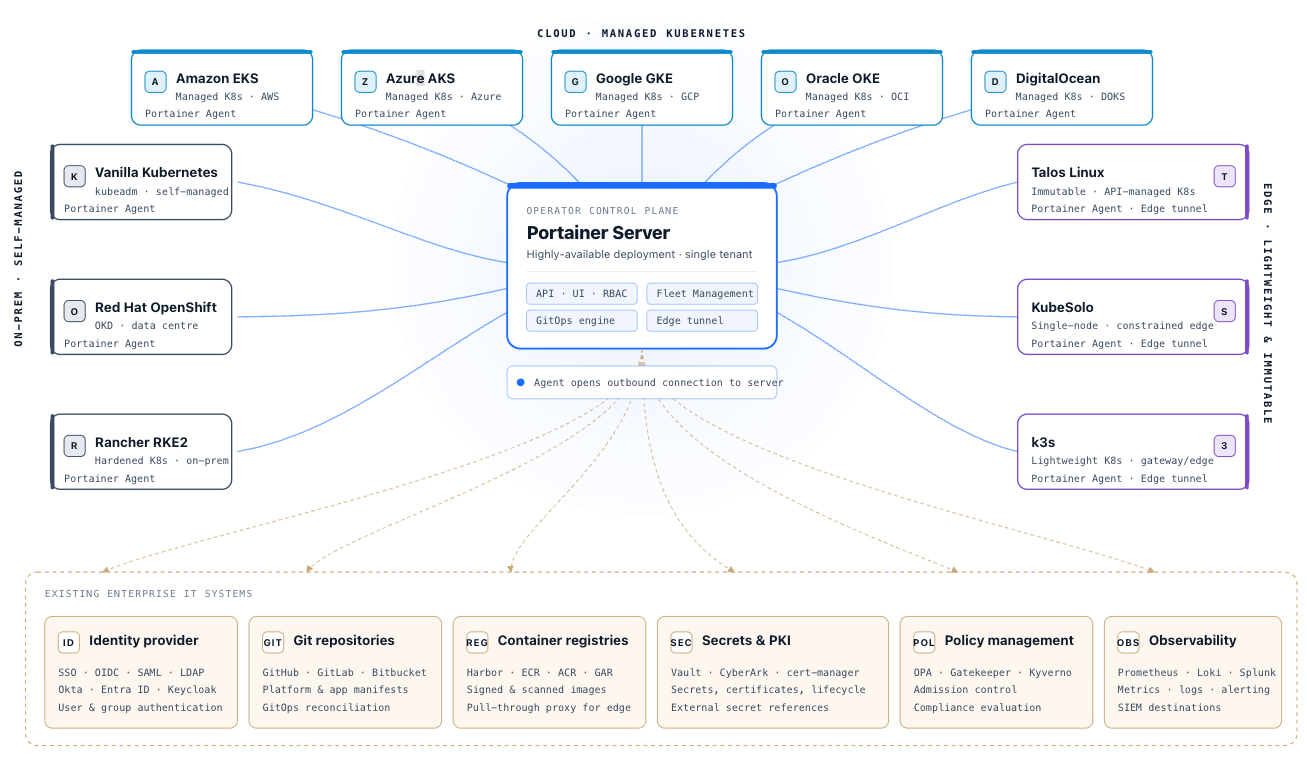
A Portainer deployment consists of two components:
Portainer Server is the control plane. It is a single containerised application, running on Kubernetes (recommended for enterprise deployments) or Docker. It holds all configuration state - environments, RBAC assignments, registry definitions, GitOps configuration, and audit logs - and serves as the operational interface for all administrators and operators. The Portainer Server connects outbound to upstream systems (identity provider, Git repositories, container registries) and exposes its API and UI inbound via an ingress or load balancer endpoint.
Portainer Edge Agent is the recommended agent for all managed environments. The Edge Agent establishes an outbound encrypted connection from each managed environment to the Portainer Server - no inbound access to managed clusters is required. This outbound-only connectivity model suits enterprise deployments where cluster API servers are not directly exposed. Only the Edge Agent supports Portainer’s fleet governance policies; it is the required choice for any deployment that depends on centralised policy management. The Edge Agent’s per-cluster footprint is under 50 MB, making it viable on constrained hardware including industrial controllers, single-board computers, and resource-limited virtual machines.
Note that the Classic Agent is retained for backwards compatibility only; new deployments should not use the Classic Agent. It does not support any new features, including fleet governance policies.
2.2 Server Placement
Where the Portainer Server runs is a foundational architectural decision. It determines the failure domain of the Control Plane, the degree to which security hardening can be isolated from workload clusters, and the operational model for fleet growth.
Dedicated management cluster (recommended for multi-cluster enterprise and all edge deployments): For multi-cluster and enterprise deployments, the Portainer Server should run on a dedicated Kubernetes cluster, separate from the workloads it manages. A dedicated management cluster provides failure isolation - a workload cluster outage does not affect Portainer availability, and a Portainer maintenance window does not affect running workloads. It also allows the management cluster to be hardened independently, with stricter network policies, restricted node access, and dedicated security controls that would be impractical to apply to a general-purpose workload cluster. This pattern would also place the Portainer server adjacent (from a security or networking perspective) to its enterprise IT dependencies, including identity, logging facilities, Git repos and more. This is the topology used in Scenarios B, C, D, and E.
Co-located on the managed cluster (single-cluster deployments): For organisations managing a single cluster, or at the start of Portainer adoption, running the Portainer Server on the managed cluster itself is acceptable. Kubernetes pod scheduling and a durable PersistentVolumeClaim provide the baseline availability posture. The trade-off is a shared failure domain - a cluster-level incident affects both management access and running workloads simultaneously. This is the topology described in Scenario A and is the natural starting point before the estate grows to warrant a dedicated management cluster.
2.3 Agent Mode Selection
All (not just Edge) deployments should use the Edge Agent. The choice of Edge Agent sub-mode is one of the first decisions in a Portainer deployment. It determines connectivity requirements, operational behaviour, and the capabilities available for each environment.
Edge Agent Standard is the default sub-mode for environments with reliable network connectivity to the Portainer Server. The Edge Agent establishes an outbound encrypted connection to the Portainer Server, and management operations are synchronous - commands execute and return results in real time. Full Portainer capabilities are available, including live log streaming, interactive terminal access, and real-time resource metrics. This sub-mode requires the Portainer Server to be reachable from the managed environment on two ports: port 9443 (HTTPS API, for registration and commands) and port 8000 (WebSocket Tunnel, for interactive sessions). This sub-mode is appropriate for all data centre and cloud-hosted clusters with normal network access.
Edge Agent Async is designed for severely bandwidth-constrained or intermittently connected environments - satellite links, industrial OT networks, and similar far-edge scenarios. It uses only port 9443 (HTTPS API) and does not establish a live tunnel; instead it operates entirely on scheduled snapshots, and the Portainer Server displays a recent state capture rather than live environment state. Interactive terminal sessions are not available in Async mode. The command dispatch frequency defaults to 1 minute and is configurable per environment.
In Async mode, the edge environment operates fully autonomously between polls - running workloads are unaffected by connectivity gaps, and Portainer Server unavailability has no impact on local operations. Operations dispatched from the Portainer Server are queued and delivered in order: if multiple changes accumulate during a connectivity gap, they are executed in sequence when the agent next connects, with no manual intervention required. Partial or intermittent connectivity - high-latency links, bandwidth-constrained networks, satellite connections - is handled gracefully; no operations are lost during interruptions.
For both sub-modes, the Edge Agent initiates all connections outbound to the Portainer Server - no inbound access to the managed environment is required. This model is resilient to connectivity interruptions: the environment continues operating autonomously and synchronises when connectivity resumes. Edge Agent is required for air-gapped environments; between the two sub-modes, Async is preferred where the port 8000 tunnel cannot be opened or connectivity is severely constrained.
The decision is straightforward: use Edge Agent Standard for environments with reliable connectivity, and Edge Agent Async for remote, constrained, or intermittently connected environments.
2.4 High Availability
HA Architecture
Portainer's HA model is fundamentally different from active-active application clustering. Because Portainer uses bboltDB - an embedded, single-writer key-value database - it cannot be run as multiple simultaneous active replicas sharing state. HA is instead achieved through platform-native scheduling and storage durability : the Portainer Server runs as a single replica, and the scheduler (Kubernetes) is responsible for detecting failure and restarting it, with persistent storage providing continuity of state.
This distinction is important for architects to understand clearly. Portainer is not a stateless application that scales horizontally. It is a stateful control plane with a single active writer. The HA strategy must therefore focus on fast failure detection and recovery, durable storage, and minimising RTO - not on eliminating the single active instance.
The critical assurance is that Portainer Server unavailability does not impact running workloads . If the Portainer Server is restarting, application workloads on managed clusters continue operating without interruption. Portainer outage affects management access and administrative operations only.
Deployment on Kubernetes (Recommended)
Running Portainer Server on Kubernetes is the recommended HA posture for enterprise deployments. A Deployment with a single replica, backed by a PersistentVolumeClaim on durable storage, provides the baseline. Kubernetes detects pod failure and reschedules it, typically within seconds to low minutes depending on node availability and scheduling constraints. The PVC ensures the bboltDB database is preserved across pod restarts and node failures.
For stronger recovery guarantees, the PVC should be backed by storage that supports cross-node access (RWX or provider-managed block reattachment) so the rescheduled pod can mount the volume on any available node. Cloud-managed block storage (Azure Disk, EBS) and storage providers like Portworx support this pattern.
Traffic Routing, Load Balancing, and WebSocket Considerations
Portainer’s API and UI are exposed via a standard Kubernetes Service and a Gateway API HTTPRoute (the recommended path for new deployments per Chapter 3, section 3.4) or a Kubernetes Ingress resource (acceptable for environments with existing ingress infrastructure). A Gateway API controller or legacy ingress controller provides TLS termination and routes external traffic to the Portainer Server pod. Because Portainer uses WebSocket connections for live log streaming and interactive terminal sessions, the routing layer must support WebSocket protocol upgrades. Envoy-class Gateway API controllers handle WebSocket connections natively. Legacy ingress configurations may require explicit WebSocket annotations - many default ingress configurations drop or time out WebSocket connections and this must be explicitly validated.
Since Portainer is single-replica, session persistence (sticky sessions) is not required at the application layer. However, if Portainer is deployed behind a network load balancer that operates at Layer 4, ensure that connection timeouts are sufficiently long to support interactive terminal sessions. Edge Agent tunnel connections are persistent and long-lived; these must also traverse the load balancer without being prematurely terminated.
RTO and RPO
RPO (Recovery Point Objective): Portainer's RPO is determined by the backup frequency of the bboltDB database. Configuration changes (new environments, RBAC changes, registry updates) made after the last backup will need to be re-applied after a restore. For organisations with frequent configuration changes, more frequent backups reduce RPO. Application workload state is not held in Portainer - it is held in the Kubernetes clusters themselves - so workload RPO is independent of Portainer's RPO.
RTO (Recovery Time Objective): In a Kubernetes-hosted deployment, RTO for Portainer failure is dominated by Kubernetes pod rescheduling time - typically under five minutes in a healthy cluster with pre-pulled images. For a full disaster recovery scenario (cluster loss), RTO is determined by the time to provision a new Kubernetes environment, restore the bboltDB from backup, and redeploy the Portainer Server. This can be reduced significantly by maintaining infrastructure-as-code for the management cluster and automating the restore process.
Availability Targets and Cost Implications
Availability targets have a non-linear impact on platform engineering effort and must be set before staffing and SLA commitments are made to the business. Each additional “nine” of availability - moving from 99% to 99.9%, or from 99.9% to 99.99% - increases annual labour requirements by approximately 20–30%, driven by the engineering overhead of automated failover validation, on-call scheduling, change window enforcement, and rollback automation [1]. A 99.9% platform SLA carries meaningfully different staffing implications than a 99% target. Set the availability target deliberately, cost it, and staff accordingly - the incremental headcount required to move between availability tiers is a known and predictable engineering cost.
2.5 Sizing and Scaling
Portainer's resource footprint is intentionally minimal - it is designed to be a guest in your infrastructure, not a burden. However, resource requirements scale with fleet size, user count, and audit log volume, and known architectural constraints must be understood before designing for large fleets.
Known Constraints
The most important constraint is the bboltDB single-writer model . bboltDB does not support concurrent writes from multiple processes, which is why Portainer cannot run as an active-active cluster. This means Portainer's write throughput is bounded by the single instance. For typical fleet management operations (configuration changes, deployments, RBAC updates), this is not a bottleneck. For very high-frequency automation scenarios (thousands of concurrent API-driven changes), this constraint is relevant and should be validated with the Portainer team.
Database size grows with the number of managed environments, audit log retention volume, and stack/template definitions. bboltDB performs well at scale but benefits from being hosted on low-latency NVMe-backed storage. High-latency network-attached storage is not recommended for the Portainer database volume. For larger or performance-critical deployments, target SSD-level storage with at least approximately 3.5 MB/s throughput, 30,000 IOPS, and under 10 ms write IO latency. When using cloud provider storage, exercise caution: both absolute latency and burstable or noisy-neighbour performance characteristics can cause intermittent degradation under load that is difficult to diagnose and reproduce.
CPU, Memory and Storage Sizing
Sizing should be validated with Portainer's official documentation and the Portainer team for specific fleet configurations. As directional guidance:
- Small deployment (up to ~20 clusters, up to ~100 users): 2 vCPU, 4 GB RAM, 10 GB storage
- Medium deployment (~20–100 clusters, ~100–500 users): 4 vCPU, 8 GB RAM, 50 GB storage
- Large deployment (100+ clusters, 500+ users, high audit volume): 8 vCPU, 16 GB RAM, 100+ GB storage, SSD-backed storage mandatory
The storage figures above are baselines for the Portainer database and configuration state. If Git-based deployment functionality is in use, additional headroom is required: Portainer clones remote Git repositories locally to the data volume as part of each GitOps deployment operation. Organisations using multiple or large Git repositories should account for this when sizing the persistent volume, and should consider setting a cleanup or retention policy to bound disk growth.
CPU consumption is driven primarily by concurrent API requests, WebSocket connections, and GitOps polling activity. Memory consumption is driven by active sessions, concurrent environment connections, and in-memory database caching.
Cluster and Agent Scaling
Portainer is designed to manage fleets at scale. The practical upper boundary for managed cluster count is influenced by the polling frequency of connected agents, the volume of concurrent management operations, and the API capacity of the underlying Kubernetes cluster hosting Portainer. For very large fleets (tens of thousands of environments), it is important to tune agent poll intervals and GitOps reconciliation schedules to avoid concentrating load on the Portainer Server.
Edge Agent scaling introduces additional considerations: each Edge Agent maintains a persistent tunnel connection to the Portainer Server. At large edge fleet scale, the number of concurrent tunnel connections becomes a relevant capacity dimension. Network bandwidth for tunnel traffic and status synchronisation should be factored into the Portainer Server's network allocation. Portainer has been load-tested at 15,000 actively connected environments with a 5-second polling frequency, generating approximately 7 Mbps of network traffic to the Portainer instance and requiring 4 CPUs to handle the encryption and tunnel load. For very large edge fleets, tuning the agent poll interval is the primary lever for managing load on the Portainer Server.
User and RBAC Scaling
Portainer's RBAC system is designed to support large enterprise directories, including directories with 100,000+ identities. RBAC is evaluated at request time; the overhead is proportional to role complexity and team membership depth, not raw user count. For LDAP/AD integrations with very large directories, directory query latency and result set size should be considered - see Chapter 4 for identity integration guidance.
Minimum viable staffing: Portainer reduces the team required to operate a container fleet, but it does not eliminate the need for qualified platform operators. Every managed environment should be supported by at least two qualified individuals to ensure operational continuity, cover for absence, and resilience against single-person dependency. Relying on a single individual for platform operation - however capable - is an operational risk that surfaces at the worst possible moment. When estimated effort appears to require less than one full-time engineer - for example, 1,500 hours per year for a small fleet - the practical requirement is still a full-time hire: a 0.75 FTE estimate does not translate to 0.75 operational risk [1]. Size the platform engineering team before committing to a production SLA, not after.
2.6 Data Protection and Backup/Restore
What Portainer State Contains
Portainer runs two separate BoltDB instances , both on the Server's persistent volume. The main data database holds all operational configuration state: environment definitions, RBAC assignments, team memberships, registry credentials, GitOps stack configurations, application templates, custom templates, and settings. The audit and activity logs database is a separate BoltDB instance, isolating the audit trail from operational configuration. Both database files must be included in any backup strategy - backing up only one leaves either configuration state or audit history unprotected.
Neither holds workload cluster or application workload state; running containers, Kubernetes objects, and application data reside in the managed clusters themselves. Restoring Portainer restores management configuration, not application runtime. Therefore, it is recommended to run a Kubernetes data protection solution such as Kasten, Velero or CloudCasa.
See https://docs.portainer.io/sts/faqs/getting-started/what-does-portainers-backup-include for more details on what the backups contain.
Backup Strategy
Backup approaches include:
Volume-level snapshots taken via the storage provider's snapshot mechanism (CSI snapshots, cloud provider volume snapshots) are acceptable for short-term and ephemeral backups during, for instance, Portainer Server upgrades, but are not compliant with a proper 3-2-1 backup strategy (3 copies of data, on two different media/technologies, of which 1 is stored off-site).
Portainer's built-in backup feature provides an application-consistent export of Portainer’s state stored externally in an S3-compliant bucket. It can be scheduled to run periodically. This is the recommended off-cluster backup target for organisations with existing S3-compatible storage infrastructure, providing native backup without additional tooling.
A 3rd party Kubernetes Data Protection Solution (such as Kasten, Velero or CloudCasa) can be used to provide a comprehensive, policy-driven backup of Kubernetes-based applications (including Portainer) on the management and the managed workload clusters. These solutions capture Kubernetes object state, as well as any persistent storage in a single recoverable unit. These support scheduled backup policies, retention management, and cross-cluster restore, making it a strong option for organisations that have mission-critical applications running on Kubernetes.
Whichever backup mechanism is chosen, backups should be stored external to the cluster hosting Portainer and tested regularly through restore drills.
Note that the backup includes the cloned git-repositories, and backups can grow relatively large as a result. See https://docs.portainer.io/sts/faqs/troubleshooting/stacks-deployments-and-updates/why-is-my-portainer-backup-so-large for more information.
DR Posture
Recovery from a total management cluster failure requires:
- a backup of the Portainer database
- infrastructure-as-code or runbooks for provisioning a new management cluster,
- the Portainer Server deployment manifest.
With these in place, recovery is deterministic. Application workloads on managed clusters are unaffected by the loss of the management cluster - they continue running. Only management access is disrupted until Portainer is restored.
2.7 Certificate Management
Portainer's API and UI endpoint must be secured with a valid TLS certificate; by default, Portainer generates a self-signed certificate on first start, which must be replaced before production use. In a Kubernetes-hosted deployment, TLS is typically managed at the traffic routing layer. The certificate lifecycle - issuance, renewal, and rotation - requires explicit architectural treatment; expired certificates will break agent connectivity and operator access.
cert-manager is the standard Kubernetes-native solution for automated certificate lifecycle management. It integrates natively with both Gateway API controllers (via cert-manager.io/cluster-issuer annotations on Gateway or HTTPRoute resources - the preferred path for new deployments) and legacy ingress controllers. cert-manager handles certificate issuance from a configured CA (Let's Encrypt for internet-exposed endpoints, an internal PKI CA for private or air-gapped environments) and automates renewal before expiry. This is the recommended approach for Kubernetes-hosted Portainer deployments. As a secondary option, TLS can instead be terminated directly at the Portainer pod by supplying a Kubernetes TLS secret via the tls.existingSecret Helm parameter; this approach bypasses the ingress layer entirely but foregoes the centralised certificate lifecycle management and observability that an ingress-level solution provides, and is not recommended for enterprise deployments.
For air-gapped environments, certificates must be issued from an internal CA. cert-manager supports internal CA issuers (including integration with Vault PKI) and does not require external connectivity to operate.
Edge Agent trust: Edge Agents establish tunnel connections to the Portainer Server and validate the server's TLS certificate. Certificate rotation on the Portainer Server endpoint must be coordinated carefully - if agents are configured with a pinned or trust-anchored certificate, rotation may require agent reconfiguration. Automated certificate renewal via cert-manager reduces this risk by renewing certificates before expiry without manual intervention.
Mutual TLS (mTLS): For deployments requiring stronger authentication between Edge Agents and the Portainer Server, mTLS is available as an optional security layer. Under mTLS, both the Portainer Server and each Edge Agent authenticate each other cryptographically via a shared certificate authority, ensuring that only agents presenting a valid client certificate issued by that CA can connect. mTLS is configured on the Portainer Server either at installation time via CLI flags or post-installation through the Edge Compute settings in the UI. Note that at the time of writing, mTLS support for Edge Agents deployed on Kubernetes is not yet available.
Expiry alerting: Even with automated renewal in place, certificate expiry should be monitored as a safety net. Prometheus-based monitoring (using the x509-certificate-exporter or cert-manager's built-in metrics) can alert when any certificate in the chain approaches expiry. This alert should route to the platform operations team with sufficient lead time to investigate renewal failures before they cause an outage.
TLS hardening: Portainer enforces a minimum of TLS 1.2 on all server connections; TLS 1.0 and 1.1 are not accepted. HTTP/2 is disabled by default to reduce protocol-level attack surface. Cipher suite selection prioritises ECDHE-based key exchange , providing forward secrecy - historical session traffic cannot be decrypted even if the server private key is later compromised. These defaults apply to the Portainer Server endpoint and do not require additional configuration.
2.8 Infrastructure as Code - Terraform Provider
Portainer provides an official Terraform Provider that enables infrastructure-as-code management of Portainer's own configuration: environments (endpoints), users, teams, RBAC assignments, registries, stacks, and settings. This is distinct from Portainer's GitOps engine, which manages workload configuration on managed clusters. The Terraform Provider manages the Portainer control plane's own configuration.
When to Use the Terraform Provider
The Terraform Provider is most valuable in organisations that already use Terraform for infrastructure provisioning and want to extend that model to platform configuration. Key use cases include:
- Bootstrapping new Portainer deployments with a consistent, reproducible configuration - environments, teams, and access policies defined as code and version-controlled
- Multi-instance Portainer deployments (e.g., separate Portainer instances per region or per environment tier) where configuration parity must be maintained programmatically
- Change management integration - Terraform plan/apply workflows provide a reviewable change record for Portainer configuration modifications, complementing Portainer's own audit log
Managing Portainer configuration via Terraform integrates it into an existing IaC pipeline and provides Terraform's plan/apply review model. However, it introduces a dependency on Terraform state management and may duplicate what Portainer's own audit log and API already provide.
Managing Portainer configuration through its UI and API keeps all platform operations within a single tool and leverages Portainer's native audit trail. For organisations without an existing Terraform adoption for platform configuration, this is typically the simpler path.
A pragmatic middle ground: use the Terraform Provider for initial deployment and bootstrap (where reproducibility is highest-value), and manage ongoing configuration changes through Portainer's UI and API. This captures the value of IaC for initial setup without introducing ongoing Terraform state management as a dependency of daily platform operations.
2.9 Upgrade Lifecycle
Release Tracks: LTS vs. STS
Portainer follows semantic versioning with two release streams. Minor releases (X.Y) follow an approximately monthly cadence and may introduce new features while maintaining backward compatibility. Patch releases (X.Y.z) are issued as needed and are limited to backward-compatible bug fixes. Major versions (X) are infrequent and may include breaking changes requiring a migration process.
Long-Term Support (LTS) releases are published approximately every six months, identified by an "LTS" suffix. Support and maintenance run until the next LTS release plus a three-month migration window, giving organisations a predictable upgrade runway of approximately nine months per LTS cycle. LTS releases undergo more intensive testing than STS releases, with an explicit focus on stability over feature velocity. LTS is the correct track for production enterprise deployments, regulated environments, large fleets where upgrade coordination is complex, and organisations with formal change management processes.
Short-Term Support (STS) releases follow the monthly cadence, identified by an "STS" suffix. Each STS release is supported and maintained only until the next STS or LTS release - an effective support window of approximately one month. STS releases receive less intensive testing than LTS. They are appropriate for non-production environments and teams that want early access to new capabilities, but running STS in production is strongly discouraged where stability and change control are priorities.
The LTS vs. STS decision should be made at deployment time and applied consistently across the fleet. Mixing tracks increases operational complexity and should be avoided. Portainer does not backport fixes to unsupported releases - remaining on an unsupported version means operating without security patch coverage.
Portainer Server Upgrade
Portainer Server upgrades are performed by updating the container image version. Because Portainer is a single-replica deployment, an upgrade involves a brief control plane outage while the old pod is terminated and the new pod starts. Running workloads on managed clusters are unaffected. The upgrade duration is typically measured in seconds to low minutes.
Before upgrading, a database backup should be taken. Portainer supports database migration across versions automatically on startup - manual database migration steps are not typically required. Downgrade from a higher to a lower version is not supported after database migration has occurred, making the pre-upgrade backup the only rollback path.
Agent Upgrade Sequencing
Portainer Agents and Edge Agents are versioned separately from the Portainer Server. Portainer maintains backward compatibility between agent and server versions within a defined compatibility window, allowing agents to be upgraded independently of the server. The recommended sequencing is to upgrade the Portainer Server first, then upgrade agents in a phased rollout - validating connectivity and operation at each stage before proceeding to the next environment group.
For large fleets, agent upgrades can be automated via GitOps (Chapter 6) - updating the agent image version in the deployment manifest and relying on Portainer's GitOps reconciliation to apply the update across environments in a controlled sequence.
Change Window Alignment
Portainer Server upgrades should be aligned with the organisation's change management process. Because the upgrade causes a brief control plane outage, it should be scheduled during a maintenance window. Agent upgrades on production clusters should similarly be scheduled, though their impact is limited to a brief agent restart with no workload interruption.
2.10 Security and Non-Functional Considerations
The primary non-functional concerns for Portainer deployments - high availability, performance and sizing, and certificate lifecycle - are addressed in dedicated sections (2.4, 2.5, and 2.7 respectively). This section covers the security hardening considerations that apply across all deployment topologies.
FIPS-140-3 compliance: Portainer supports a FIPS-140-3 compliant operational mode, using only FIPS-validated cryptographic libraries. This is required for U.S. federal, defence, and certain critical infrastructure deployments. FIPS mode must be enabled at deployment time and applies to all cryptographic operations within the Portainer Server.
Database encryption at rest: Portainer's internal bboltDB database can be encrypted at rest using AES-256-GCM , providing cryptographic protection for all stored configuration state - registry credentials, Git credentials, IdP client secrets, RBAC assignments, and audit logs. Database encryption is not automatically enabled. Database encryption is required in most regulated environments (PCI-DSS, HIPAA, FedRAMP) and should be enabled by default in all enterprise deployments. The key must be backed up independently of both the Portainer database and the cluster hosting it - in the enterprise secret store (Vault, AWS Secrets Manager, Azure Key Vault) or offline cold storage. Test key backup and restore before enabling in production. If the encryption key is lost, the database cannot be decrypted and all platform configuration state is permanently inaccessible. See https://docs.portainer.io/sts/advanced/db-encryption for more information.
Audit log integrity and retention: Portainer's audit log records all user actions and system events. Audit logs should be forwarded to the organisation's SIEM (Chapter 10) to ensure their integrity and long-term retention outside of the Portainer database. Relying solely on the Portainer database for audit log retention introduces a single point of failure for compliance evidence.
Multi-tenancy: A single Portainer instance can serve multiple teams and business units through its RBAC model. Team and environment scoping provides logical multi-tenancy. For organisations with strong isolation requirements between tenants (separate compliance boundaries, regulatory constraints), separate Portainer instances per tenant should be evaluated against the operational overhead of managing multiple instances.
Network exposure hardening: The Portainer Server API should not be exposed to the public internet without appropriate access controls. In enterprise deployments, access should be restricted to internal networks or VPN, with ingress-level authentication offload where appropriate. The Portainer Agent connection from clusters to the Portainer Server uses an encrypted, authenticated protocol and does not require the Portainer API to be publicly exposed.
Just-in-time and short-lived credentials: Long-lived platform credentials - kubeconfigs, API tokens, service account keys - represent a persistent attack surface. Enterprise deployments should prefer short-lived, just-in-time credentials wherever the identity and secrets infrastructure supports it: time-bounded kubeconfigs, ephemeral service account tokens, and credential issuance on demand rather than by a rotation schedule alone. This principle applies most urgently to privileged access and CI/CD pipeline credentials. Chapter 4 (Identity and Access Management) and Chapter 8 (Secret Management) cover the implementation patterns.
Out-of-band alerting and machine-readable formats: Platform alerts must not be delivered exclusively through the Portainer UI. Significant operational events - environment offline, agent disconnect, restart storms, policy violations - must reach on-call engineers through external channels (PagerDuty, OpsGenie, email) even when the Portainer interface is unavailable. Portainer's webhook-based alerting integrates with the enterprise alerting pipeline for this purpose. Alerts should be emitted in open, machine-readable formats to allow ingestion by monitoring aggregation systems without requiring custom parsers or screen-scraping of the management UI. Chapter 9 (Platform Observability), section 9.5 covers the alert routing architecture.
2.11 Deployment Scenarios
Five reference deployment topologies illustrate how the architectural decisions in this chapter combine into complete, operational configurations. Unlike the other chapters in this reference architecture, the topology patterns described here are not a strict linear or maturity progression; instead they portray the various logical deployments in various architectures. Choose the topology that matches your requirements.
The simplest deployment: Portainer Server runs on the same Kubernetes cluster it manages. GitOps, RBAC, and registry governance operate from the same cluster. Appropriate for organisations beginning their Portainer adoption, managing a single non-critical workload estate, or evaluating the platform before committing to a dedicated Control Plane. The trade-off is a shared failure domain: a cluster-level incident affects both management access and running workloads simultaneously. This is the natural starting point; when the estate grows beyond a single cluster, migrate to Scenario B.
Portainer Server runs on a dedicated Kubernetes management cluster, separate from the workload clusters it manages. Portainer can optionally also manage the management cluster. Edge Agents on each workload cluster establish outbound encrypted connections to the Portainer Server - no inbound access to workload clusters is required. This is the recommended baseline topology for production enterprise deployments. A dedicated management cluster delivers four concrete operational benefits: independent security hardening, failure isolation (workload cluster outage does not affect Portainer availability), elastic fleet growth, and consistent RBAC governance across all environments. GitOps, registry governance, and Fleet Governance Policies are all centralised on this management cluster. Used as the foundation for Scenarios C, D, and E.
Portainer Server on the central management cluster (as in Scenario B); remote sites - branch offices, industrial facilities, retail locations - run Edge Agents in Async mode. Central governance and visibility across the entire fleet. Individual sites operate fully autonomously between polls: running workloads are unaffected by connectivity gaps, and commands dispatched during outages are queued and delivered in sequence on reconnect. KubeSolo is deployed at sites where a full multi-node Kubernetes cluster is unnecessary or impractical - single-node deployments such as factory automation systems, retail point-of-sale, and remote sensing equipment - providing Kubernetes API compatibility without clustering overhead. This topology represents Portainer's strongest architectural differentiation: consistent fleet governance across fundamentally different connectivity environments, from always-on data centres to intermittently-connected industrial nodes.
A combination of Scenarios B and C. The fleet includes always-connected clusters managed via Edge Agents in Standard mode and remote or constrained environments managed via Edge Agents in Async mode. This is the most common topology for large, geographically distributed enterprise estates. Portainer's unified control surface manages all environment types through a single interface; agent mode is transparent to the governance model - RBAC, GitOps, and policy enforcement operate consistently regardless of whether an environment runs Standard or Async. This topology is appropriate once the fleet includes both well-connected data-centre or cloud clusters and remotely operated or intermittently-connected sites.
Portainer Server runs on an air-gapped management cluster with no external network connectivity. All upstream dependencies - container registry (Chapter 5), Git repository (Chapter 6), identity provider (Chapter 4), Helm chart repositories - are self-hosted within the air-gapped boundary. All images are sourced from a local mirror registry; all manifests and charts from a local Git mirror; certificates from an internal PKI CA. Edge Agents on remote nodes within the boundary communicate via the internal network. This scenario requires careful upfront planning across several dimensions before deployment: image and chart mirror population, internal PKI CA setup, GitOps mirror seeding, and policy engine image pre-staging. Chapter 5 (mirror registry) and Chapter 6 (Gitea air-gapped mirror) cover the required patterns. Appropriate for sovereign, regulated, or security-classified deployments where external connectivity is not permitted - government, defence, and critical infrastructure environments.
2.12 Key Decisions Addressed
- Ch2-D-01 - Server Placement: Run the Portainer Server on a dedicated central management cluster, separate from the workloads it manages. For single-cluster deployments, co-location on the managed cluster is acceptable. - see section 2.2
- Ch2-D-02 - Agent Mode Selection: Deploy the Edge Agent in Standard mode by default for all environments with reliable connectivity. Use Async mode only for severely bandwidth-constrained or intermittently connected environments. - see section 2.3
- Ch2-D-03 - Portainer Server Replica Count: The Portainer Server must run as a single replica (replicas=1). Its embedded BoltDB database does not support concurrent multi-instance access; resilience is achieved through platform-level rescheduling, not horizontal scaling. - see section 2.4
- Ch2-D-04 - Data Persistence and Backup: Portainer's database and associated data must be stored on a persistent volume. The PVC must use a storage class that makes the volume accessible across multiple cluster nodes. Either Portainer's built-in backup must be configured, the underlying persistent volume must be covered by infrastructure-level backup, or both. - see section 2.6
- Ch2-D-05 - Off-Cluster Backup Storage: Portainer backups must be stored outside of both the management cluster and any managed workload clusters. A backup held on the same cluster it protects provides no recovery capability in the event of a cluster-level failure. Acceptable targets include S3-compatible object storage, an external NAS, or a dedicated backup service. - see section 2.6
- Ch2-D-06 - Traffic Routing and WebSocket Support: The Portainer Server must be exposed outside the cluster via a Gateway API HTTPRoute (preferred for new deployments) or a Kubernetes Ingress resource (acceptable for legacy environments). The routing layer must explicitly support WebSocket connections, which Portainer relies on for the container console and live log streaming. Envoy-class Gateway API controllers support WebSocket natively; legacy ingress controllers require explicit annotation or configuration. Without WebSocket support, these interactive features will fail. - see section 2.4
- Ch2-D-07 - Certificate Management: cert-manager is the recommended mechanism for certificate lifecycle management on Kubernetes-hosted Portainer deployments. For Gateway API deployments (preferred), cert-manager integrates via cert-manager.io/cluster-issuer annotations on Gateway or HTTPRoute resources. For legacy ingress controller deployments, it integrates with the ingress controller directly. Configure with either Let’s Encrypt (internet-exposed) or an internal PKI CA (air-gapped). Direct pod-level TLS termination via the tls.existingSecret Helm parameter is available as a fallback but is not recommended for enterprise deployments. - see section 2.7
- Ch2-D-08 - Certificate Expiry Alerting: Certificate expiry alerting must be configured even where automated renewal is in place. Automated renewal can fail silently; alerting acts as a safety net. Alerts must route to the platform operations team with sufficient lead time to investigate and remediate renewal failures before they cause an outage. - see section 2.7
- Ch2-D-09 - Terraform Provider Adoption: If your organisation uses Terraform, use it for initial deployment and bootstrap only where repeatability of deployment is required. Manage ongoing configuration changes through Portainer’s UI and API rather than Terraform. This approach assumes that backups of the Portainer Server are being taken in line with the organisation’s RTO and RPO objectives, so that configuration state can be recovered without relying on Terraform state as the source of truth. - see section 2.8
- Ch2-D-10 - Release Track: Use the LTS release track consistently across all environments. LTS releases carry a longer support window and a lower upgrade cadence, making them appropriate for enterprise production deployments. Adopt the STS track only when a specific feature required by the organisation is not yet available in the current LTS release, and plan to return to LTS at the next available opportunity. - see section 2.9
- Ch2-D-11 - Audit Log Forwarding: Audit logs must be forwarded to the organisation’s SIEM (see Chapter 10) to ensure their integrity and long-term retention outside of the Portainer database. Retaining audit logs solely within Portainer’s embedded BoltDB provides no tamper-resistance and is subject to the same data loss risks as the operational database. External forwarding ensures the audit trail survives a Portainer failure, supports compliance requirements, and enables correlation with events from other platform components. - see section 2.10
- Ch2-D-12 - Database Encryption at Rest: Enabling encryption at rest for the Portainer database is strongly recommended for all production deployments but is opt-in and must be explicitly configured. Encryption at rest protects sensitive configuration state - including registry credentials, environment definitions, and RBAC assignments - from exposure in the event of physical or logical access to the underlying storage. Deployments in regulated industries or with strict data protection requirements should treat this as mandatory. - see section 2.10
- Ch2-D-13 - Identity-Based Access Control Only: Once Portainer is adopted as the primary cluster management and access layer, identity-based access control through the corporate identity provider must supersede long-lived platform credentials such as kubeconfig files and API tokens. Distributing raw cluster credentials bypasses Portainer’s RBAC model, audit trail, and session controls, and creates credential sprawl that is difficult to revoke. Direct cluster access should be retained only for break-glass scenarios and tightly controlled accordingly. - see Chapter 4
- Ch2-D-14 - External Alert Routing: Alerts must not be delivered exclusively through the Portainer UI. Significant operational events - environment offline, agent disconnect, restart storms, policy violations - must reach on-call engineers through existing alerting tooling, even when the Portainer interface is unavailable. Relying on the UI as the sole notification channel creates a blind spot precisely when visibility matters most. Chapter 9 (Platform Observability), section 9.5 covers the alert routing architecture. - see section 2.10
- Ch2-D-15 - Mutual TLS for Agent–Server Communication: For deployments requiring stronger mutual authentication between Edge Agents and the Portainer Server - regulated environments, zero-trust network architectures, or deployments where the agent connection traverses untrusted network segments - enable mTLS as an additional security layer. Under mTLS, both the Portainer Server and each Edge Agent authenticate each other cryptographically via a shared certificate authority; only agents presenting a valid client certificate issued by that CA can connect, preventing unauthorised agents from registering with the Server. mTLS is configured on the Portainer Server at installation time via CLI flags or post-installation through the Edge Compute settings in the UI. Note that mTLS support for Edge Agents deployed on Kubernetes is not yet available at the time of writing - this decision currently applies to non-Kubernetes edge deployments only. - see section 2.7
[1] Portainer, "The True Cost of Kubernetes Platform Adoption" . Labor cost benchmarks derived from U.S. Bureau of Labor Statistics and Levels.fyi . SLA cost escalation estimates referenced from Gremlin, "State of Availability" .