
Container Registries
Scope
Portainer enforces registry governance - it does not host registries, but ensures that only images sourced from approved registries can be deployed. This chapter covers how Portainer integrates with enterprise container registries; how approved registry lists, access scoping, and just-in-time credential injection enforce supply chain boundaries at deployment time; vulnerability scanning, image signing, and SBOM practices that govern image trustworthiness; configuration patterns for cloud-provider, self-hosted, and air-gapped registry deployments; and the non-functional considerations that keep the registry tier available, auditable, and secure.
5.1 Registry Architecture Principles
The container registry is the last authoritative control point before an image reaches a running workload. Every image that executes in a cluster passed through a registry; controlling what is in the registry, who can push to it, and what can be pulled from it is therefore a foundational control in supply chain security.
Uncontrolled registry access - where developers can pull from any public source and deploy without inspection - introduces several enterprise risks: known-vulnerable images reaching production, unvetted third-party code in the runtime environment, no traceability between running containers and auditable image provenance, no component inventory or SBOM for running workloads - leaving the organisation unable to determine which containers are affected when a new CVE is disclosed against a specific library or base image - and credential sprawl as ad-hoc pull secrets accumulate across namespaces.
Portainer's role is to enforce registry governance, not to host registries. Portainer does not operate a registry. It integrates with existing enterprise registries, enforces an administrator-defined approved registry list, manages credential distribution to clusters using a just-in-time injection model, and provides team-scoped registry access consistent with the RBAC model described in Chapter 4. The supply chain integrity controls - scanning, signing, policy gates - live in the registry and its adjacent tooling; Portainer ensures that only images sourced from approved registries can be deployed.
Registry controls operate in concert with two other chapters: policy enforcement engines (Chapter 7, OPA Gatekeeper / Kyverno) provide admission-time gates that complement Portainer's deployment-time guardrails; GitOps pipelines (Chapter 6) are the authoritative source for which images are declared for deployment, and the registry is the artifact store those pipelines reference.
5.2 Approved Registry Enforcement in Portainer
Portainer enforces registry governance at deployment time - users can only select from registries that have been added to Portainer and granted access to their environment. This section covers how registries are configured, how access is scoped, and how Portainer’s enforcement layer fits within the broader supply chain control model.
Registry configuration builds on the identity and environment setup in Chapter 4. Teams must exist in Portainer before registry access can be assigned to them, and users must already hold an environment role before they can be granted registry access on that environment. Complete team and environment configuration before proceeding with registry setup.
Adding registries: Registries are added globally in Portainer under Registries in the main navigation menu. Portainer provides native configuration templates for the most common registry providers: Docker Hub (authenticated), AWS ECR, Azure Container Registry, GitLab container registry, GitHub Container Registry (GHCR), Quay.io , and ProGet. Google Artifact Registry and legacy GCR do not have a dedicated native template - they are configured via the custom registry option using the Docker Registry V2 API; see section 5.4 for the integration details. Any registry conforming to the Docker Registry API v2 standard is supported via the custom registry option. OCI registries are supported in Portainer Business Edition only . For each provider, Portainer requests only the credentials and configuration specific to that provider’s authentication model. Credentials are stored using the write-only model described in section 5.5 - they are available for deployment operations but cannot be read back through the interface.
Connected registries can serve both container images and OCI-format Helm charts (Business Edition), enabling a registry to act as a unified artifact source for both container workloads and Helm chart deployments. This is particularly relevant for air-gapped environments where a single internal registry can replace both a container registry and a separate Helm chart repository.
Business Edition additionally allows browsing registry contents and managing registry data - tags, image details, and vulnerability report status - directly within the Portainer interface. Platform teams can inspect and manage registry contents without leaving the management plane or requiring separate registry UI access.
Hiding Docker Hub anonymous access: By default, Portainer includes a Docker Hub (anonymous) entry available to all users. This must be hidden on all production and staging environments by clicking Hide for all users on the Registries page. Leaving it visible allows any user to deploy from any public Docker Hub image, bypassing the approved registry model entirely. Note that hiding it is a Portainer UI control only - Docker’s native pull behaviour on cluster nodes is not affected. Egress network policy (Chapter 3, section 3.3) and admission controller policy (Chapter 7) are required as complementary controls to prevent direct node-level pulls.
Registry access - Kubernetes environments: In Kubernetes environments, registry access is assigned per namespace , not per user or team. After adding a registry globally, navigate to the target environment (Cluster → Registries), locate the registry, and select Manage access to assign it to specific namespaces. Only namespaces explicitly granted access to a registry can pull from it through Portainer’s deployment workflows. This namespace-level scoping aligns registry governance with the namespace-as-tenancy model - a team can only use registries their namespaces have been granted access to, consistent with their RBAC scope (Chapter 4, section 4.5).
Registry access - Docker Standalone and Swarm environments: For Docker Standalone and Swarm environments, registry access is assigned at the user and team level. Navigate to the environment (Host → Registries or Swarm → Registries), select Manage access , and assign specific users or teams. Only users and teams already granted access to the environment appear in the assignment dropdown - identities that exist in Portainer but have not been granted environment access are excluded from selection. This prevents registry access from being used as an indirect route to environment visibility, and ensures that the registry access model respects the environment access boundaries established in Chapter 4.
Layered enforcement: Portainer’s approved registry list is a deployment-time control - it prevents users from selecting unapproved registries through the management interface. It does not prevent direct workload pull requests that bypass Portainer entirely (for example, a manifest deployed via kubectl or a GitOps reconciler that references a registry not in Portainer’s list). The admission controller (Chapter 7, OPA Gatekeeper or Kyverno) provides the complementary enforcement mechanism: image source policy rules can enforce that only images from approved registries are admitted to cluster workloads, regardless of how the deployment was initiated. Both controls are required for complete supply chain enforcement.
Credential Distribution and JIT Injection
Portainer uses a just-in-time credential injection model for registry authentication. Credentials are never stored persistently on cluster nodes or injected as long-lived Kubernetes Secrets into workload namespaces. At deployment time, Portainer follows a five-step injection flow:
- Retrieve - Portainer retrieves the registry credential from its AES-256-GCM encrypted credential store on the Portainer Server.
- Scope check - Portainer validates that the requesting user or team has access to that registry per the approved registry list and RBAC assignment.
- Encrypted transmit - The credential is transmitted to the target cluster over the encrypted agent channel (mTLS for Edge Agent, TLS for Standard Agent).
- Runtime inject - The credential is injected as a Kubernetes imagePullSecret into the workload namespace for the duration of the deployment operation.
- No persistent storage - The injected credential is not retained on the node or in cluster storage after the operation completes. There is no long-lived secret available to an attacker through node-level access.
This model eliminates credential sprawl at the node level and ensures that registry credential exposure is bounded to the deployment window.
5.3 Image Scanning and Supply Chain Security
Vulnerability scanning operates at three points in the image lifecycle, each with a distinct role. Build-time scanning (in the CI pipeline, before push) catches vulnerabilities in newly built layers and gives development teams the fastest feedback loop. Push-time scanning (in the registry, triggered on push) ensures that all images in the registry carry a current vulnerability report regardless of how they were pushed, including images promoted from upstream sources. Admission-time scanning (in the cluster, enforced by the policy engine at deployment) provides the final gate, ensuring only images with acceptable scan results reach the runtime even if registry-level controls are bypassed or if new vulnerabilities are disclosed after the image was scanned at push time.
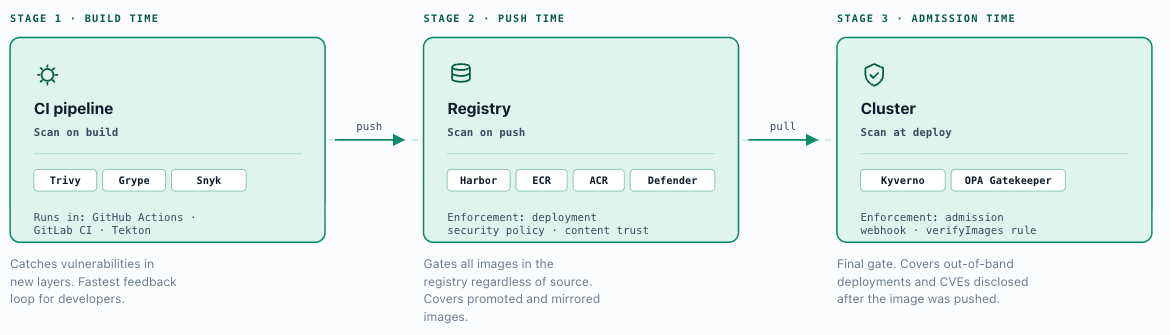
All three layers should be active in production environments. They are not redundant - they are defence in depth. Build-time catches issues early; push-time provides the registry gate; admission-time covers out-of-band deployments and new CVE disclosures between push and deploy.
Scanning tools: Trivy (Aqua Security, open source) is the reference scanner for this architecture - it is embedded in Harbor, available as a standalone CLI, and integrates natively with GitHub Actions, GitLab CI, and Tekton pipelines. Grype (Anchore, open source) is a validated alternative with equivalent capability and strong SBOM integration. Snyk, Prisma Cloud (formerly Twistlock), and Aqua Platform are commercial options that add runtime monitoring, compliance reporting, and managed vulnerability database feeds - appropriate for enterprises with dedicated application security teams and formal compliance audit requirements.
Vulnerability threshold enforcement: Define severity thresholds per environment tier and configure them consistently across both registry-level (Harbor deployment security policy) and admission-time (Chapter 7 policy engine) enforcement. A recommended baseline: block on Critical in all environment tiers; block on High in staging and production; advisory-only (report but allow) for Medium in development. Threshold configuration must be consistent between the two enforcement layers - a permissive registry paired with a strict admission controller means images reach the cluster and are rejected at deploy time, causing operational disruption; a strict registry paired with a permissive admission controller leaves a gap for out-of-band deployments.
Image signing and attestation: Image signing provides cryptographic proof that an image was produced by a known, authorised build process and has not been tampered with after signing. Cosign (sigstore) is the recommended signing tool - it supports keyless signing via OIDC identity (using the CI pipeline's OIDC token, eliminating long-lived signing keys from the pipeline environment) as well as key-based signing for environments where a KMS-held key is required. Signatures are stored as OCI artifacts co-located with the image digest and are natively supported by Harbor and by Kyverno's verifyImages admission rule. Notary v2 (notation) is a standards-track alternative supported by Harbor and the OCI distribution spec. The enforcement chain: CI pipeline signs image on push → Harbor stores signature alongside the image digest → Harbor content trust policy rejects unsigned image pulls → Kyverno verifyImages rule rejects unsigned image deployments. Both gates are required - registry-level enforcement stops direct pulls; admission-time enforcement stops deployments that source images without passing through the registry policy path.
SBOM generation and consumption: SBOMs (Software Bill of Materials) document the component inventory of a built image at a specific digest. Generate SBOMs at build time using Syft or Docker BuildKit's --sbom flag, attach them to the image digest in Harbor (Harbor 2.6+ stores SBOMs as OCI artifacts), and retain them for the image's operational lifecycle. For ongoing assurance, automate SBOM consumption by integrating with a vulnerability correlation service - Grype in watch mode, Dependency-Track, or a CSPM platform - that ingests SBOMs from Harbor and alerts when a newly published CVE matches a component in a currently deployed image's bill of materials. This closes the gap between push-time scanning (which reflects the vulnerability database at the moment of scan) and continuous assurance (which reflects the current state of the vulnerability landscape across the full deployed fleet).
5.4 Registry Integration Patterns
Cloud-Hosted Public Registries (Docker Hub, GHCR, Quay)
Public registries provide broad image availability but introduce risks that must be explicitly managed in enterprise environments. Docker Hub imposes unauthenticated pull rate limits that affect CI pipelines and cluster nodes sharing egress IPs. Authenticated pulls against a paid Docker Hub account raise these limits but introduce the credential management overhead of distributing Docker Hub credentials to all environments.
The more significant risk is provenance: public registries host images from arbitrary publishers with no mandatory vulnerability scanning or signing at source. An image pulled directly from Docker Hub may contain known vulnerabilities, misconfigured packages, or malicious layers injected through a compromised upstream account. Enterprise deployments must not treat public registries as trusted runtime sources.
Acceptable use boundary: Public registries are acceptable as upstream sources for a controlled mirroring pipeline - images are pulled from Docker Hub or GHCR into an internal registry (Harbor, ECR, ACR), scanned, and only the approved subset made available to cluster workloads. Direct public registry access from production clusters should be disabled via Portainer’s approved registry enforcement (section 5.2) and reinforced by egress network policy (Chapter 3). GitHub Container Registry (GHCR) offers improved provenance for images tied to GitHub repositories and supports Cosign signing natively, making it a reasonable upstream source for open-source base images when used within a mirroring pipeline.
Cloud-Provider Registries (ECR, ACR, GCR)
Cloud-provider registries authenticate via cloud IAM systems rather than static username/password credentials. This has direct implications for how Portainer integrates and how cluster-level pull authentication is managed.
AWS Elastic Container Registry (ECR): ECR issues short-lived authorisation tokens (12-hour validity) via the AWS Security Token Service rather than static credentials. Portainer integrates using an IAM user with ecr:GetAuthorizationToken and the appropriate ECR read permissions, storing the access key and secret in Portainer’s write-only credential store. For EKS clusters, the recommended approach is IRSA (IAM Roles for Service Accounts) for workload-level pull authentication - the cluster’s IAM role is granted ECR pull permissions at the infrastructure level, and Portainer holds credentials only for management-plane operations. ECR registries are region-scoped; cross-region access requires separate registry configurations per region in Portainer. Cross-account ECR access requires IAM cross-account trust policies on the target account’s ECR repository.
Azure Container Registry (ACR): ACR integrates with Entra ID. Portainer uses either a Service Principal or admin account credentials stored write-only. Service Principals should be scoped to the minimum required ACR role: AcrPull for deploy-only access, AcrPush for CI pipeline push operations. For AKS clusters, Managed Identity attachment eliminates the need for Portainer-managed pull credentials on cluster nodes - the cluster’s managed identity is granted AcrPull at the infrastructure level. Portainer still holds Service Principal credentials for management-plane operations including registry browsing (BE feature). ACR supports geo-replication for multi-region deployments; configure Portainer to use the nearest regional endpoint to minimise pull latency.
Google Artifact Registry (and legacy GCR): Google Artifact Registry ( pkg.dev ) supersedes Google Container Registry ( gcr.io ); new deployments should use Artifact Registry. Portainer integrates using a Google Cloud Service Account with the Artifact Registry Reader role, storing the service account JSON key write-only. For GKE clusters, Workload Identity Federation eliminates service account key files on the cluster - the Kubernetes service account is granted registry access via IAM binding. Both Artifact Registry and legacy GCR implement the Docker Registry V2 API and are supported via Portainer’s custom registry option where native integration is not listed explicitly.
Self-Hosted Registries (Harbor, Nexus, Artifactory)
Self-hosted registries provide full control over image storage, access policy, and scanning infrastructure. They are the required model for air-gapped environments and are recommended for any enterprise with strong compliance or data residency requirements. Authentication is managed via the registry's own RBAC model, integrated with the enterprise IdP where supported. TLS certificates must be issued by an enterprise CA trusted by all cluster nodes and Portainer Server; self-signed certificates require explicit trust configuration in Portainer's registry integration settings.
Nexus Repository and JFrog Artifactory support container registry functions alongside broader artifact management (Maven, npm, Helm charts), making them suitable as unified artifact proxies in environments with diverse build toolchains. Both are addressed in Scenario C.
ProGet (Inedo) is a self-hosted artifact server common in .NET and Windows-oriented environments. It supports the Docker Registry API v2 for container image storage alongside NuGet, npm, PowerShell Gallery, and other package formats - making it a natural fit for organisations with Windows-centric build toolchains that need a single artifact store. Portainer integrates with ProGet using its dedicated registry template, with credentials stored write-only. Scanning and signing capabilities vary by ProGet version and configuration; validate coverage against the three-layer scanning model in section 5.3 when ProGet is the registry tier.
Harbor is the recommended self-hosted registry in this reference architecture. It is purpose-built for container workflows and provides the supply chain controls this chapter requires - project-based multi-tenancy, integrated Trivy scanning, content trust, and deployment security policy - without additional tooling. Where Nexus or Artifactory is already the enterprise standard, the architectural principles in the next section apply, but some implementation details differ; see Scenario C for the relevant substitutions.
Harbor Configuration Reference
The following covers the configuration decisions for a Harbor deployment aligned to this architecture.
Project mapping: Harbor organises images into projects - isolated namespaces within the registry, each with independent access controls, scanning policies, and storage quotas. The recommended mapping is one Harbor project per Portainer environment group, or per application team depending on team structure. The platform engineering team holds Harbor Project Admin on all projects; application teams hold Developer or Guest roles on their project only. This mirrors the Portainer team-to-environment-group mapping from Chapter 4, ensuring that registry access and deployment access are governed by the same organisational structure - a team can only deploy from registries they are authorised to pull from.
Robot accounts: Harbor's robot accounts are machine identities scoped to one or more projects with configurable permissions (push, pull, delete) and a mandatory expiry date. CI/CD pipelines use robot accounts to push images; Portainer uses robot accounts to pull images for deployment operations. Robot account credentials are stored in Portainer using the write-only credential model (section 5.5) - the credential is available for deployment operations but cannot be read back through the Portainer interface. Robot accounts must be scoped to the minimum required permissions; Harbor supports automated expiry to enforce rotation deadlines without manual intervention.
RBAC alignment: Harbor's project-level roles map to Portainer RBAC personas as follows: platform engineering teams → Project Admin; application teams with CI push rights → Developer; application teams with deploy-only access → Guest; security and audit teams → Limited Guest (pull and scan result read only). This alignment ensures that a team member's Harbor access and their Portainer deployment access are governed by equivalent organisational boundaries - a team cannot push to a project they cannot deploy from, and cannot pull from a project outside their Portainer environment scope.
Trivy integration: Harbor embeds Trivy as its native vulnerability scanner. Configure all projects to scan automatically on push - no manual trigger should be required. Scan results are stored against the image digest and are visible in the Harbor UI and accessible via the Harbor API. Vulnerability severity thresholds (Critical, High, Medium) are configurable per project; the threshold determines whether Harbor's deployment security policy blocks a pull request for that image (see Policy enforcement, below). Keep the Trivy vulnerability database updated; Harbor supports scheduled database refresh on a configurable interval.
Policy enforcement: Harbor's deployment security policy controls whether images that exceed the configured vulnerability threshold or fail content trust checks can be pulled. When enabled, a pull request for an image with unresolved Critical or High vulnerabilities (per project threshold) is rejected at the registry - the image never reaches the cluster regardless of what the deployment tooling requests. This provides a registry-level gate that operates independently of and in addition to the admission controller policy in Chapter 7. Configure strict enforcement (block on Critical and High) for production projects; advisory-only (scan but allow pull) for development projects where teams need to iterate on vulnerable base images.
Signed images: Harbor supports image signing via Cosign (sigstore) and Notary v2 (notation). Cosign signatures are stored as OCI artifacts co-located with the image digest; Harbor displays signature status in the UI alongside the vulnerability scan result. Sign images in the CI pipeline immediately after push using a pipeline signing key stored in a secrets manager. Harbor's content trust policy can be configured to require a valid signature before allowing a pull - unsigned images are rejected at the registry boundary. Portainer does not enforce image signature verification natively; signature enforcement is implemented at the registry (Harbor content trust policy) and at the admission controller (Kyverno verifyImages rule, Chapter 7). Both layers are required for production - registry-level as the first gate, admission-time as the final gate for any out-of-band deployments that bypass the registry policy.
SBOM considerations: SBOMs (Software Bill of Materials) generated during the build process can be attached to images as OCI artifacts and stored alongside the image digest in Harbor. Harbor 2.6+ supports SBOM attachment and display natively. Generate SBOMs at build time using Syft or Docker BuildKit's built-in SBOM output, then attach to the image digest in Harbor and retain for the image's full lifecycle. SBOMs serve two purposes: compliance (demonstrating what components are in a deployed image for audit purposes) and ongoing vulnerability correlation (cross-referencing the component inventory against newly disclosed CVEs to identify images that require rebuilding even if they passed scanning at push time). SBOM consumption for ongoing correlation is handled by tools such as Grype in watch mode or Dependency-Track, which ingest SBOMs from Harbor and alert when a newly published CVE matches a component in a currently deployed image.
Air-Gapped and Mirror Registries
Air-gapped environments cannot reach public registries or cloud provider endpoints. The reference pattern is a controlled import workflow with three distinct zones: a connected zone where images are sourced from upstream registries, a validation zone where images are scanned, signed, and approved, and a disconnected zone where the internal mirror registry is the sole image source.
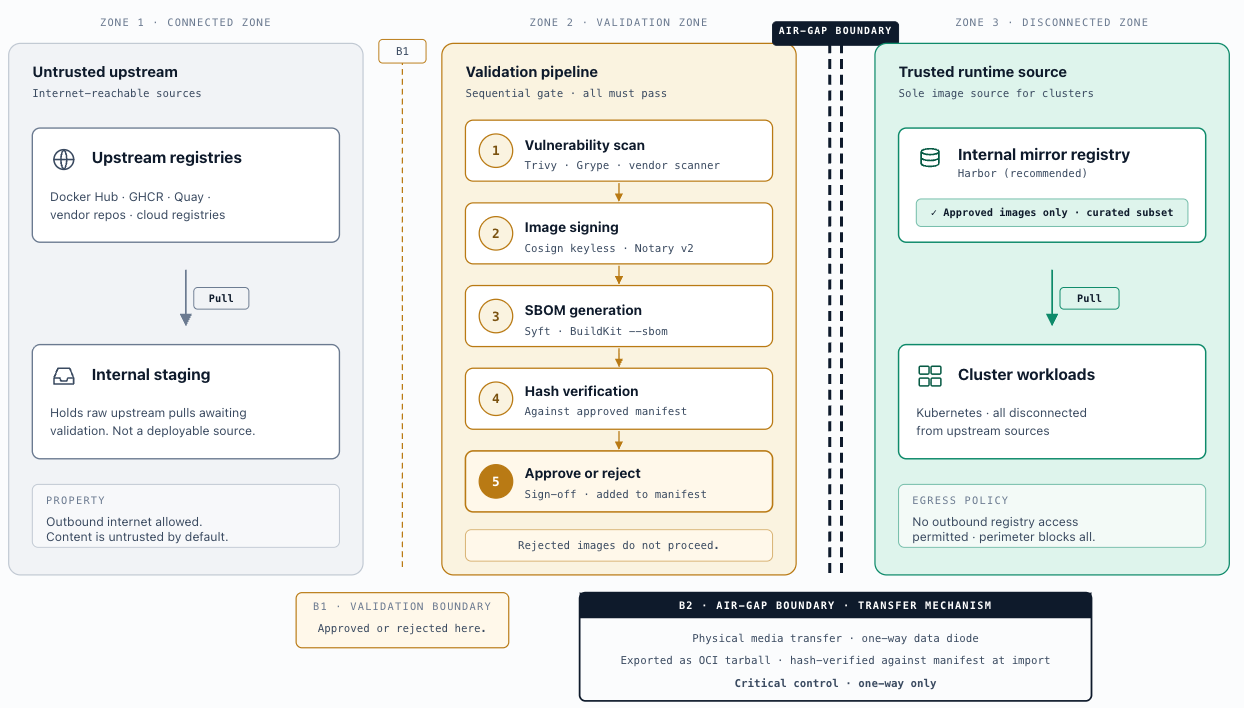
Controlled import workflow: Images are pulled from upstream sources (Docker Hub, cloud registries, vendor repositories) into the connected zone. Each image is scanned for vulnerabilities, signed with a pipeline signing key, and added to an approved content manifest. Approved images are exported as OCI tarballs, transferred through the air-gap boundary via an approved media transfer process (physical media, controlled DMZ transfer, or one-way data diode where policy requires), and imported into the internal mirror registry. Only images that passed validation in the connected zone are permitted to cross the boundary. The hash of each image tarball must be verified against the approved content manifest before import.
Mirror registry: Harbor is the recommended mirror registry for air-gapped environments. OCI artifact support in Harbor enables Helm chart and Kubernetes manifest distribution via the same registry used for container images, making the registry the single artifact distribution hub for the full GitOps pipeline and eliminating the need for a separate chart repository or Git mirror. Configure Harbor with the approved content subset only - the mirror should not be a full replica of upstream registries but a curated set of approved images.
Portainer integration: Portainer is configured with the internal mirror registry as the sole approved registry for all managed environments. The approved registry list (section 5.2) must not include any external or public registry entries. Egress network policy on all clusters should block outbound traffic to public registry endpoints as a complementary control - registry enforcement in Portainer is a management-plane control, not a network-level control.
Resync cadence: Periodic resync of base images, operator images, and Helm charts from connected sources must be scheduled, hash-verified, and audited against the approved content manifest. Establish a documented cadence (monthly at minimum for security patches, immediately for disclosed critical vulnerabilities) and a process for emergency imports when a critical CVE requires a base image update between scheduled resync windows.
5.5 Non-Functional Considerations
Registry availability: Registry unavailability directly blocks container deployments - a cluster node that cannot reach its pull source cannot start new workloads or complete rolling updates. For Harbor deployments, high availability requires PostgreSQL and Redis in HA configurations with image storage backed by a resilient S3-compatible object store. Pull-through caching and registry mirrors reduce dependency on upstream source availability and keep registry traffic on the internal network for clusters with a local Harbor instance. Portainer surfaces registry pull failures as deployment errors; configure monitoring alerts on deployment failure rates to detect registry connectivity issues early - see Chapter 9, section 9.5.
Credential rotation: Registry credential rotation - robot account key rotation in Harbor, cloud provider service principal rotation, ECR token refresh - is governed by the secrets management model in Chapter 8. Robot accounts in Harbor support mandatory expiry with automated alerting; credentials must be rotated before expiry to prevent deployment failures. Portainer’s write-only credential store requires rotation via the registry configuration UI; there is no automated rotation path within Portainer itself.
Audit logging of registry access: Registry access events are recorded at two levels. The registry (Harbor, ACR, ECR) logs all pull and push operations with the source credential, image digest, and timestamp - these logs should be forwarded to the SIEM (Chapter 10) for correlation with Portainer deployment events and Kubernetes audit logs. Portainer’s own audit log records every deployment operation including the registry and image reference, creating an end-to-end trail: user identity → deployment action → specific image digest deployed.
Egress controls and network policy: Registry traffic should traverse defined and audited egress paths. Production cluster nodes must not have unrestricted outbound access to public registry endpoints - egress network policy (Chapter 3, section 3.3) should permit only approved registry hostnames per cluster. For air-gapped environments, all outbound registry traffic is blocked at the network perimeter and the internal mirror registry is the sole pull source. Cloud-provider registries (ECR, ACR, Artifact Registry) require outbound access to provider-specific endpoints; document these in each cluster’s egress allow-list and review them as part of the firewall change process.
Write-only credential model: Registry credentials stored in Portainer are write-only by design. Administrators can create and update registry credentials, but cannot read back the stored values through the Portainer interface or API. This prevents lateral credential disclosure - a team member with Portainer admin access cannot extract credentials held by another team, even when sharing the same Portainer instance.
Cross-team credential isolation: Registry access is scoped to the teams and environments for which it is explicitly configured. Portainer's API layer enforces this isolation - a user can only deploy from registries they have been granted access to, regardless of what other registries exist in the Portainer instance.
RestrictSecrets (Kubernetes Secret visibility): Portainer provides a RestrictSecrets configuration that controls whether non-admin users can view Kubernetes Secret values through the Portainer interface. Enable this on all production environments. It does not affect workload secret access - workloads continue to consume secrets normally - but prevents the management interface from becoming an indirect secret exfiltration path.
Scenarios
Teams pull images directly from any source - Docker Hub, GHCR, or arbitrary public registries - without a managed approved list in Portainer. Pull secrets, where they exist, are manually created per namespace. There is no centralized visibility into what images are running or where they came from. No enforcement boundary separates development and production image sources. Appropriate only for early-stage evaluation where governance investment is not yet warranted. Any workload handling sensitive data requires moving to Level 2 before going live.
The approved registry list is configured in Portainer. Docker Hub anonymous access is hidden on all environments. Teams can only deploy images from registries explicitly added to Portainer and granted to their environment. Registry credentials are stored centrally in Portainer’s write-only credential store and injected just-in-time at deployment time - pull secrets are no longer distributed manually per namespace. Scanning may exist but is not systematically enforced.
This eliminates the most common Level 1 failure: developers deploying arbitrary public images without any control point. Technology flavours: cloud-provider registries (ECR, ACR, Artifact Registry) for cloud environments; a simple self-hosted registry or GHCR for on-premises teams getting started.
Vulnerability scanning is active at push time and enforced at the registry - images exceeding the configured severity threshold cannot be pulled. A single approved registry is in place per environment, with projects or repositories scoped by environment tier (development, staging, production). The admission controller (Chapter 7) enforces the image source list at deployment time regardless of how the deployment was initiated - kubectl, GitOps, or Portainer. Scanning thresholds are consistent between registry enforcement and admission-time policy.
Technology flavours: Harbor with integrated Trivy and deployment security policy; or cloud registries (ECR with Amazon Inspector, ACR with Microsoft Defender for Containers) with Portainer’s approved list as the enforcement layer.
Three-layer scanning is active: build time (CI pipeline), push time (registry on push), admission time (policy engine at cluster). All production images are signed before deployment, enforced at both the registry (content trust policy) and the cluster (Kyverno verifyImages rule). SBOMs are generated at build time, attached to image digests, and stored in the registry. Robot accounts with mandatory expiry cover all Portainer and CI pipeline integrations - no long-lived credentials. Registry access is mapped precisely to the namespace-as-tenancy model: a team can pull only from registry projects their namespaces have been explicitly granted.
Technology flavours: Harbor with Cosign, Trivy, content trust policy, SBOM attachment, and robot accounts; or Nexus Repository / JFrog Artifactory with JFrog Xray for scanning and signing, where these are the enterprise standard.
The registry is the sole artifact distribution hub for a fully disconnected environment. All images follow a controlled import workflow: validated, scanned, and signed in a connected zone; hash-verified against an approved content manifest; transferred through the air-gap boundary; imported into an internal mirror registry. OCI artifact support means the mirror also distributes Helm charts and manifests - a single registry replaces both a chart repository and a container registry, simplifying the air-gapped pipeline. SBOM correlation runs continuously: component inventories are cross-referenced against live CVE feeds (Dependency-Track or Grype in watch mode) and alert when a newly published CVE matches a component in a currently deployed image, regardless of when it last passed a scan.
Technology flavours: Harbor as the air-gapped mirror with OCI artifact support; Nexus or Artifactory in an equivalent controlled import workflow.
Key Decisions Addressed
- Ch5-D-01 - Approved Registry List: All Portainer environments must operate with an approved registry list. Only registries explicitly added to Portainer and granted access to an environment may be used for deployments through the management interface. Docker Hub anonymous access must be hidden on all production and staging environments. The approved registry list is a deployment-time control; it must be paired with admission controller policy (Chapter 7) for complete supply chain enforcement. - see section 5.2
- Ch5-D-02 - Registry Selection by Deployment Model: Harbor is the reference registry for on-premises and air-gapped deployments. Cloud-native registries (ECR for AWS, ACR for Azure, Artifact Registry for GCP) are the recommended choice for cloud-hosted clusters, leveraging native IAM-based authentication and cluster identity integration. Public registries (Docker Hub, GHCR, Quay) are permitted as upstream sources in a controlled mirroring pipeline only - not as direct runtime image sources for production workloads. - see section 5.4
- Ch5-D-03 - Three-Layer Image Scanning: Vulnerability scanning must be active at all three image lifecycle points: build time (CI pipeline), push time (registry on push), and admission time (policy engine at cluster). These are complementary controls. Build-time catches issues early; push-time provides the registry gate; admission-time covers out-of-band deployments and CVEs disclosed after push. Missing any layer leaves a coverage gap. - see section 5.3
- Ch5-D-04 - Image Signing for Production: All production images must be signed before deployment. Cosign (keyless via OIDC or key-based via KMS) is the reference signing tool. Signing must be enforced at two gates: registry-level (Harbor content trust policy) and admission-time (Kyverno verifyImages rule). Both are required - registry enforcement stops direct pulls; admission enforcement covers deployments that bypass the registry policy path. - see section 5.3
- Ch5-D-05 - Kubernetes Registry Access at Namespace Level: In Kubernetes environments, registry access is assigned per namespace, not per user or team. Only namespaces explicitly granted access to a registry can pull from it through Portainer. This aligns registry access with the namespace-as-tenancy model and ensures a team’s image sourcing authority is bounded by the same organisational scope as their deployment authority. - see section 5.2
- Ch5-D-06 - Acceptable Use Boundary for Public Registries: Public registries (Docker Hub, GHCR, Quay.io ) are permitted as upstream sources for a controlled mirroring pipeline only - images are pulled from public sources into an internal registry, scanned, signed, and only the approved subset made available to cluster workloads. Direct public registry access from production clusters must be disabled at two layers: Portainer’s approved registry list prevents selection through the management interface (section 5.2), and egress network policy (Chapter 3, section 3.3) enforces the boundary at the network level for any pull that bypasses the management plane. Public registries must not appear as approved registries on production or staging environments. - see section 5.4
- Ch5-D-07 - Vulnerability Severity Thresholds: Vulnerability severity thresholds must be defined consistently across all enforcement points. Recommended baseline: block Critical vulnerabilities in all environment tiers; block High in staging and production; advisory-only (scan but allow) for Medium in development. Thresholds must match between the registry enforcement layer (Harbor deployment security policy) and the admission controller (Chapter 7 policy engine) - a mismatch creates either operational disruption (images rejected at deploy time after passing the registry) or a coverage gap (images admitted despite failing registry policy). - see section 5.3
- Ch5-D-09 - SBOM Generation and Ongoing CVE Correlation: Generate SBOMs for all production images at build time, attach to image digests in the registry, and retain for the image’s operational lifecycle. Configure ongoing SBOM correlation against live CVE feeds (Dependency-Track or Grype in watch mode) to detect when newly published CVEs match components in currently deployed images. This closes the gap between point-in-time push scanning and continuous assurance - an image that passed scanning at push time may contain a vulnerable component once a new CVE is published. SBOM generation and correlation are not automatic; they require explicit tooling integration in the CI pipeline and registry configuration. - see section 5.3
- Ch5-D-08 - Service Credentials for Registry Integrations: All non-human registry integrations - CI/CD pipelines, Portainer deployment operations - must use registry service accounts (robot accounts in Harbor) scoped to the minimum required permissions and configured with mandatory expiry dates. Credentials with no expiry are not permitted for production registry integrations. Robot account credentials are stored in Portainer’s write-only credential store and are available for deployment operations but cannot be read back through the interface. - see section 5.4 (Harbor Configuration Reference)