
Git Repositories
Scope
Portainer's GitOps engine consumes configuration from Git repositories and OCI registries - it does not host them. This chapter covers GitOps as a governance mechanism for both cluster configuration and application deployment and configuration; how Git platforms (GitHub, GitLab, Azure DevOps, Bitbucket, Gitea) and OCI registries integrate with Portainer’s reconciliation engine; how Git and OCI sources complement each other; how different manifest types are handled; and how branching strategies and reference types map to environment promotion and change control.
6.1 GitOps Architecture Principles
GitOps is commonly described as a deployment methodology for applications. That framing is too narrow. In a governed enterprise container platform, GitOps is the mechanism by which everything in a cluster is declared, versioned, and applied - not only the workloads running inside it, but also the cluster configuration that governs those workloads.
What GitOps governs
A cluster managed through GitOps has two categories of configuration under version control.
Cluster configuration encompasses everything that defines the governance baseline: namespace definitions and labels, NetworkPolicies (including default-deny baselines), ResourceQuotas and LimitRanges, ClusterRoles and RoleBindings, Ingress classes and routing rules, StorageClass definitions, PodDisruptionBudgets, admission controller policies (Gatekeeper ConstraintTemplates and Constraints, or Kyverno ClusterPolicies), and non-sensitive ConfigMaps used as platform configuration. This is the Day-1 and Day-2 baseline described in Chapter 3; GitOps is the mechanism that maintains and enforces it continuously after initial bootstrap.
Application deployment and configuration encompasses the workloads running inside the governed cluster: Deployments, StatefulSets, DaemonSets, Services, application-level Ingress rules, HorizontalPodAutoscalers, PVCs, application ConfigMaps, and secret references (ExternalSecret CRDs pointing to a secrets manager, or SealedSecret ciphertext - never raw secret values; see Architecture Principles, section 1.5).
Cluster configuration precedes application configuration. The provisioning tooling (Chapter 3, section 3.7) establishes the initial baseline at Day-1; GitOps continuously enforces it thereafter. Applications deploy into namespaces that already have their ResourceQuota, NetworkPolicy, and RBAC objects in place - because those objects are also under GitOps control, not applied ad hoc.
GitOps architecture components
A complete Portainer GitOps setup involves four components: the Git repository (and OCI registry) as the source of truth; Portainer’s reconciliation engine as the centralised execution layer; the target environment (Kubernetes cluster or Docker environment) where state is applied; and the audit trail that records every deployment event.
Portainer’s GitOps Reconciliation Engine
Portainer's reconciliation engine runs in the Control Plane rather than inside each workload cluster. Git repository polling and change detection run exclusively in the Portainer Control Plane - managed clusters do not poll Git repositories and do not require Git credentials for reconciliation. Clusters are engaged only when an update is applied; between deployment events, clusters are quiescent from a GitOps perspective. Portainer’s centralised model has no per-cluster controller to deploy, upgrade, or maintain - making it operationally simpler in restricted, air-gapped, and edge environments while still providing full repeatability and auditability.
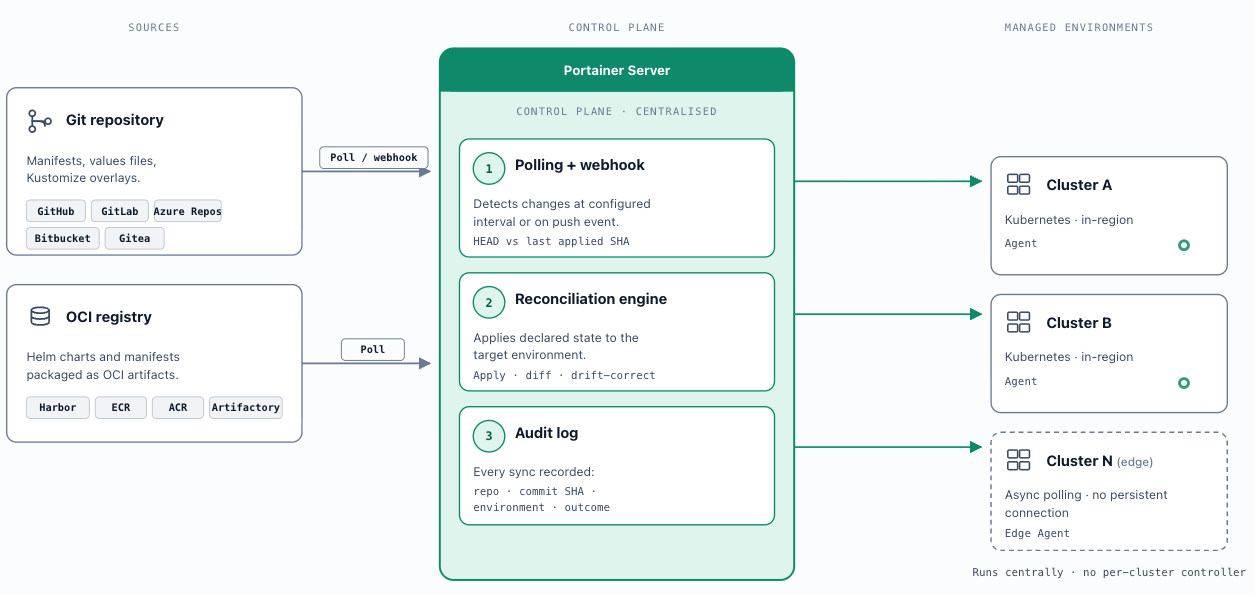
This is architecturally distinct from Argo CD and Flux. The defining distinction is not whether Git can overwrite drift - all three tools can. The distinction is when enforcement happens and where the reconciliation work runs . Argo CD enforces desired state through continuous in-cluster reconciliation loops. Flux also enforces continuously, either per-cluster or centrally via hub-and-spoke - but regardless of topology, reconciliation remains continuous. Portainer enforces desired state deterministically during deployment events, with no continuous observation of cluster state between cycles.
Coexistence with Argo CD and Flux: Portainer’s GitOps engine is not designed to replace Argo CD or Flux. A common pattern in mature platform environments is to use Argo CD or Flux for continuous Git-driven delivery automation, while Portainer provides the operational control plane: access control, fleet visibility, RBAC management, policy enforcement, audit logging, and day-2 operational workflows. In this model Portainer governs the environment in which Argo CD or Flux operate, without competing with their delivery automation.
Portainer supports Kubernetes manifests, Helm charts, Docker Compose files, and Git-based application definitions as deployment formats, allowing teams to continue using familiar formats while applying consistent operational controls across all environments.
Portainer's GitOps engine uses periodic or change-based (webhook) reconciliation. The minimum effective reconciliation interval should be defined per environment and documented in the platform operational model.
Auditability and change traceability: All deployment activity is recorded in the Portainer audit log with user identity, timestamp, Git repository, and commit reference. Git history combined with the Portainer audit log provides complete deployment provenance: who approved the change (pull request review), when it was merged (Git timestamp), and when it was applied to which environment (Portainer audit entry). This satisfies the audit evidence requirements for ITSM change management and regulated environment compliance. Portainer specifically emits GitOps synchronisation events as a distinct named stream in the audit log - separate from user actions and policy events - recording the repository, commit SHA, target environment, and reconciliation outcome for every sync cycle. These events must be forwarded to the SIEM (Chapter 10) alongside user activity and policy events to provide complete GitOps audit coverage.
OCI registries as a GitOps source: Portainer supports OCI-compliant container registries as a GitOps artifact source alongside Git repositories. Helm charts and Kubernetes manifests packaged as OCI artifacts can be consumed directly from an OCI registry without requiring a separate Git repository. This pattern is particularly valuable in air-gapped environments where the container registry is already the primary artifact distribution mechanism, and for organisations that manage Helm chart distribution through their registry rather than a separate chart server. OCI-sourced and Git-sourced GitOps configurations can coexist within a single Portainer deployment.
Git repository polling: Portainer's reconciliation engine checks the configured Git repository at a defined polling interval and compares the current HEAD commit of the configured branch, tag, or pinned SHA against the last successfully applied commit reference. If the reference has changed, Portainer triggers a reconciliation run. The polling interval is configurable per stack and determines the maximum latency between a Git commit and its application to the target environment. Webhook-triggered reconciliation is also supported - the Git platform sends a push event to a Portainer-generated webhook URL, which triggers immediate reconciliation without waiting for the next polling cycle. The recommended configuration is both: webhooks for immediate trigger, polling as a fallback for missed or undelivered webhook events.
Webhook-triggered reconciliation is not supported for Edge Agent environments . The Edge Agent tunnel is opened on-demand rather than maintained as a persistent connection, meaning there is no permanent endpoint to receive incoming webhook calls. For environments managed via the Edge Agent - remote sites, industrial networks, air-gapped clusters - polling is the only available reconciliation mechanism. Factor this into the reconciliation latency SLA for edge environments.
Declarative state enforcement: At each reconciliation cycle - whether triggered by polling or webhook - Portainer applies the full desired state declared in the Git repository to the target environment. The declared manifests are applied in their entirety: resources added to Git are created on the cluster, resources removed from Git are removed from the cluster, and resources modified in Git are updated. This re-application model ensures the live cluster state converges to the Git-declared state at every reconciliation event, regardless of any manual changes made to the environment between cycles. Manual changes made locally will be overridden by the application definition in the Git repository.
Drift detection: Drift occurs when the live state of a managed environment diverges from the state declared in Git - for example, if a workload is scaled manually via kubectl between reconciliation cycles, or if a resource is deleted outside the GitOps pipeline. In Portainer's centralised polling model, drift is detected at the next reconciliation cycle: Portainer compares the live cluster state against the declared Git state and identifies divergence. Drift detection latency is therefore bounded by the polling interval - this contrasts with Argo CD and Flux in default per-cluster mode, which run continuous reconciliation loops and surface drift in near-real time. Flux’s hub-and-spoke deployment centralises where the controllers run, but reconciliation remains continuous regardless of topology. Detected drift is surfaced in the Portainer UI against the affected stack. When auto-sync is enabled, Portainer re-applies the Git state to correct drift automatically. When auto-sync is disabled, drift is surfaced as a status alert requiring a manual reconciliation trigger by an authorised user.
Always apply manifest: Portainer provides an Always apply manifest option per stack that forces re-application of the full declared Git state at every reconciliation cycle, regardless of whether a change has been detected in the repository. With this option disabled (the default), Portainer only applies changes when it detects a new commit reference. With it enabled, Portainer re-applies the entire declared state on every cycle - correcting any drift that accumulated since the last cycle and enforcing Git as the unconditional source of truth. Enable this on production stacks where absolute convergence to declared state is non-negotiable. Be aware that enabling it increases cluster API load proportionally to the reconciliation interval.
Drift prevention in this reference architecture operates at three independent, additive controls: host immutability (Talos OS ensures node-level configuration cannot drift at the OS level - Chapter 3); workload declarative state (Portainer’s GitOps engine continuously reconciles workload configuration to the Git-declared state - this section); and admission control (Chapter 7 policies reject non-compliant workloads at the cluster API regardless of how they were initiated). A bypass or failure at one control does not compromise the other two. Together they create a system where drift is minimised and deviations from expected behaviour are immediately visible across all three controls.
6.2 Git Platform Integration Patterns
GitHub / GitHub Enterprise
Portainer supports three authentication patterns for GitHub integration: Personal Access Tokens (PAT) with repo scope for individual or small-team setups; GitHub Apps for organisation-wide deployments where fine-grained installation-scoped permissions and reliable webhook delivery are required; and SSH deploy keys for read-only repository access in environments where token-based authentication is not permitted by policy.
Webhook integration is the recommended trigger model for GitHub - configure a repository or organisation webhook pointing to the Portainer-generated endpoint to trigger immediate reconciliation on push events, bypassing the polling interval. For organisations managing many repositories, organisation-level webhooks avoid per-repository configuration overhead.
GitHub Enterprise Server supports the same integration patterns as GitHub.com and is the required deployment model for organisations with source code data residency requirements or air-gapped SCM infrastructure. For air-gapped GitHub Enterprise Server deployments, ensure the Portainer Server has network reachability to the GitHub Enterprise Server API endpoint. Webhook delivery requires that the GitHub Enterprise Server can reach the Portainer Server's webhook endpoint; where this is not possible due to network segmentation, polling-only mode is the fallback.
GitLab / GitLab Self-Managed
Portainer integrates with GitLab using Personal Access Tokens (with read_repository scope for pull-only access; api scope if programmatic webhook management is required), deploy keys for read-only access scoped to a single project, or project access tokens for service-account-style authentication not tied to an individual user identity - the preferred pattern for production integrations.
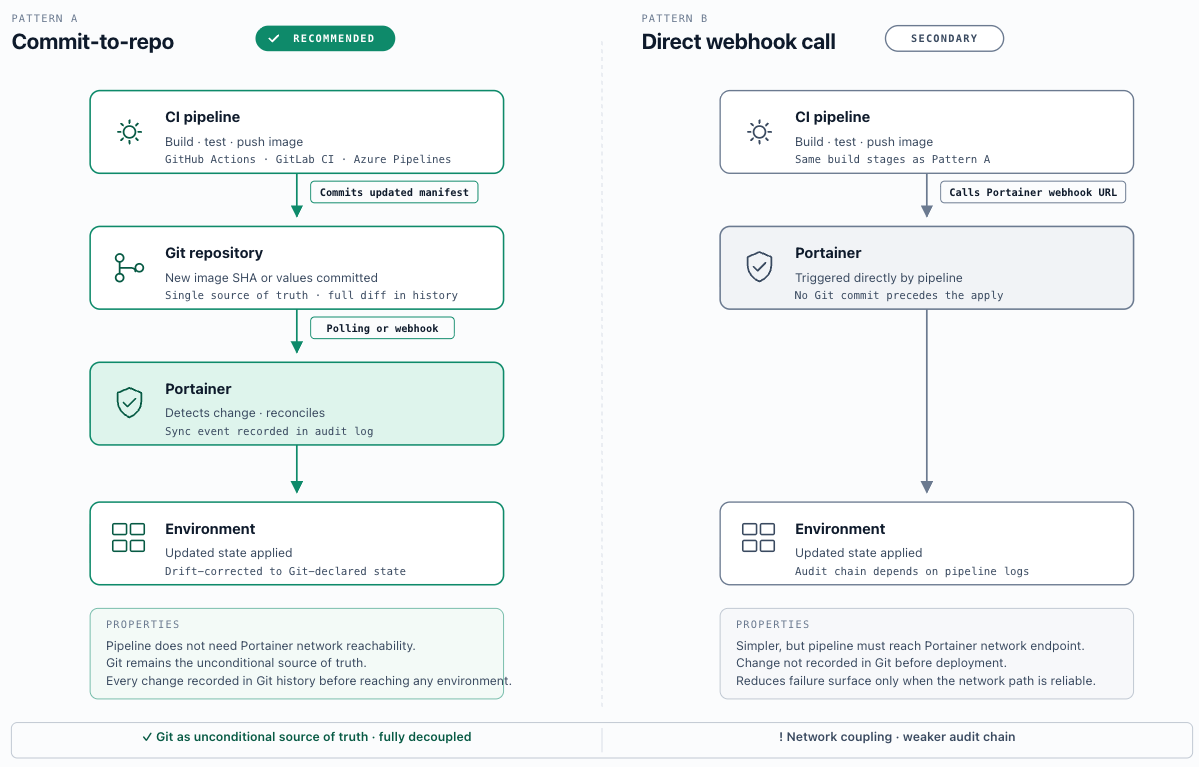
GitLab serves as both SCM and CI/CD platform. The architectural boundary between GitLab CI and Portainer should be defined clearly: GitLab CI is responsible for building images, running tests, and publishing artifacts to the registry; Portainer is responsible for deploying the resulting artifacts to managed environments. The integration point is either a GitLab CI pipeline stage that calls the Portainer webhook URL to trigger reconciliation after a successful build, or a pipeline stage that commits an updated manifest to the GitOps repository which Portainer then detects via polling or webhook. The commit-to-repo model decouples the CI pipeline from Portainer network reachability and is the preferred pattern for air-gapped or network-restricted deployments.
GitLab Self-Managed is supported with the same authentication patterns and is the required deployment for sovereign or air-gapped SCM infrastructure. Self-managed instances must have valid TLS certificates trusted by the Portainer Server, or the certificate must be explicitly trusted in Portainer's Git integration configuration.
Azure DevOps Repos
Azure DevOps Repos is the SCM component of the Azure DevOps platform and is commonly used in Microsoft-stack enterprises with existing Azure AD / Entra ID infrastructure. Portainer integrates with Azure DevOps Repos using Personal Access Tokens scoped to Code (Read) for pull-only access. Service connections used within Azure Pipelines are OAuth-based and are not directly usable as Portainer credentials - use a dedicated PAT issued under a service account identity (an Entra ID service principal or a dedicated Azure DevOps service account), not under a named user, to prevent access disruption on personnel change.
Because Portainer's Azure DevOps Repos authentication uses PATs rather than Azure AD tokens, it operates independently of the Azure AD / Entra ID OIDC integration described in Chapter 4. The two integrations are managed separately - IdP integration governs user authentication to Portainer; the PAT governs Portainer's read access to the Git repository.
Azure Pipelines integration: Portainer GitOps reconciliation can be triggered from Azure Pipelines by configuring the Portainer webhook URL as an HTTP invocation task at the end of a successful pipeline run, or by having the pipeline commit an updated manifest to the GitOps repository and relying on polling or a repository webhook to trigger Portainer. The pipeline-commits-to-repo model is preferred - it maintains the Git repository as the single source of truth and decouples Portainer from pipeline network reachability requirements.
Bitbucket / Bitbucket Data Center
Portainer integrates with Bitbucket Cloud and Bitbucket Data Center using app passwords (Bitbucket's equivalent of PATs, scoped to specific permissions) or SSH deploy keys for read-only repository access. OAuth 2.0 integration is available but app passwords under a dedicated service account are the preferred pattern for production - they are not tied to an individual user identity and do not expire on password change.
Bitbucket Data Center is the self-hosted deployment model for organisations requiring enterprise-grade HA, data residency control, or air-gapped SCM infrastructure. It supports the same authentication patterns as Bitbucket Cloud. Self-managed instances must have valid TLS certificates trusted by the Portainer Server. Webhook delivery in Data Center environments requires that the Data Center instance can reach the Portainer Server webhook endpoint; where network segmentation prevents this, polling-only mode is the fallback.
Bitbucket's integration with the Atlassian ecosystem provides useful change management correlation: Jira issue keys referenced in commit messages are linked to deployment events in the Portainer audit log via the commit SHA, creating a traceable chain from ITSM ticket to deployed state. Bamboo and Bitbucket Pipelines can trigger Portainer reconciliation via webhook at the end of a successful build pipeline. Use Bitbucket where it is already the SCM of record in an Atlassian-invested organisation - introducing a separate Git platform solely for Portainer creates unnecessary operational overhead.
Gitea / Forgejo (Self-Hosted)
Gitea (and its community fork Forgejo) is a lightweight, self-hosted Git service that runs as a single container with minimal resource requirements and no external dependencies. It supports the full range of Portainer authentication patterns: Personal Access Tokens , SSH deploy keys , and webhooks for event-driven reconciliation. Both Gitea and Forgejo are fully supported by Portainer's Git integration.
Gitea's primary role in this reference architecture is as the air-gapped SCM for disconnected or sovereign environments (see Scenario E). In this pattern, Gitea is seeded from an external Git platform during the air-gap transfer process, receiving mirrored repositories alongside container images and Helm charts as part of the controlled content import workflow. Within the disconnected network, Portainer polls the Gitea instance and teams commit to it directly. Gitea's webhook support enables event-driven reconciliation within the air-gapped network without any external connectivity.
For organisations with simple SCM requirements that do not have an existing Git platform, Gitea also functions as a primary SCM. Its low operational footprint makes it appropriate for edge cluster management networks where running a full-featured Git platform would be disproportionate.
OCI Registry as GitOps Source
An OCI registry serves two complementary roles in the platform: as the container image store (Chapter 5) and as a GitOps artifact source. These roles are distinct but closely related.
As a container image store, the OCI registry holds the images that workloads run from. As a GitOps artifact source, it holds packaged Helm charts and Kubernetes manifests stored as OCI artifacts - deployment configuration that Portainer can consume directly without requiring a separate Git repository.
The relationship between Git and OCI sources reflects a broader division of responsibility. Git is the authoritative source of deployment intent - the human-readable manifests, values files, and overlay logic that describe what should run and how. OCI is the authoritative source of deployment artifacts - the packaged, versioned units (container images, Helm charts) that Git configuration references. A typical Helm-based GitOps configuration declares the chart version and values in Git; the chart artifact itself is fetched from an OCI registry at reconciliation time.
When to prefer OCI as the GitOps source: OCI-sourced GitOps is particularly valuable in air-gapped environments where the OCI mirror registry (Chapter 5, section 5.4) is already the primary artifact distribution mechanism. Rather than maintaining a separate Git mirror for Helm chart distribution alongside the container image mirror, the registry becomes the single artifact distribution hub for both images and deployment configuration. This reduces the number of systems required in the disconnected network and simplifies the content transfer process.
Portainer configures OCI registry GitOps sources using the same write-only registry credentials established in Chapter 5. OCI artifact tags serve the same role as Git branches or tags for release management: tag a chart version for staging, promote to a production tag after validation. Pinning to a specific OCI artifact digest rather than a mutable tag provides the strongest immutability guarantee - equivalent to SHA-pinning in Git-based GitOps.
OCI-sourced and Git-sourced GitOps configurations can coexist within a single Portainer deployment. An environment may consume application deployment configuration from an OCI-hosted Helm chart while its cluster configuration - namespaces, NetworkPolicies, RBAC - is managed from a Git repository.
6.3 Manifest Types and Repository Structures
Helm Charts
Helm is the recommended manifest format for Kubernetes environments. Portainer's GitOps engine consumes Helm charts directly from a Git repository (chart source + values) or from an OCI registry (packaged chart artifact). The standard environment differentiation pattern is a separate values file per environment ( values-dev.yaml , values-staging.yaml , values-production.yaml ) stored alongside the chart in the repository; Portainer is configured to reference the appropriate values file for each environment stack.
Chart versioning and pinning: Helm charts should always reference a pinned chart version, not a floating reference ( >= or latest ). Floating chart references mean that a repository update can silently change what is deployed at the next reconciliation cycle without any change to the GitOps repository - violating the principle that Git is the authoritative source of truth for deployed state. Pin the chart version in Chart.yaml or in the Portainer stack configuration, and update the version reference explicitly and deliberately as part of the normal change process. For OCI-sourced charts, pin to a specific digest rather than a tag where possible, as tags are mutable.
Custom Helm repository integration: Portainer supports adding custom Helm repositories (HTTP or OCI) alongside the official Helm stable repository, allowing organisations to host internal chart libraries and reference them from GitOps configurations. Authentication for private Helm repositories uses the same credential model as registry authentication - credentials are stored write-only in Portainer and injected at reconciliation time.
Kubernetes Manifests (Raw YAML)
Raw Kubernetes YAML manifests are fully supported and are the appropriate format for teams that manage their own resource definitions without a templating layer. For multi-environment fleet management, Kustomize overlays are the recommended pattern: a base/ directory contains the common resource definitions shared across environments; environment-specific overlays/dev/ , overlays/staging/ , overlays/production/ directories contain patches that override or extend the base resources for each environment. Portainer is configured to point each environment stack at the relevant overlay directory path within the repository.
Directory structure conventions matter for maintainability at fleet scale. A common convention: clusters/<cluster-name>/ or environments/<env-name>/ as top-level directories containing all stacks for that environment, with application-level subdirectories beneath. The structure should be consistent enough that Portainer stack configurations follow a predictable pattern and can be programmatically generated for new environments.
Git submodule limitation: Portainer does not currently support Git submodules in repository-based deployments. If a repository references submodules, those submodules will not be pulled as part of the deployment - the omission is silent and will produce incomplete deployments without an obvious error. Teams using monorepo patterns or shared library repositories that rely on submodule references must structure their GitOps repositories to be fully self-contained: all manifests, overlay patches, and referenced files must be present in the main repository tree.
Docker Compose
Portainer supports Docker Compose files as a stack format for Docker standalone and Docker Swarm environments, and for edge nodes managed via Edge Agent. Compose is the natural format for teams migrating from Docker-first workflows and for edge deployments where the lightweight runtime footprint of Docker is preferred over Kubernetes.
Compose files have meaningful limitations relative to Helm and raw Kubernetes manifests for production workloads: no native support for namespace isolation, no Kubernetes-native RBAC, limited declarative rollout and rollback semantics, and no support for Kubernetes-specific features (HPA, PodDisruptionBudget, NetworkPolicy). For production Kubernetes environments, Helm or Kustomize-managed manifests are the required format. Compose remains appropriate for Docker-based edge nodes, development environments, and VM-based workloads where the operational model is container-level rather than cluster-level.
6.4 Branching Strategy and Environment Promotion
Portainer maps each managed stack to a specific Git reference - a branch name, a tag, or a pinned commit SHA. This mapping is the mechanism by which different environments track different states of the same repository, and the choice of reference type has direct implications for stability, auditability, and promotion workflow design.
Branch-per-environment model: Each environment tracks a dedicated branch in the same repository. Developers commit to dev ; promotion to staging is a merge from dev to staging ; promotion to production is a merge from staging to main (or production ). Each Portainer environment stack is configured to track its corresponding branch. Portainer detects a new HEAD commit on the branch at the next polling cycle or on webhook delivery and applies the change. This model aligns promotion events with pull request or merge request workflows, giving every promotion a code review gate and a merge commit as an auditable change record. Its principal weakness is long-lived branch divergence - branches that receive environment-specific fixes accumulate differences that make future merges more costly. Teams must enforce that all changes flow through the defined promotion order and never bypass intermediate environments.
Directory-per-environment model: A single branch (typically main ) contains environment-specific configuration in separate directory trees ( /environments/dev/ , /environments/staging/ , /environments/production/ ). Each Portainer environment stack points to the same branch but a different path. Promotion is a file-copy or Kustomize overlay operation within the same branch rather than a branch merge, avoiding long-lived branch divergence. This model requires stricter pipeline controls - a direct commit to /environments/production/ is immediately live without passing through lower environments unless enforced by branch protection and pipeline gates.
Portainer Git reference types: Branch tracking (HEAD of the named branch, updated on each polling cycle or webhook trigger) is appropriate for development and staging environments where continuous delivery is the goal. Tag-based references (a specific named tag) and SHA-pinned references (a specific commit hash) do not update automatically - the stack configuration must be explicitly changed to reference a new tag or SHA. Tag or SHA pinning is the required model for production environments: it ensures that what is running in production corresponds to an explicit, immutable release artifact rather than a branch HEAD that can change with any merge. Tags are human-readable and suitable for release management; SHA pinning provides the strongest immutability guarantee.
Promotion workflow: A representative end-to-end promotion using Portainer: a developer merges a feature branch into dev → Portainer's dev stack detects the new HEAD and reconciles → the change is validated in the development environment → a reviewer opens a PR from dev to staging → after approval and merge, Portainer's staging stack reconciles → after staging validation, a release tag is cut from staging HEAD → an authorised platform operator updates the production Portainer stack configuration to reference the new tag (a Portainer configuration change, subject to RBAC) → production reconciles against the tagged release.
Change management alignment: In organisations operating ITSM change management processes, Git merge events and Portainer reconciliation events are the natural change record anchors. The merge commit SHA links the Portainer deployment event (recorded in the audit log with user, timestamp, and Git reference) to the ITSM change record. For environments requiring formal change approval before deployment, disable auto-sync on production stacks - reconciliation must be manually triggered by an authorised user after the ITSM change record is approved. The Portainer audit log entry provides the deployment evidence required for change record closure.
6.5 Non-Functional Considerations
Repository access controls: Git repositories holding cluster configuration and application deployment manifests are high-value targets - a write to a production manifest triggers a production deployment. Repository access must be governed with the same rigour as production cluster access: branch protection rules on production branches (require pull request review, require passing status checks, restrict who can push directly), protected tags (only authorised roles can create or move release tags), and RBAC-scoped access at the repository or organisation level consistent with the identity model in Chapter 4. Service accounts used for Portainer's Git integration (deploy keys, project access tokens, app passwords) must have read-only access only - Portainer reads from Git; it never writes to it.
Credential management: All credentials Portainer uses to access Git repositories - PATs, app passwords, SSH private keys - are stored write-only in Portainer's credential store and cannot be read back through the interface. Credential rotation (on expiry, on personnel change, or as part of the periodic credential audit cycle) requires updating the Portainer integration configuration with the new credential. There is no automated rotation path within Portainer itself; integrate with the secrets rotation tooling described in Chapter 8 to alert when credentials approach their expiry date.
Repository availability: Portainer's GitOps engine depends on Git repository reachability at reconciliation time. If the repository is unreachable - due to network partition, SCM platform outage, or credential expiry - reconciliation fails. Running workloads on the target cluster are not affected by a reconciliation failure; they continue operating on their last applied state. However, no new deployments or configuration changes can be applied until connectivity is restored. For environments with strict availability requirements, configure polling intervals that surface connectivity failures promptly and route reconciliation failure alerts through the platform alerting pipeline (Chapter 9, section 9.5). Mirror-based architectures (Gitea for air-gapped environments, GitHub Enterprise Server for data-residency requirements) eliminate external connectivity dependencies.
Audit trail: Git commit history and Portainer's deployment audit log together form the complete change record for all managed environments. Git provides the what and why (commit message, PR review, approver identity, diff). Portainer provides the when and where (timestamp, target environment, Portainer user identity that triggered reconciliation). Neither is sufficient alone: Git history without Portainer deployment records cannot confirm whether a commit was actually applied; Portainer audit records without Git history cannot explain what changed or why. Both must be retained and forwarded to the SIEM (Chapter 10) for the full compliance audit chain.
Scenarios
Operators deploy workloads directly via Portainer’s web interface using the form-based or Compose deployment model. No Git repository is configured as a stack source. Changes are applied manually and are not version-controlled. Portainer’s audit log records who deployed what and when, but there is no Git history to explain why. This is appropriate for learning environments, exploratory proof-of-concept work, or teams at the earliest stage of containerisation who have not yet committed to GitOps practices. The recommended path out of this level is to use Portainer’s “export as stack” capability to capture the current workload definition as a Compose or manifest file, commit it to a Git repository, and re-link the stack to that repository as the source of truth.
A single Git repository is connected to Portainer. Teams commit Docker Compose files or simple Kubernetes manifests to a shared repository branch; Portainer polls the repository on a defined interval. Webhooks may not yet be configured - polling provides the reconciliation trigger. All environments (dev and production if both exist) track the same branch or different directories in the same repository. There is no formal branching strategy, no pull request gates, and no SHA-pinning on production stacks. The goal at this level is repeatability: workload configuration lives in Git, changes are visible in commit history, and re-deployment is possible from the repository. This is appropriate for small teams beginning their GitOps journey or individual operators who have outgrown direct ClickOps but have not yet formalised their promotion workflow.
Cloud enterprises typically use GitHub or GitHub Enterprise Cloud as their SCM and Helm as the standard deployment manifest format. Portainer is configured with a GitHub App installation for authentication - providing installation-scoped permissions, reliable webhook delivery, and no dependency on individual user PATs. Repository webhooks trigger immediate Portainer reconciliation on push events; polling at a defined interval provides fallback coverage for missed webhook deliveries. Helm values files are organized per environment ( values-dev.yaml , values-staging.yaml , values-production.yaml ); Portainer stacks reference the appropriate values file for each environment. The production stack is configured to track a pinned Git tag rather than a branch HEAD, ensuring production reconciliation can only be updated by an explicit tag reference change - a Portainer RBAC-gated configuration operation. GitHub Actions handles the CI side: build, scan, push to ECR or ACR, and either commit an updated image SHA to the values file or cut a release tag to trigger production promotion.
On-premises enterprises running GitLab Self-Managed use project access tokens for Portainer authentication - service-account-style credentials scoped to the target project with read_repository permission and a defined expiry, not tied to an individual user identity. Portainer polls the configured GitLab repository at a defined interval; GitLab CI pipeline webhook calls to Portainer's webhook endpoint trigger immediate reconciliation after a successful CI run. Kustomize overlays provide environment differentiation: a base/ directory contains common resource definitions; overlays/dev/ , overlays/staging/ , overlays/production/ contain environment-specific patches. Each Portainer environment stack is configured to point at the corresponding overlay path. Production stacks are SHA-pinned with auto-sync disabled - reconciliation is triggered manually by the platform operator after the ITSM change record is approved, with the SHA and deployment event recorded in the Portainer audit log for change record closure.
Supplemental - Azure DevOps Repos (Microsoft-stack variant of Level 4)
Microsoft-stack enterprises using Azure DevOps Repos integrate Portainer using a dedicated PAT issued under an Entra ID service account identity (a service principal or a dedicated Azure DevOps service account), preventing access disruption on personnel change. The PAT is stored write-only in Portainer's credential store and scoped to Code (Read) on the target repositories. Azure Pipelines triggers Portainer reconciliation by committing updated manifests - with new image SHAs or configuration values - to the GitOps repository at the end of each successful pipeline run; Portainer's polling or repository webhook detects the change and reconciles. This model decouples Azure Pipelines from direct Portainer network reachability - the pipeline does not call Portainer directly, reducing the failure surface. Portainer audit log entries correlate to Azure DevOps commit history via the commit SHA, providing the change record traceability required for ITSM integration and audit evidence.
Disconnected or sovereign environments where external Git platforms are not reachable require an on-premises SCM. Gitea (or its community fork Forgejo) is lightweight, runs as a single container, requires minimal operational overhead, and fully supports Portainer's Git integration via PAT or SSH deploy key authentication. In this pattern, Gitea is seeded from an external Git platform during the air-gap transfer process - repositories are mirrored to Gitea alongside image and Helm chart transfer as part of the controlled content import workflow. Within the disconnected network, Portainer polls the Gitea instance for changes; development and operations teams commit to Gitea repositories directly. Gitea's webhook support enables event-driven reconciliation even within the disconnected environment. The OCI mirror registry (Chapter 5, Scenario E) and Gitea together form the complete artifact distribution stack for the air-gapped environment - images from the mirror registry, deployment configuration from the Gitea mirror - providing full GitOps capability without any external dependencies.
Key Decisions Addressed
- Ch6-D-01 - Production GitOps Mandate: All production cluster configuration (namespaces, NetworkPolicies, ResourceQuotas, LimitRanges, RBAC objects, admission controller policies, Ingress configuration) and all production application deployment and configuration must be managed through Portainer’s GitOps engine, sourcing state from a Git repository or OCI registry. Direct application of manifests to production clusters via kubectl or any out-of-band mechanism is prohibited except in documented break-glass scenarios subject to the controls in Chapter 4, section 4.9. Auto-sync must be disabled on production stacks; reconciliation must be triggered by an authorised operator after the corresponding change record is approved. GitOps is strongly recommended for all non-production environments to maintain environment parity and preserve promotion traceability. Documented exceptions for non-production environments are permitted where a team can demonstrate that manual configuration does not affect production fidelity; exceptions must be reviewed at each change management cycle. The recommended non-production adoption path is to deploy and iterate via ClickOps in development or staging, validate the configuration, then export the workload as a stack definition and commit it to the GitOps repository before promoting to production. Portainer supports converting existing workloads to declarative stack definitions, providing a natural bridge from exploratory ClickOps to governed GitOps without requiring teams to write manifests from scratch. To make the production mandate technically enforceable within Portainer, enable the Enforce code-based deployment setting (Settings → General) - this removes the ‘Add with form’ option from the deployment interface, preventing form-based deployments that bypass the GitOps pipeline entirely. - see section 6.1
- Ch6-D-02 - Production Git Reference Model: Production stacks must use tag-based or SHA-pinned Git references - not branch tracking. Branch tracking is appropriate for development and staging where continuous delivery is the goal; production must track an explicit, immutable release reference so that what runs in production corresponds to a deliberate, reviewable release event. Auto-sync must be disabled on all production stacks; reconciliation must be triggered manually by an authorised operator after the corresponding change record is approved. - see section 6.4
- Ch6-D-03 - Kubernetes Manifest Format: Helm charts are the recommended deployment format for Kubernetes environments; raw Kubernetes manifests managed with Kustomize overlays are the validated alternative. Docker Compose is not an appropriate format for production Kubernetes workloads. All Helm chart version references must be pinned - floating references ( latest , >= ) are not permitted. For OCI-sourced charts, pin to a specific digest rather than a mutable tag where possible. - see section 6.3
- Ch6-D-04 - Service Account Credentials for Git Integration: All Portainer Git integrations must use service account credentials - GitHub App installations, project access tokens, app passwords, or SSH deploy keys - scoped to the target repository or organisation with read-only access. Credentials must not be tied to named user identities; an individual leaving the organisation must not cause a reconciliation failure. Portainer reads from Git repositories and never writes to them. - see sections 6.2 and 6.5
- Ch6-D-05 - CI/CD to GitOps Integration Pattern: Where a CI/CD pipeline must trigger a Portainer reconciliation after a successful build, the preferred pattern is for the pipeline to commit the updated manifest (new image SHA, updated values) to the GitOps repository rather than calling the Portainer webhook URL directly. This decouples the pipeline from Portainer network reachability, maintains the Git repository as the unconditional source of truth, and ensures every change is recorded in Git history before it reaches any environment. Direct pipeline-to-Portainer webhook calls are permitted as a secondary pattern where the commit-to-repo model is not feasible. - see section 6.2