
Policy Enforcement
Scope
This chapter covers Portainer's Fleet Governance policy model across four policy types, applicable to Kubernetes and Docker environments (with different enforcement mechanisms per platform):
- Security policies (pod security constraints, namespace restrictions, and secret visibility controls)
- Registry policies (approved image sources enforced at admission time)
- Setup policies (cluster configuration standards including ingress controls, storage classes, load balancer access, and GitOps change windows)
- RBAC policies (fleet-wide propagation of role assignments to users and teams across environment groups).
It also covers how Portainer’s Fleet Governance Policies deploy, manage, and continuously enforce these policies across the fleet via OPA Gatekeeper as the native admission control engine, the lifecycle of policies from authorship through staged rollout to enforcement, and how admission control is structured to prevent non-compliant workloads from reaching production regardless of how they were deployed.
7.1 Policy Architecture Principles
Policy authorship and policy enforcement are organisationally separated. The security or platform team defines the policy baseline - which workload configurations are acceptable, which registry sources are approved, which capabilities are restricted. The platform’s admission controllers enforce that baseline automatically for every workload, regardless of who deployed it or how. This separation ensures that security requirements cannot be bypassed through operational convenience: a team unable to change the policy still has that policy enforced against their workloads, including deployments made via kubectl or any other tool that bypasses Portainer entirely.
Admission control at the Kubernetes API server level is the architecturally correct enforcement point because it is unavoidable. Every workload - deployed through Portainer, a GitOps reconciler, a CI/CD pipeline, or kubectl directly - must pass through the API server. A webhook registered at the API server evaluates every in-scope request before it is persisted, independent of the deployment path. Enforcement placed only at the Portainer UI layer can be bypassed by any tool with direct cluster API access; enforcement at the API server level cannot be bypassed without removing the webhook itself, which Fleet Governance Policies detect and automatically remediate.
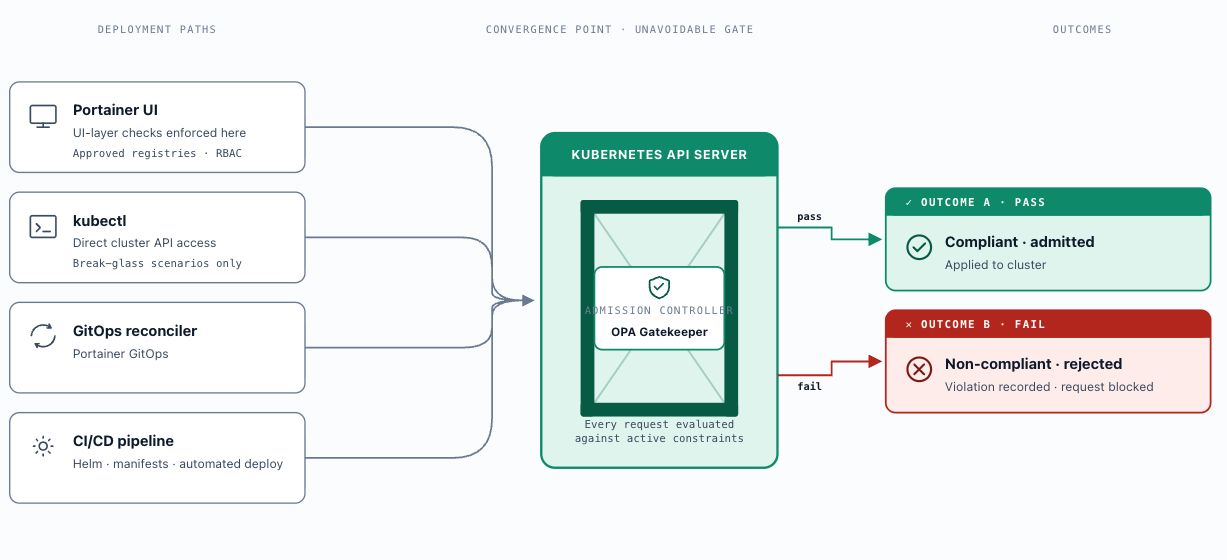
Portainer’s role is governance, not authorship. It deploys the policy engine to managed clusters, ensures it remains correctly configured, distributes policies from the Platform Control Plane to each cluster and provides central visibility into compliance state across the fleet. Portainer does not decide what policies say - that is the security and platform team’s responsibility. What Portainer ensures is that the policies those teams define are consistently present, correctly deployed, and actively enforced across every cluster in the fleet, with no cluster able to silently opt out.
Fleet Governance Policies are the mechanism that enforces the presence and configuration of policy components at fleet scale. They continuously monitor each managed cluster for the expected policy engine components and required policy definitions. If any component is removed, misconfigured, or drifts from the expected state, Portainer detects the deviation and automatically remediates it - providing the guarantee that every cluster in the fleet is actively protected at all times, not only at initial deployment.
Portainer's policy enforcement is one control in a defence-in-depth model, not the sole safeguard . The controls operate as follows: Portainer's UI and API enforce approved registry lists, deployment guardrails, and namespace boundaries at the interaction layer. Admission controllers (OPA Gatekeeper) enforce security baselines independently at the Kubernetes API layer, regardless of whether a workload was deployed through Portainer or directly. Runtime controls (network policies, PodSecurity standards, seccomp profiles) enforce constraints at workload execution time. No single control is assumed to be complete or sufficient in isolation; a failure or deliberate bypass of one control does not negate the protections provided by the others. Portainer augments native Kubernetes and container runtime security rather than replacing it - controls are additive, not substitutive .
Just-in-time credentials for policy operations: Policy infrastructure - admission webhooks, constraint configurations, policy exemptions - represents a high-privilege surface. Administrative access to policy components should use short-lived, just-in-time credentials rather than long-lived service accounts with permanent policy administration rights. Policy exemptions in particular must be treated as privileged, time-limited operations: granted with an explicit expiry, an associated audit record, and a review requirement before renewal. Permanent exemptions should not exist; all policy bypasses should be time-bounded by design.
OPA Gatekeeper is Portainer’s native policy engine : when a policy is created or attached to a managed environment in Portainer, Portainer automatically deploys and configures the Gatekeeper controller components to that cluster - no manual installation required. Kyverno can be deployed as an alternative but is not natively managed by Portainer; see section 7.2. Governance (policies, versions, rollout state, audit results) is managed centrally from the Platform Control Plane; enforcement occurs locally within each cluster’s admission webhook. This two-plane model means a policy violation attempted directly via kubectl is caught and blocked by the cluster-local engine with no dependency on Portainer being in the request path.
7.2 Policy Engine Options
⚠️
Current limitation: Fleet Governance Policies are not yet GitOps-integrated. Portainer deploys and propagates Fleet Governance Policies directly through its own agent-polling mechanism - not via a GitOps pipeline. When a policy is created or updated in the Portainer UI, changes propagate automatically to all attached environments via the Portainer agent.
Policy configuration should still be version-controlled in Git as a governance best practice (to maintain change history, support peer review, and enable rollback), but the distribution mechanism is Portainer-direct, not GitOps.
Full GitOps integration for Fleet Governance Policies - where policy definitions are authored in the Portainer UI, reviewed as code manifests, merged into an admin Git repository, and applied to the fleet via declarative reconciliation - is on the Portainer roadmap.
OPA Gatekeeper
OPA Gatekeeper is the reference architecture choice. It is Portainer’s native policy engine: automatically deployed on policy attachment, fleet-managed through its full lifecycle, and centrally visible in the Portainer compliance dashboard. OPA Gatekeeper is the CNCF-graduated admission controller built on Open Policy Agent.
Gatekeeper is also widely referenced by name in regulated-industry compliance frameworks (financial services, healthcare, government), providing an established audit trail for policy governance. The Rego learning curve is the primary operational cost; Portainer’s template policies mitigate this by providing pre-built, safe-default ConstraintTemplates that require no Rego authorship to adopt.
It extends the Kubernetes API server with a validating admission webhook and runs two controllers in-cluster: the webhook controller validates or rejects API server requests in real time against active policy constraints; the audit controller periodically evaluates all existing resources in the cluster against active constraints, surfacing violations in resources that predate the policy or that were deployed while the webhook was temporarily offline.
Constraint templates and constraints: Gatekeeper separates policy schema from policy instances using two resource types. A ConstraintTemplate defines the policy schema and the Rego logic that evaluates it - it is the reusable, version-controlled policy definition. A Constraint is an instance of a ConstraintTemplate, scoped and parameterised for a specific enforcement context (for example, "all Pods in the production namespace must not use hostNetwork "). This separation means a single ConstraintTemplate can be instantiated as multiple Constraints with different scopes and parameters without duplicating policy logic. For Portainer's built-in policy types (Security, Registry, Setup, RBAC), ConstraintTemplates and Constraints are managed entirely by Portainer - no authorship or manual configuration is required. For enforcement requirements beyond the built-in types, custom ConstraintTemplates may be authored by the platform or security team and version-controlled in Git; Constraints are then the deployment-time parameterisation applied per cluster or namespace.
Audit mode vs. enforcement mode: Gatekeeper supports per-Constraint enforcement modes: deny (enforce - rejects non-compliant resources at admission time) and warn (audit - allows the resource but records a violation and surfaces a warning in the API response). The recommended phased rollout is to introduce new policies in warn mode first, inspect the audit results for unintended violations across existing workloads, remediate or refine policy logic, then promote to deny mode once the violation backlog is addressed. Enforcing a new policy in deny mode on a large fleet without an audit phase risks immediately blocking running workload updates.
Portainer integration: Portainer automatically deploys and manages the Gatekeeper controller components to a managed cluster when the first policy is created or attached to that environment in the Portainer interface - no manual Gatekeeper installation is required. The deployment is triggered by policy attachment, and Portainer maintains ownership of the Gatekeeper installation throughout the cluster lifecycle. Fleet Governance Policies continuously verify that the Gatekeeper webhook and audit controller remain present and correctly configured; component removal or misconfiguration surfaces as a compliance violation in the Portainer UI. Portainer distributes policy definitions (ConstraintTemplates and Constraints) directly to clusters through the Fleet Governance mechanism - when a policy is attached or updated in the Portainer interface, the change propagates automatically to all environments in the attached group via the Portainer agent. Policy definitions should be version-controlled in Git as the authoritative record of what the fleet should enforce, but distribution is Portainer-direct, not via the GitOps pipeline.
Rego complexity and namespace exclusions: Rego policy logic requires careful management of namespace and service account exclusions. Without explicit exclusions for system namespaces ( kube-system , the Portainer agent namespace, critical controllers, and cluster add-ons), a Gatekeeper policy can block system services or lock platform teams out of the cluster entirely. Managing these exclusion lists correctly - and keeping them current as the cluster evolves - is a significant operational burden for teams writing custom ConstraintTemplates. Portainer’s template policies are pre-configured with safe defaults that include the necessary exclusions, ensuring that attaching a policy through Portainer does not inadvertently break cluster operations. When building custom ConstraintTemplates, platform teams must explicitly define exclusions for system-critical namespaces and service accounts before applying in enforcement mode.
Kyverno
Kyverno is a CNCF-graduated Kubernetes-native policy engine that uses YAML-based policies rather than Rego, making it accessible to teams without OPA expertise. It supports validate, mutate, and generate rules - including automatically injecting security contexts, enforcing labels at admission, and generating default NetworkPolicy objects when namespaces are created. It produces machine-readable compliance output via PolicyReport and ClusterPolicyReport CRDs.
Kyverno is not the reference architecture choice and is not natively integrated with Portainer. It must be deployed independently via the cluster profile Helmfile (Chapter 3, section 3.7), and while Portainer can monitor its presence through Fleet Governance Policies and distribute Kyverno resources via the GitOps pipeline, Portainer’s policy management workflow - the four Portainer policy types, Fleet Governance auto-deployment, and centralised compliance visibility - is built exclusively around OPA Gatekeeper. Teams with existing Kyverno deployments can run it alongside Portainer, but they do so outside Portainer’s native policy orchestration and must manage its lifecycle independently.
7.3 Policy Lifecycle Management
Policy inheritance and group scope: Policies are applied at the environment group level, not per individual environment. When a policy is attached to an environment group, all environments within that group inherit the policy automatically. A policy defined once at the group level propagates to all child environments without per-environment configuration, consistent with the fleet governance model in Chapter 4 (section 4.6). Group-level policies override any existing environment-level settings for that policy type. Policy attachment failures are automatically retried every 15 minutes; if a policy shows a persistent failure with ‘Failed to install/upgrade Helm chart’, the issue is at the environment level (typically a Helm installation failure or Kubernetes version incompatibility) and requires manual resolution before the policy can be applied.
Policy authorship: Policy authorship belongs to the platform or security team - not to application teams or individual cluster operators. This separation is enforced primarily by restricting policy configuration access in Portainer via RBAC role scoping. For organisations managing custom ConstraintTemplates in Git, CODEOWNERS rules and branch protection on the platform configuration repository should additionally limit who can modify those policy definitions. Application teams may request policy adjustments through the standard change process but do not modify policy definitions directly. This ensures that the organisation's security baseline cannot be weakened by an individual team's operational convenience.
Policy versioning and change management: Portainer's built-in policy configurations (Security, Registry, Setup, RBAC) are authoritative in Portainer - they are not stored as Git files and do not require Git version control. Custom ConstraintTemplates and Constraints authored beyond Portainer's built-in types must be version-controlled in Git alongside application configuration. Policy changes follow the same review process as application changes: a pull request with at least one approver from the security or platform team, a linked ITSM change record where required, and a test cycle before production promotion. Git history provides a complete change record and enables rollback to a known-good policy state. Version-controlling policy definitions in Git provides change history, peer review, and rollback capability - these are governance benefits that are independent of distribution. Policy distribution is handled by Portainer directly through the Fleet Governance mechanism, not via the GitOps pipeline. Full GitOps integration for policy distribution is on the Portainer roadmap (see section 7.2 callout).
Testing before rollout: New policies must be validated before enforcement. The recommended process: deploy in audit ( warn ) mode to the development cluster first, inspect audit results for unintended violations across existing workloads, remediate violations or refine policy logic, then promote to staging in audit mode, and only promote to enforcement ( deny ) mode once the violation rate is zero or all remaining violations are documented and accepted. For organisations authoring custom ConstraintTemplates, Gatekeeper's gator CLI dry-run tooling should be integrated into the CI pipeline so that policy changes are tested against a corpus of known-good manifests before merge. Portainer's built-in policy types do not require this step - changes to built-in policy configurations are validated through the audit mode rollout process described above.
Staged rollout: Policy promotion follows a development → staging → production sequence managed in Portainer. A policy is attached to the development environment group first, validated in audit mode, then promoted by attaching to the staging environment group, and finally to production once the violation count is zero or all remaining violations are formally accepted. Portainer propagates the updated policy to all environments within each group automatically when the attachment is made. Each promotion event is captured in the Portainer audit log, providing a change record for the rollout. Promotion between stages requires passing the audit-mode validation gate - a policy that produces unintended violations in staging does not proceed to production.
Policy deprecation and removal: Removing a policy is a high-significance change - a class of previously blocked resources becomes admissible. Policy removal must follow the full change management process, including a documented rationale (policy superseded, control implemented at a different layer, unacceptable false positive rate), security team sign-off, and standard environment-stage promotion. Removal is implemented by detaching the policy from the relevant environment groups in Portainer, which immediately stops its propagation to new clusters. Where the policy was based on a custom ConstraintTemplate, the ConstraintTemplate and its associated Constraints should also be deleted from the Git record to prevent inadvertent re-attachment. Portainer built-in policy configurations do not require Git cleanup - removing them from Portainer is sufficient.
7.4 Policy Types, Templates, and Custom Configuration
Portainer's Fleet Governance Policies are created in the Portainer UI. Policies are organised by environment type (Kubernetes or Docker) and by category (RBAC, Security, Setup, Registry).
💡
Predefined templates for RBAC, Setup, and Registry policies are on the Portainer roadmap. Until available, these policy types require full custom configuration. Some example policy configurations are included below.
All policy types are attached at the environment group level and propagated fleet-wide through the Fleet Governance mechanism.
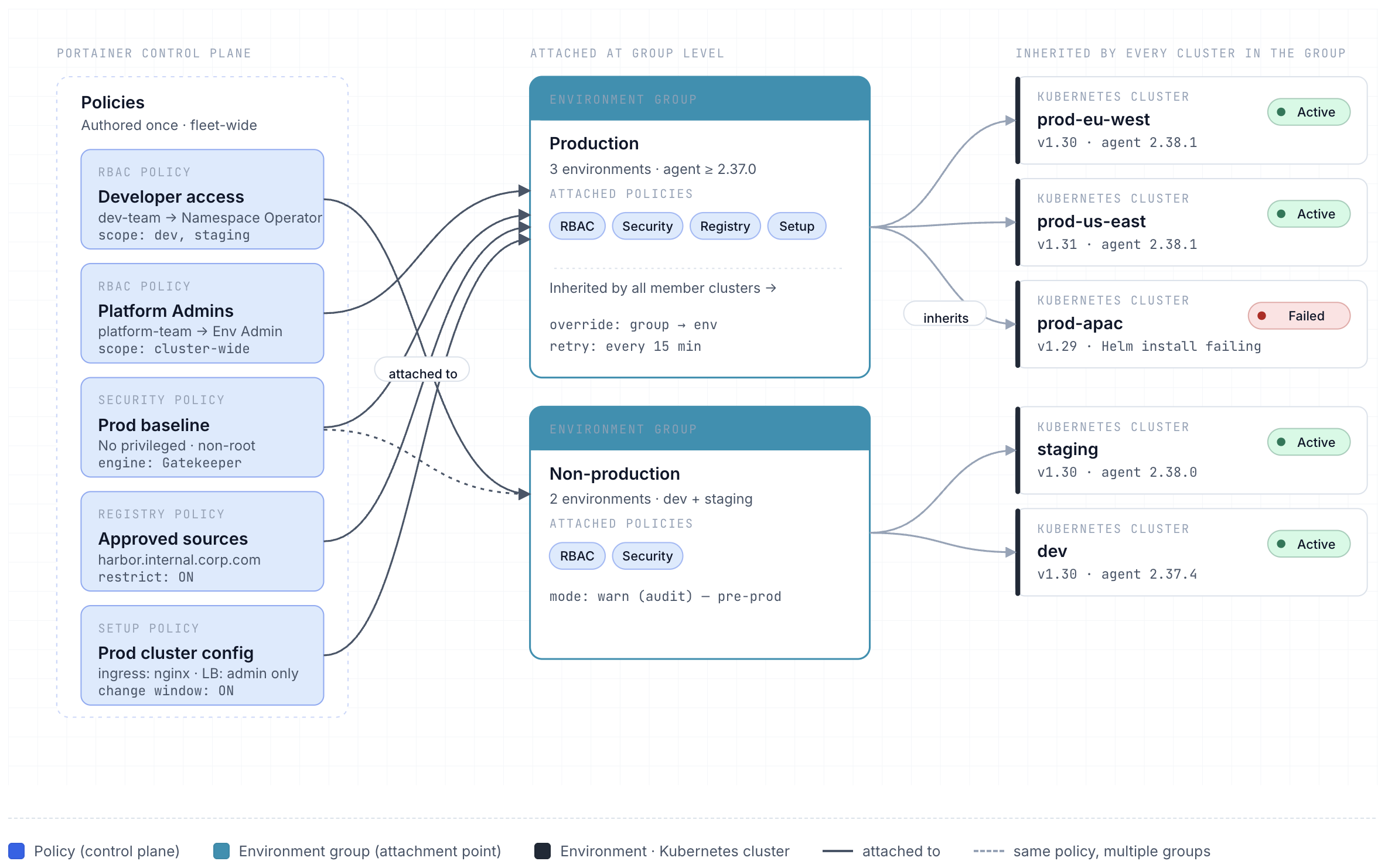
Policies are attached to one or more environment groups simultaneously - when a policy is attached or updated in the Portainer UI, the change is automatically pushed to every environment within each attached group via the Portainer agent. This means a production Security policy or a fleet-wide RBAC policy is a single configuration object that Portainer distributes and maintains across potentially hundreds of clusters without per-cluster intervention. Group-level policy settings override any existing environment-level settings for that policy type, ensuring the group definition is always authoritative. Portainer tracks the attachment status of each policy per environment individually - each environment shows as Active (policy applied and enforced) or not, with a message explaining the failure if the attachment did not succeed. Failed attachments are automatically retried every 15 minutes, so transient agent connectivity issues resolve without manual intervention; a persistent failure with 'Failed to install/upgrade Helm chart' indicates a cluster-level issue that requires direct remediation before the policy can be applied. Policies can currently only be applied to Edge (Standard) Agent environments running agent version 2.37.0 or later; environments that do not meet this requirement will not receive the policy even if their group is attached.
RBAC policies assign users or teams to roles across all environments within an environment group, propagating access assignments fleet-wide from a single configuration. When a namespace-scoped role (such as Namespace Operator) is selected, a Namespaces field appears to target specific namespaces - enabling namespace-level access grants to be defined once and applied consistently to every environment in the group. RBAC policies complement the per-environment role assignments described in Chapter 4 (section 4.6): where environment group hierarchy cascades roles from group to child environments, RBAC policies provide the Fleet Governance mechanism for defining those assignments centrally and propagating them fleet-wide. Currently only custom RBAC policies can be created; policy templates will be introduced in a future release.
⚠️
Known limitation: RBAC policies currently create non-conflicting role bindings rather than overriding existing environment or group-level role assignments. A user with an existing Environment Administrator grant may retain that higher privilege even when an RBAC policy attaches a more restrictive role (such as Standard User) to the group. Until this is resolved, verify effective permissions using the Effective Access Viewer (Chapter 4, section 4.7) after attaching an RBAC policy to confirm that the intended restrictions are in force.
Registry policies serve two functions: granting namespace access to a registry, and optionally restricting all workloads to approved image sources. The access grant associates a registry with one or more target namespaces, ensuring Portainer can pull from that registry on behalf of workloads in those namespaces. The restriction function is separate and optional - enabling Restrict to allowed sources causes Portainer to create a Kubernetes native ValidatingAdmissionPolicy resource on the cluster (not an OPA Gatekeeper constraint), which rejects at admission time any Pod whose image reference does not match the approved sources list. Allowed sources are specified as a registry URL prefix with an optional path, and can be scoped globally (cluster-wide) or to specific namespaces. The allowed sources list is pre-populated with images required for Portainer itself to operate; removing these entries will cause Portainer agent update failures. For Docker environments, enforcement is Portainer server-side only - the API and Docker proxy validate image sources before any action reaches the environment. ValidatingAdmissionPolicy requires Kubernetes 1.30 or later . Registry policies are currently custom-only; templates are on the Portainer roadmap.
Setup policies define the operational boundaries and available infrastructure features for Kubernetes clusters in an environment group. Where Security policies govern what workloads can do, Setup policies govern what platform capabilities teams can consume: whether external load balancers may be provisioned, which ingress controllers are permitted, whether resource over-commit is allowed, which storage classes are available for application deployments, and whether a change window restricts when GitOps reconciliation applies updates. Setup policies are the primary mechanism for preventing teams from inadvertently consuming cloud infrastructure that incurs unexpected cost or exposes the cluster to unintended external access - for example, restricting external load balancer creation to platform admins prevents accidental cloud load balancer provisioning by application teams. Setup policies also control whether the metrics API is enabled, enabling or disabling CPU and memory usage graphs at the cluster and node level. Currently only custom Setup policies can be created; predefined templates are on the Portainer roadmap.
Platform policies are enforced uniformly across all clusters and namespaces - no workload team can override or weaken them. Workload policies are scoped to specific namespaces or environment groups, within the boundaries set by platform policies. The authorship, ownership, and conflict-resolution model for these two categories is covered in section 7.5.
Security policies define the workload security constraints enforced across all Kubernetes clusters in an environment group. They cover two areas: namespace-level access controls (restricting the default namespace to prevent workloads landing there without explicit permission, and limiting non-admin visibility of secret contents in the Portainer UI), and pod security constraints - the full set of Kubernetes admission-level security controls covering privileged container use, host namespaces, host networking and ports, run-as-user enforcement, privilege escalation, Linux capabilities, allowed volume types, read-only root filesystem, AppArmor profiles, and seccomp profiles. Portainer enforces Security policies through OPA Gatekeeper, which it automatically deploys to each managed cluster on first policy attachment. Security is the only policy type with predefined templates; custom configuration is also available for full control over individual constraint settings.
Custom Security policies: For requirements beyond the predefined Security templates, the Custom option provides access to the full set of available pod security constraints. Custom Security policies configure two areas: namespace restrictions (restricting access to the default namespace; restricting non-admin visibility of secret contents in the Portainer UI - note this is a UI-only control and does not prevent secret access via kubectl or the Kubernetes API), and pod security constraints (privileged container use, host namespaces, host networking and ports, run-as-user enforcement, privilege escalation, Linux capabilities, allowed volume types, read-only root filesystem, AppArmor profiles, and seccomp profiles). Each constraint can be individually toggled and parameterised. Custom Security policies are well-suited to tiered environments: development clusters may permit a relaxed subset of constraints that production clusters fully enforce, with each tier's policy attached to its own environment group.
Predefined Security policy templates: Security policies are currently the only policy type with predefined templates. Templates provide pre-configured security constraint profiles for common deployment patterns. The available templates vary by release - consult the policy creation screen ( Policies → Create Policy → Kubernetes → Security ) for the current list. Selecting a template pre-populates the security constraint settings; platform teams should review and adjust each setting before attaching the policy to a production environment group. Templates are a deployable starting point, not a substitute for security team review of the specific constraints applied at each environment tier. All template policies are UI-configured - they are not files stored in Git.
7.4.1 Example Policy Configurations
The following worked examples illustrate how a platform team would configure each of the four Portainer policy types for a typical enterprise fleet. These are representative configurations - adjust thresholds, namespaces, and registry lists to match your specific environment.
Security policy - Production Workload Security Baseline
This policy enforces the minimum security posture across all production Kubernetes clusters. Attach to the production environment group.
- Restrict access to the default namespace: ON - prevents workloads from landing in default without explicit permission
- Restrict secret contents access for non-admins: ON - blocks non-admin users from viewing or editing secret values in the Portainer UI
- Pod security constraints: ON, with the following settings:
- Restrict privileged containers: ON - no workload may run in privileged mode
- Restrict host namespace: ON - no hostPID or hostIPC
- Restrict host networking and ports: ON - no hostNetwork , no host port bindings
- Run as user: MustRunAsNonRoot - all containers must run as a non-root user
- Restrict escalation to root: ON
- Restrict Linux capabilities: ON, drop ALL - workloads may request only explicitly approved capabilities
- Restrict volume types: configMap, secret, projected, emptyDir - no hostPath , no raw persistentVolumeClaim for stateless workloads
- Require read-only root filesystem: ON
- Restrict AppArmor profiles: ON, allowed: runtime/default
- Restrict seccomp profiles: ON, allowed: runtime/default
Setup policy - Production Cluster Configuration
This policy locks down cluster-level capabilities for production environments, preventing cost-incurring or high-risk features from being enabled without platform team oversight.
- Allow users to use external load balancers: OFF - prevents teams from inadvertently provisioning cloud load balancers; only admins can expose services externally
- Allowed Ingress Controllers: nginx (explicit whitelist) - only the approved controller may be used; controllers must be pre-installed on the cluster
- Only allow admins to deploy ingresses: ON - routing changes require platform team involvement
- Allow resource over-commit: OFF - production workloads require guaranteed resource allocation; over-commit risks scheduling failures under load
- Storage Classes: fast-ssd , standard-hdd - only approved storage tiers are available; teams cannot reference ad-hoc storage classes
- Enable Change Window: ON, configured for the organisation’s maintenance schedule - GitOps reconciliation only applies updates within the approved window
- Enable metrics API features: ON - allows CPU and memory graphs at cluster and node level
RBAC policy - Developer Access to Non-Production Namespaces
This policy grants the development team operational access to their assigned namespaces in development and staging, without cluster-level visibility.
- Users/teams: dev-team
- Role: Namespace Operator - operational control (deploy, scale, restart, view logs) scoped to assigned namespaces
- Namespaces: dev , staging - access is bounded to these namespaces; no visibility into adjacent team namespaces or production
Note the current known limitation on RBAC override behaviour before applying (see callout above).
Registry policy - Production Approved Image Sources
This policy restricts workloads to images sourced only from the organisation’s internal registry, preventing accidental pulls from public sources in production.
- Registry: harbor.internal.corp.com - the organisation’s internal Harbor instance
- Namespaces: all production namespaces
- Restrict to allowed sources: ON
- Allowed source: harbor.internal.corp.com (Global scope) - only images from this registry are permitted across the cluster
- Portainer’s own required images are pre-populated in the allowlist; do not remove these entries
7.5 Platform vs. Workload Policy Separation
Defining the boundary: Platform policies are non-negotiable security baselines applied uniformly across all clusters and namespaces in the fleet. No workload team can override or disable them. Examples: no privileged containers, approved registry list enforcement, no hostNetwork or hostPID , no containers running as root UID 0, required resource limits on all containers. Platform policies are owned by the platform or security team, applied cluster-wide (using Gatekeeper Constraints with no namespace scope restriction), and are applied before any workload-specific policy is evaluated.
Workload policies are scoped to specific namespaces or team environment groups and define operational constraints appropriate to that context - permitted ingress classes, allowed storage classes, resource quota boundaries, required cost-allocation labels. These may be delegated to the team leads responsible for specific namespace groups, but remain within the boundaries set by platform policies. A workload policy cannot relax a platform policy constraint; it can only add constraints within the space that platform policy permits.
Namespace-scoped policy delegation: Gatekeeper’s per-namespace Constraint scoping allows the platform team to delegate workload policy management within a namespace boundary. In organisations using custom ConstraintTemplates, delegation can be implemented through RBAC - the namespace-owning team is granted write access to namespace-scoped Constraint definitions for their namespace only, while cluster-scoped ConstraintTemplates remain under platform team control exclusively. This aligns with the namespace-as-tenancy model (Chapter 4, section 4.5) and the Namespace Operator RBAC role (Chapter 4) - the same team that owns the namespace in Portainer manages the workload-scoped policies within it, within platform-defined limits.
Preventing policy conflicts: Conflicts arise when a workload policy attempts to permit something a platform policy denies, or when multiple policies produce inconsistent mutation outcomes. Prevent structural conflicts by convention: document the list of resource fields and behaviours reserved for platform policy control and explicitly off-limits for workload policy authors. In Gatekeeper, cluster-scoped ConstraintTemplates define the policy logic; Constraints scope their application - all matching Constraints are evaluated and validation conflicts are additive (more restrictive wins). Review policy overlap as a mandatory step in the policy change management process.
7.6 Non-Functional Considerations
Policy audit reporting and compliance evidence: Gatekeeper’s audit controller continuously evaluates all existing resources against active Constraints and surfaces violations in both the Portainer UI and via kubectl get constraints . Violation data constitutes machine-readable compliance evidence - aggregate it for regulatory audit, compliance dashboards, and change management verification. Portainer surfaces Fleet Governance Policy compliance across all managed clusters, providing a fleet-wide compliance posture view without per-cluster manual inspection.
Drift detection: Portainer’s Fleet Governance Policies continuously verify that policy engine components - Gatekeeper controllers, webhook configurations, and required ConstraintTemplates - remain present and correctly configured on each managed cluster. Removal of a policy engine component, modification of the webhook failure policy (for example, changing Fail to Ignore ), or deletion of a required constraint triggers automatic remediation: the Portainer agent detects the drift and reinstalls the removed or modified component to restore the intended state. Drift is not merely surfaced as a compliance violation - it is actively corrected without manual intervention. Drift detection operates continuously, not only at deployment time, and is the enforcement mechanism for the requirement that admission controls remain active across the full lifecycle of each cluster.
Integration with SIEM: Gatekeeper constraint violation events must be forwarded to the SIEM (Chapter 10) alongside Portainer’s Control Plane audit events. Configure log collection agents on each cluster to capture Gatekeeper audit controller logs and forward them to the central log aggregation pipeline. Policy violations in production are high-priority security signals - correlate them with deployment events from the Portainer audit log to determine whether violations represent attempted policy bypasses or configuration gaps requiring remediation.
Air-gapped policy distribution: In disconnected environments, policy engine images must be pre-pulled into the mirror registry (Chapter 5, section 5.4) as part of the controlled content import workflow. Policy definitions should be version-controlled in the Gitea mirror (Chapter 6, Scenario E) for governance and audit purposes, but are distributed to clusters by Portainer through the Fleet Governance mechanism, not via the GitOps pipeline. Policy updates follow the same validation-and-transfer process as image and manifest updates: validated in a connected staging environment, packaged, verified, and transferred into the disconnected network under the standard change management process. Policy engine version pins in the cluster profile must reference mirror registry digests, not external registry tags.
Namespace policy delegation alignment: Portainer’s namespace-level role assignments (Chapter 4, section 4.5) should be reflected in the policy model. Namespace Operators who own a namespace boundary may be delegated write access to namespace-scoped Constraints within their namespace, consistent with the namespace-as-tenancy model. Platform-level ConstraintTemplates and cluster-scoped Constraints remain exclusively under platform team control.
Scenarios
No admission control policies are configured. Workloads can be deployed with any image source, any privilege level, and any host access configuration. Portainer’s own UI-layer controls remain in effect - users can only deploy within their RBAC-permitted environments - but no Kubernetes admission webhook is installed. A privileged container or a workload using hostNetwork can be deployed via kubectl without any API-level rejection. Appropriate for isolated development clusters, lab environments, or the earliest stage of containerisation where policy evaluation would add friction without meaningful risk reduction. Any movement toward production workloads must be accompanied by a plan to introduce admission controls at L3 or higher.
The organisation begins enforcing deployment guardrails using Portainer’s built-in Registry and Setup policies - without deploying OPA Gatekeeper. Registry policy enforces approved image sources using Kubernetes’ native ValidatingAdmissionPolicy (Kubernetes 1.30+), rejecting deployments from unapproved registries at the API server level. Setup policy controls which ingress controllers and storage classes are available and restricts external load balancer provisioning to platform admins. No pod security constraints are enforced at the API level: a workload using kubectl can still deploy privileged containers or host-networked processes. The boundary at this level is “where images come from” and “what infrastructure features are accessible”, not “what workloads are allowed to do at runtime”. Appropriate for small teams consolidating around an approved registry before introducing full admission control.
OPA Gatekeeper is deployed and managed through Portainer’s Fleet Governance mechanism for the first time. Portainer’s built-in Security policy templates are used - no custom Rego authorship is required. Policies are attached to non-production environment groups first, in audit ( warn ) mode; Gatekeeper’s audit controller surfaces the compliance posture across existing workloads before any enforcement is applied. All four Portainer policy types (Security, Registry, Setup, RBAC) are configured and propagate fleet-wide through the environment group model automatically. The defining step at this level is the introduction of API-level admission control through Portainer’s native policy mechanism - workloads that bypass the Portainer interface can no longer circumvent the security baseline, because the enforcement lives in the cluster’s API server, not in Portainer’s UI.
Policies have progressed through the full staged rollout - development audit → staging audit → production enforcement - and are running in deny mode across all environment tiers. All four policy types are active fleet-wide. The organisation has authored custom ConstraintTemplates for requirements beyond Portainer’s built-in types: mandatory label enforcement, specific security context requirements, or namespace-level resource constraints. These custom templates are version-controlled in Git and deployed through Fleet Governance. Policy drift is actively remediated: Portainer reinstalls any removed or misconfigured webhook or constraint without manual intervention, and every remediation event is captured in the audit log. Fleet-wide compliance posture is visible across all managed clusters in the Portainer interface without per-cluster inspection.
Policy enforcement is connected to the full compliance chain. Gatekeeper constraint violation events are forwarded to the SIEM (Chapter 10) and correlated against deployment events from the Portainer audit log - violations are treated as security signals requiring triage, not operational exceptions to be noted and closed. Policy exemptions are managed as time-bounded, audited change records with explicit expiry dates and linked ITSM records; no permanent exemptions exist. Compliance evidence is continuously available: Gatekeeper’s audit output and Portainer’s policy event stream together form a machine-readable compliance record suitable for regulatory submission.
For disconnected environments, policy engine images are pre-staged in the mirror registry (Chapter 5, Scenario E) and policy definitions are version-controlled in the Gitea mirror (Chapter 6, Scenario E); updates follow the same controlled import workflow as images and manifests - validated in a connected staging environment, packaged, transferred, and applied to the disconnected fleet under the standard change management process.
Key Decisions Addressed
- Ch7-D-01 - Policy Engine Selection: OPA Gatekeeper is Portainer’s native policy engine and the required choice for all deployments using Portainer’s built-in policy management. When a policy is created or attached to a managed environment, Portainer automatically deploys and manages Gatekeeper - no manual installation is required. Kyverno can be deployed independently by teams that prefer YAML-native policy authorship; it must be installed via the cluster profile Helmfile configuration and is not natively managed by Portainer's policy workflow. - see section 7.2
- Ch7-D-02 - Enforcing Mode and Fail-Closed Configuration: Production clusters must run admission controllers in enforcing ( deny ) mode. Audit-only mode on production is not compliant - it logs violations without preventing them. All admission controller webhooks on production clusters must additionally be configured with failurePolicy: Fail (fail-closed); fail-open ( Ignore ) creates an admission control gap whenever the policy engine is temporarily unavailable. Policy engine deployments must include a PodDisruptionBudget to minimise unavailability during rolling updates. - see sections 7.2 and 7.3
- Ch7-D-03 - Phased Policy Rollout: New policies must be deployed in audit (warn) mode before enforcement (deny) mode. A policy must pass through the full audit cycle - development audit → staging audit → production audit - with a zero or fully-documented violation count before promotion to enforcement mode. Deploying a new policy directly to enforcement mode on a production fleet without an audit phase is prohibited. - see section 7.3
- Ch7-D-04 - Policy Authorship Separation: Policy authorship is restricted to the platform or security team. Application teams may request policy adjustments through the standard change process but do not modify ConstraintTemplates or Constraints directly. Policy configuration access in Portainer is restricted via RBAC role scoping. For organisations managing custom ConstraintTemplates in Git, CODEOWNERS rules and branch protection on the platform repository provide the equivalent control over who can modify custom policy definitions. - see section 7.3
- Ch7-D-05 - Permanent Exemptions Prohibited: All policy exemptions must be time-limited, documented, and reviewed before renewal. Permanent exemptions are not permitted. Every exemption must be implemented as an explicit configuration change, version-controlled in Git and promoted through the standard change management process. Every exemption requires an explicit rationale, an expiry date, and a linked change record. Active exemptions are reviewed as part of the regular policy audit cycle. - see section 7.3
- Ch7-D-06 - Admission Enforcement at the API Server: Policy enforcement must be implemented at the Kubernetes API server level via a validating admission webhook, not solely at the Portainer UI layer. UI-layer enforcement can be bypassed by any tool with direct cluster API access (kubectl, CI/CD pipelines, GitOps reconcilers). Only a webhook registered at the API server evaluates every in-scope request regardless of how the workload was deployed. - see section 7.1
- Ch7-D-07 - Defence-in-Depth Posture: Policy enforcement is one control in a defence-in-depth model, not the sole safeguard. Controls operate at three levels: Portainer UI/API (deployment guardrails, registry enforcement, namespace boundaries), admission controller (OPA Gatekeeper, API-server-level), and runtime (network policies, PodSecurity standards, seccomp profiles). No single control is assumed complete in isolation; a bypass of one control does not negate the protections of the others. Controls are additive, not substitutive. - see section 7.1
- Ch7-D-08 - Just-in-Time Credentials for Policy Infrastructure: Administrative access to policy components - admission webhooks, constraint configurations, policy exemptions - must use short-lived, just-in-time credentials rather than long-lived service accounts with permanent policy administration rights. Permanent exemptions are prohibited (see D-05); all policy bypass grants must be time-bounded, documented, and subject to renewal review. - see section 7.1
- Ch7-D-09 - Continuous Drift Remediation: Fleet Governance Policies must actively remediate policy engine drift, not merely surface it. Removal or misconfiguration of a Gatekeeper webhook, audit controller, or required Constraint triggers automatic reinstallation by the Portainer agent. The guarantee is that every cluster is actively protected throughout its full lifecycle - not only at initial deployment. - see sections 7.1 and 7.6
- Ch7-D-10 - Webhook Scope and Latency Governance: The Gatekeeper ValidatingWebhookConfiguration scope - which resource types, namespaces, and operations trigger evaluation - must be set deliberately and reviewed as the fleet evolves. Over-broad scope increases API server latency for all operations; under-broad scope creates enforcement gaps where non-compliant resources are admitted without evaluation. Webhook evaluation latency must be monitored in production with a defined SLO (P99 < 50ms recommended); if breached, narrow scope to high-risk resource types (Pods, Deployments, Services) and verify the policy engine has sufficient CPU allocation before widening scope again. - see section 7.6