
Identity and Access Management
Scope
Identity is the platform’s primary security control. Portainer integrates with enterprise identity providers rather than replacing them. This chapter covers how Portainer connects to identity systems; how users and teams are authenticated and authorised; how enterprise directory groups map to Portainer’s RBAC model and Kubernetes RBAC bindings; namespace isolation and tenancy controls for multi-team Kubernetes environments; RBAC design patterns for common enterprise structures; and break-glass access procedures.
4.1 IAM Architecture Principles
Identity is the primary security control in a Portainer enterprise deployment. Portainer integrates with the corporate identity provider for authentication and maps directory group membership to Kubernetes-native RBAC across all managed environments. This model allows organisations to apply significantly stricter controls to cluster access than most achieve managing clusters independently - reducing overly permissive defaults, minimising the number of cluster admins, and making on-boarding and off-boarding predictable and auditable.
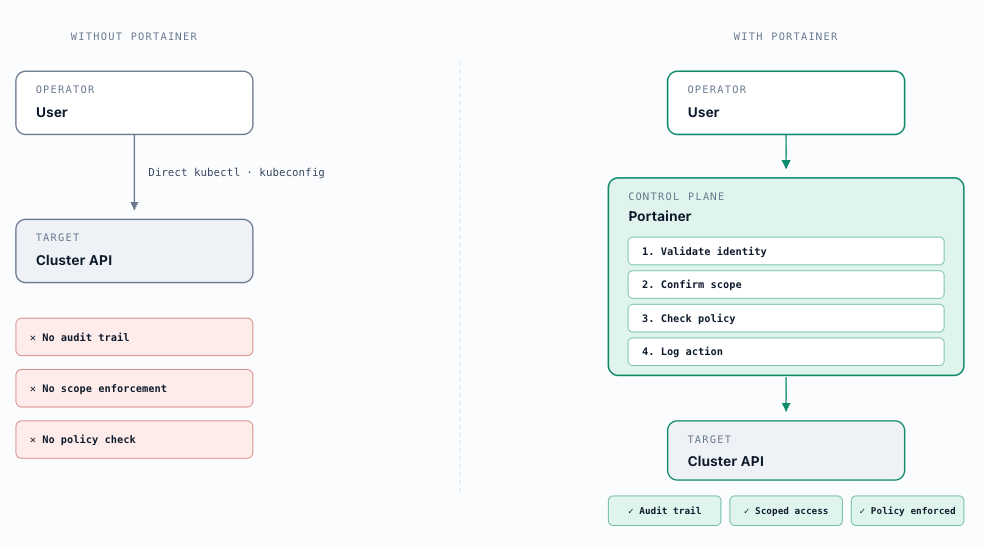
The cost of poor RBAC compounds at scale. Overly broad permissions increase the blast radius of every mistake - a developer intending to inspect logs can restart pods; a CI job meant to update a deployment can delete resources in the same namespace. When secrets are accessible to more identities than intended, a single compromised account exposes credentials fleet-wide. During an incident, coarse RBAC makes it impossible to quickly determine which account caused a change, slowing recovery and extending outage duration. Clusters with poorly governed access fail compliance audits not because incidents occurred, but because the possibility of incidents cannot be ruled out. And as RBAC complexity grows unmanaged, the practical response is to grant cluster-admin to unblock work - recreating the centralised gatekeeper pattern that platform tooling was meant to eliminate.
Portainer acts as the cluster access broker for all cluster interactions - the single mediation layer between operators and managed environments. The Portainer Server never directly exposes Kubernetes or container APIs to users. Every request is proxied and scoped through Portainer's authorisation layer: the Server validates the identity of the user or system actor, confirms their authorisation scope against the target environment, applies policy checks, and records the action in the audit log before routing the operation to the cluster. Under normal operations, the Control Plane is the access surface - users do not hold or use direct cluster credentials for day-to-day operations. This model ensures consistent identity enforcement across the fleet, eliminates ad-hoc access paths, and provides a complete audit trail for every privileged action. A break-glass pathway exists for emergencies but must be tightly controlled and auditable - see section 4.9.
Portainer does not own identity - it delegates authentication and group membership to the enterprise directory and applies that identity through its RBAC model across all managed environments. This keeps the IdP as the canonical source of access truth: onboarding, offboarding, and role changes happen once at the directory level and propagate to Portainer automatically at next login, without manual access administration in the Control Plane. Per-cluster RBAC configuration maintained outside Portainer is an anti-pattern at fleet scale - it produces drift, incomplete audit coverage, and a revocation problem whenever users change roles or leave the organisation. Note that in exceptional cases, like air-gapped environments, Portainer supports local authentication.
Just-in-time access: Platform identity patterns should support time-bounded access grants rather than persistent role assignments for privileged operations wherever possible. Rather than issuing long-lived role bindings, prefer credentials and grants that are issued for a specific session and expire automatically. Where the identity provider supports it (Entra ID Privileged Identity Management, HashiCorp Vault with OIDC integration), just-in-time role elevation reduces the window of exposure for high-privilege access and ensures that privileged access is always associated with an explicit approval event. This principle applies most critically to cluster-admin equivalent roles, production environment access, and any access that bypasses normal review workflows. Chapter 8 (Secret Management) covers the secrets infrastructure that enables JIT credential issuance.
Cross-system identity principle: The enterprise identity provider must be the single canonical source of access truth across all components of the platform stack - not only Portainer. In a complete deployment, Portainer (via group-to-team claim mapping), Kubernetes RBAC (via group-bound ClusterRoleBindings applied to managed clusters), Grafana (role and team mapping via OIDC), Harbor (project-level RBAC via OIDC federation), and the secrets store (policy engine mapping group claims to secret access paths) should all authenticate and authorise from the same IdP group claims. The practical consequence: a group change in the IdP propagates access changes across the full platform stack without touching each system individually. Onboarding, offboarding, and role changes happen once, at the source. Any component that cannot federate to the enterprise IdP becomes an access island requiring separate lifecycle management - this is the condition to eliminate. In a typical platform stack without a unified control plane, these islands multiply quickly. ArgoCD maintains its own AppProject-based RBAC model independent of Kubernetes RBAC - an engineer needs both an ArgoCD identity and a separate Kubernetes credential, and the two are neither aware of nor constrained by each other. CI/CD pipelines operate through service account tokens or OIDC federation configured per pipeline, per cluster, per namespace. Grafana maintains its own user database and dashboard permission model. Container registries (Harbor, ECR, ACR) manage project-level access independently. Vault operates its own auth engine with HCL-defined policies entirely separate from any Kubernetes identity. None of these systems is aware of the others. The security cost of this fragmentation is not only the configuration overhead at onboarding - it is the revocation risk at offboarding. When an engineer leaves, access must be revoked across every tool individually. A single missed deprovisioning in any one of them is a persistent security exposure that may go unnoticed until an incident surfaces it. Portainer eliminates this fragmentation at the Control Plane level; the principle must extend to all other platform components through the cross-system IdP federation described above.
4.2 Identity Provider Integration Patterns
Production Portainer deployments must use an external corporate authentication provider - internal authentication lacks MFA enforcement, password expiration, and account lockout capabilities and must not be used as the primary mechanism in production (see D-15). Before configuring any external authentication provider, ensure Portainer Teams have been created and named to match the group names in your external provider. Auto-mapping of users to Portainer Teams at login depends on exact name matching - create teams first, then configure authentication.
Portainer credential storage model: All credentials stored in Portainer - IdP client secrets, bind DN passwords, registry credentials, Git credentials - are write-only. They cannot be read back through the Portainer UI or API once saved, only overwritten. Internal user account passwords are stored as bcrypt hashes only; API key values are stored as hashes only - neither is recoverable after creation. These protections apply regardless of whether database encryption is enabled.
4.2.1 LDAP
LDAP authentication is appropriate for organisations using generic LDAP directories - OpenLDAP, Oracle Directory Server, or any LDAP-compliant service that is not Microsoft Active Directory. For Microsoft AD environments, use section 4.2.2.
Connection and security: Portainer requires a dedicated read-only service account (bind DN) to query the directory. This must be a dedicated service principal with read-only access, not a general user account. Portainer supports LDAPS (LDAP over TLS, port 636) and StartTLS for encrypted connections - plaintext LDAP must not be used in production. Upload the CA certificate for the TLS connection; do not enable “Skip verification of server certificate” in production, as this removes protection against man-in-the-middle attacks on the authentication path. Multiple LDAP servers can be configured for authentication fallback.
User search configuration: The user search defines which users are permitted to authenticate.
- BaseDN : Use the most restrictive scope possible. dc=mydomain,dc=com searches the entire directory; ou=myou,dc=mydomain,dc=com limits to a specific OU. For large directories, always scope by OU to keep login query times consistent.
- Username attribute : uid for standard OpenLDAP; adjust if the schema differs.
- Filter : Restricts which users can log in. To allow only members of a specific group: (&(objectClass=user)(memberOf=cn=mycn,ou=myou,dc=mydomain,dc=com)) . Filters gate Portainer access to a controlled set of identities rather than the full directory.
Multiple user search configurations can be added for organisations with users spread across multiple OUs or directory trees.
Group search and auto-team assignment: Group search drives automatic Portainer Team assignment from LDAP group membership. When a user logs in, Portainer resolves their LDAP group memberships and places them into any Portainer Team whose name exactly matches an LDAP group name. This is the recommended approach for fleet-scale access management - the directory becomes the authoritative source for team membership without per-user manual configuration in Portainer.
- Group Base DN : Scope to the specific OU containing Portainer-relevant groups.
- Group Membership Attribute : member - the attribute that lists group members.
- Group Filter : Restrict to Portainer-relevant groups, e.g. (&(objectclass=group)(cn=*Portainer*)) to match all groups containing “Portainer” in the name.
By default, Portainer evaluates direct group membership only - a user must be a direct member of an LDAP group for it to be matched against a Portainer Team. Nested groups (where a group contains other groups as members) are not traversed; users who are members of a sub-group are not included unless they are also direct members of the parent group. Circular group references must be eliminated at the directory level regardless - they will cause login hangs.
Nested group traversal requires manually modifying the user search filter in the AD configuration - there is no UI toggle for this. See section 4.2.2 for the filter syntax and the Microsoft AD-specific OID required. This technique is not available for generic LDAP. Where the recursive membership filter is in use, the privilege escalation risk through sub-group membership applies - a user in a sub-group of a group mapped to a high-privilege Portainer Team will inherit that team’s role. See section 4.6 for the role conflict and escalation implications.
Large directory performance (100,000+ identities): Portainer executes a targeted bind → user search → group membership query per login with no directory state caching between logins. Ensure the LDAP server has appropriate indexes on the username attribute and group membership attributes. Use the most restrictive BaseDN and filter possible to limit query scope.
Automatic user provisioning: Automatically creates a Portainer user record on first successful login. Strongly recommended - without it, administrators must manually create matching user records before any user can log in.
Auto-populate team admins: Specified LDAP groups can be configured to automatically grant Portainer administrator rights to their members. Restrict this to a single, tightly controlled platform-admin group.
4.2.2 Microsoft Active Directory
Portainer provides a dedicated Active Directory authentication method - distinct from generic LDAP - with AD-specific features: Simple and Kerberos binding modes, a structured user and group search UI, username format selection, and guided AD configuration. Use this method for all Microsoft AD environments: on-premises Windows Server AD and any Kerberos-capable Microsoft directory service.
Binding type: Portainer supports two binding modes:
- Simple binding : A service account and password authenticates to the domain controller. The standard approach for most deployments. The service account must be read-only, dedicated to Portainer, and should have a managed, non-expiring password subject to the organisation’s privileged credential rotation policy.
- Kerberos binding : Portainer authenticates using a Kerberos service principal, requiring a krb5.conf file uploaded to Portainer specifying the realm, KDC locations, and encryption types. Use Kerberos where organisational security policy restricts NTLM or requires Kerberos as the exclusive authentication protocol.
Security: Use StartTLS or TLS for all AD connections - plaintext LDAP must be blocked at the network boundary. Upload the enterprise CA certificate. Do not skip certificate verification.
User search configuration:
- Username format : Choose username or username@domainname - this must match what users will type at login and what the directory returns as the user identifier.
- User Search Path : Optionally restrict the search to specific OUs. For large AD forests, always scope to relevant OUs to reduce query time and prevent unintended accounts being returned.
- Allowed Groups : Restrict login to members of specified AD groups. Only users in explicitly approved groups should be able to access Portainer.
Group search configuration: Maps AD security groups to Portainer Teams by name. The group name in AD must exactly match the Portainer Team name.
- Group Search Path : Restrict to OUs or containers holding Portainer-relevant groups.
- Group Filter : Limit returned groups to a controlled namespace - for example, groups prefixed with a consistent identifier.
- Display User/Group matching : Test the configuration against the live directory before saving. This surfaces name mismatches between AD group names and Portainer Team names before they cause access problems in production.
Auto-populate team admins: Specific AD groups can be configured to automatically grant Portainer administrator rights. Restrict to a single platform-admin group. The AdminAutoPopulate feature additionally elevates members of a specified AD group to Portainer administrators on first login - useful for initial fleet onboarding.
For large and distributed AD deployments, configure Portainer to query the closest AD site’s Global Catalog rather than the forest root DC. Consider maintaining a dedicated, flattened Portainer-access OU containing only the groups Portainer needs to resolve - this isolates directory query load and keeps login performance consistent at scale.
Nested group traversal (manual filter configuration): By default, Portainer’s AD group search uses memberOf= , which evaluates direct group membership only. Portainer does not currently provide a UI option for nested group traversal. To include users from sub-groups, the user search filter must be manually edited in the AD configuration to use Microsoft’s LDAP_MATCHING_RULE_IN_CHAIN OID. Change the filter from: (&(objectClass=user)(memberOf=cn=group1,cn=Users,dc=domain,dc=com)) to: (&(objectClass=user)(memberOf:1.2.840.113556.1.4.1941:=cn=group1,cn=Users,dc=domain,dc=com))
The addition of :1.2.840.113556.1.4.1941: instructs Active Directory to walk the full group chain recursively. A user who is a member of Group B, where Group B is itself a member of Group A, is treated as a member of Group A for login eligibility and team assignment. This technique is specific to Microsoft AD and does not work with generic LDAP directories. Where this filter is in use, audit the full group hierarchy of every AD group mapped to a Portainer Team: a user transitively nested inside a group mapping to a high-privilege Portainer Team will inherit that team’s role via the most-permissive-wins rule (section 4.6).
4.2.3 OAuth
OAuth authentication covers Portainer’s integration with modern identity providers via OAuth 2.0 and OIDC. Portainer provides pre-configured templates for Microsoft (Entra ID / Azure AD), Google , and GitHub , and a custom provider option for any OIDC-compliant IdP - Okta, Ping, Keycloak, Authentik, or any standards-compliant provider.
Key configuration options common to all OAuth providers:
- Use SSO : Allows users with an active session at the OAuth provider to bypass the Portainer login form. Enable or disable based on organisational security policy - SSO reduces friction but may conflict with policies requiring explicit re-authentication at sensitive applications.
- Hide internal authentication prompt : Forces all users to authenticate via OAuth only. Strongly recommended for production - this prevents use of internal credentials that bypass the IdP’s MFA and conditional access policies. The break-glass admin account (user ID 1) can always log in with internal credentials regardless of this setting.
- Automatic user provisioning : Automatically creates a Portainer user record on first successful OAuth login. Enable in all deployments.
Team membership via claim mapping: Enable Automatic team membership and configure the Claim name - the name of the claim in the OAuth token that contains group information (commonly groups ). Portainer matches claim values to Team names and places users into matching Teams at login. For cases where claim values do not directly match Team names, use Statically assigned teams with regex claim mapping. A Default team can be configured for users belonging to no matched group, providing baseline access to all authenticated users.
Microsoft Entra ID (Azure AD) - critical configuration note: When using the Microsoft OAuth template with Automatic team membership, the claim value must be the group’s Object ID (a GUID), not the display name. AD group display names are not included in the OAuth token by default. In the Entra ID App Registration, configure Token Configuration → Add groups claim → Security Groups to include group Object IDs in the token, then use those Object IDs as the claim value regex in Portainer’s team membership configuration. Using display names instead of Object IDs is a common misconfiguration that results in no teams being assigned at login.
Nested groups and groups claim behaviour: Unlike LDAP and AD direct integrations where Portainer queries the directory itself, OAuth/OIDC deployments make Portainer a passive consumer of the groups claim in the ID token - a flat list resolved by the IdP before token issuance. Whether nested group memberships are included in that list is entirely IdP-specific, and is not something Portainer can control or influence.
In Entra ID , only direct group memberships are included in the token by default; transitive (nested) memberships require explicit configuration in the App Registration. A significant operational concern applies to users who belong to more than 200 groups: Azure AD stops embedding the groups list in the token entirely and instead includes a hasgroups: true overage indicator. Users in this condition receive no Portainer Team assignment despite being members of the correct AD groups - the failure is silent and can be difficult to diagnose. Validate group counts for expected Portainer users before going to production, and configure the App Registration to emit only the groups relevant to Portainer access wherever possible.
In Keycloak , the groups mapper can include full group paths (e.g. /Engineering/Frontend ) and parent groups up the hierarchy - meaning a user in a child group may also be matched to Portainer Teams mapped to ancestor groups. Review the groups mapper configuration when using Keycloak group hierarchies to ensure the token contains the expected set of group values.
Okta: Portainer connects to Okta using the Custom OAuth provider option - Okta is not a pre-configured template but is fully supported via the custom provider path. Register Portainer as an Okta OIDC application with the Portainer Server callback URI as the redirect URI. In Portainer, configure the Authorization URL ( https://{oktaDomain}/oauth2/v1/authorize ), Access Token URL ( https://{oktaDomain}/oauth2/v1/token ), Resource URL ( https://{oktaDomain}/oauth2/v1/userinfo ), client ID and secret, and set the User identifier to email or preferred_username . To include group membership in the token, add a Groups claim to the Okta application’s Sign-On policy - filter by group name prefix or regex to limit which groups appear in the token; include only the groups relevant to Portainer access. In Portainer, set the Claim name to groups . Where Okta group names do not directly match Portainer Team names, use Statically assigned teams with regex claim mapping. The Okta group model is generally flat; nested group behaviour is limited compared to AD-based directories. When evaluating Use SSO , note that Okta FastPass may silently bypass the Portainer login prompt entirely - validate this against any organisational policy that requires explicit re-authentication at sensitive applications before enabling.
In Authentik , group memberships are not included in the OIDC token by default - they must be explicitly added via a custom Scope mapping in the Authentik OIDC provider configuration. Authentik groups are flat by design: there is no hierarchy, and group names (not UUIDs) appear in the token, making claim values directly usable as Portainer Team names without regex conversion. Once the Scope mapping is in place, Authentik’s groups claim behaviour is predictable and operationally simple compared to AD-based providers. Note that Authentik does not support nested groups.
Keycloak for open-source or federated environments: Keycloak (Apache 2.0) is the recommended OAuth/OIDC provider for organisations on an open-source stack or needing to federate multiple directories under a single OIDC endpoint. Existing AD forests and LDAP directories are connected as Keycloak User Federation sources; Keycloak issues OIDC tokens containing a unified group claim set that Portainer, Grafana, Harbor, and other platform components all consume from the same source. This eliminates per-component directory federation and ensures group changes propagate across the full platform stack from a single IdP. Keycloak’s built-in MFA (TOTP, WebAuthn) applies to all downstream OIDC clients including Portainer.
Authentik for Kubernetes-native environments: Authentik (MIT, community edition) is a modern, UI-driven open-source identity provider well-suited to Kubernetes-native deployments. It provides OIDC/OAuth2, SAML, LDAP, and RADIUS in a single deployment, with a visual Flow-based policy engine for authentication and authorisation workflows. Authentik is appropriate when Keycloak’s operational complexity is disproportionate to the environment’s requirements - it has a lighter deployment footprint, a more approachable web UI, and is faster to configure for greenfield deployments without existing directory federation requirements.
Use Keycloak when multiple directories must be federated or when the platform needs to serve as the IdP for many downstream tools simultaneously; use Authentik when the environment is greenfield, Kubernetes-native, and requires a lighter operational footprint.
4.2.4 Local Accounts
Internal authentication - users and passwords stored in Portainer’s database - is appropriate only for environments where no external identity provider is reachable: fully air-gapped clusters, isolated lab environments, or emergency response systems.
Internal authentication must not be used in production deployments where an external provider can be reached. It lacks MFA enforcement, password expiration policies, and account lockout on failed attempts. Removing a user from the directory does not automatically revoke their Portainer access - it requires manual deletion from Portainer.
For local account deployments: use strong passwords stored in an offline credential vault; assign team memberships at the Team level to reduce per-user management overhead; restrict local accounts to the minimum necessary for operations; and treat the initial administrator account (user ID 1) as a break-glass credential under vault control at all times - see section 4.9.
The initial admin account (user ID 1) is retained as the sole local account in all external-auth deployments. Even when SSO is configured and the internal authentication prompt is hidden from all other users, user ID 1 can always authenticate with its local credentials. This is the break-glass path to Portainer when the IdP is unavailable.
4.3 Portainer RBAC Model
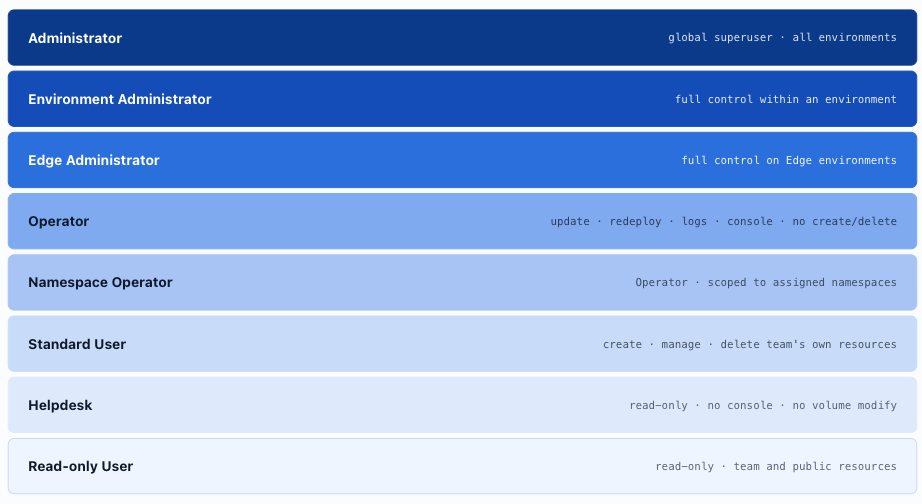
Portainer provides eight built-in roles, each scoped to a specific level of access. Per-environment role assignment allows a user to hold different roles across environments - a user may be Standard User in development clusters and Operator in staging, with no cluster-admin access anywhere by default.
- Administrator acts as a global superuser - full control over all Portainer settings and all resources on every environment. Assign to the fewest possible individuals.
- Environment Administrator has full access within a given environment for deployments, configuration, and resource management, but cannot change the infrastructure underpinning the environment (no host management), cannot change Portainer internal settings, and cannot change resource ownership.
- Edge Administrator has full control over all resources in Edge environments and access to Edge Compute features. Scoped to edge environments only.
- Operator has operational control - can update, redeploy, start/stop workloads, view logs, and open a console - but cannot create or delete resources . The appropriate role for on-call engineers and SRE personas who manage existing workloads without needing deployment authority.
- Namespace Operator has the same operational control as Operator but restricted to specified namespaces within a Kubernetes environment. The recommended role for application teams in multi-tenant clusters - see section 4.5.
- Helpdesk has read-only access to resources within scope but cannot open a console or modify volumes.
- Standard User has complete control over resources they or their team deploy. Cannot access resources owned by other teams.
- Read-only User has read-only access to their team’s resources and public resources.
The Operator / Standard User boundary is frequently misunderstood. Operator can manage and operate existing workloads but cannot create or delete - appropriate for operational and observability personas. Standard User can create, manage, and delete the resources their team owns - appropriate for development and deployment personas. Assigning Operator to a deployment team leaves them unable to create resources; assigning Standard User to an on-call team gives them unnecessary create/delete authority. Align role selection to operational responsibility, not seniority.
Team Leader is a ninth role available in the Portainer UI. It allows a designated team member to add and remove existing users from their team and promote co-leaders. This role is designed for internal authentication deployments only - it is automatically disabled when external authentication is configured . In any deployment following this reference architecture (D-15 mandates external auth in production), the Team Leader role has no effect and must not be relied upon for team membership governance. Team membership in external-auth deployments is managed via group search and claim mapping at the IdP level - see D-16.
Kubernetes RBAC Implementation
For Kubernetes environments, Portainer manages the underlying Kubernetes RBAC objects automatically. The role bindings Portainer creates are recreated on each user interaction and are authoritative - any manual modification will be overwritten:
- Administrator and Environment Administrator operations both use a Kubernetes ServiceAccount ( portainer-sa-clusteradmin ) bound to the built-in cluster-admin ClusterRole - granting unrestricted access to all Kubernetes resources across the cluster. This means the Environment Administrator role is functionally cluster-admin at the Kubernetes level, not a scoped role. Assign it only to platform team personnel who require full cluster control. Security teams reviewing cluster RBAC will see this binding on every Portainer-managed cluster; it is expected and authoritative.
- Standard user access is implemented by Portainer creating per-user, per-environment Kubernetes objects on first interaction: a ServiceAccount ( portainer-sa-user-${UUID}-${Environment_ID} ) bound to the portainer-basic ClusterRole cluster-wide (a narrow read-only role covering namespace/node listing, storage class listing, and metrics) and to the portainer-edit and portainer-view roles scoped to assigned namespaces only . Standard Users have no visibility into namespaces they have not been explicitly assigned. These objects are recreated on each interaction, ensuring Portainer's RBAC assignments remain authoritative - any manual modification will be overwritten. Portainer refers to these as User Requests , in contrast with Cluster Requests which use portainer-sa-clusteradmin .
- Operator access uses the portainer-operator and portainer-helpdesk ClusterRoleBindings plus portainer-view scoped to all non-system namespaces - not only assigned namespaces. An Operator on a Portainer environment has read visibility across every non-system namespace in the cluster regardless of team assignment. In multi-tenant clusters this cross-namespace visibility makes Operator inappropriate for application team personas.
- Namespace Operator provides operational control scoped to assigned namespaces only, enforcing the namespace isolation and tenancy model described in section 4.5. This is the correct role for application teams in multi-tenant clusters - unlike Operator, it does not grant cross-namespace visibility.
Per-namespace role overrides (roadmap): In the current model, a team is assigned a single role at the environment level, and that role applies uniformly to every namespace the team is granted access to - a team holding Namespace Operator receives Namespace Operator on all of their assigned namespaces without exception. A roadmap enhancement will allow the environment-level role to be overridden on a per-namespace basis, so a team can hold different roles across their assigned namespaces within the same environment. For example, a team could hold Namespace Operator on development and staging namespaces but Read-only User on a production namespace - enforced through a single team configuration, without requiring separate teams, environments, or parallel assignments. This will significantly improve the precision of least-privilege enforcement in multi-tier access patterns without adding administrative overhead.
Portainer Kubernetes role model: Portainer uses two distinct role scopes on non-admin user accounts. portainer-basic is a ClusterRole applied cluster-wide to Standard User and Read-Only accounts; it is deliberately narrow - listing namespaces, nodes, storage classes, and metrics only, with no write access. portainer-view is a namespace-scoped role applied to each user's assigned namespaces; it provides get, list, watch on the full set of namespace resources including configmaps, pods, services, deployments, ingresses, networkpolicies, and Kubernetes Secrets . Security teams should note that portainer-view includes read access to Secrets at the Kubernetes API level - see the RestrictSecrets note below for the implications. These role bindings are created and recreated by Portainer on each user interaction; they are expected and authoritative on every managed cluster.
This model ensures that Portainer RBAC is the single authoritative access surface. There is no divergence between what Portainer shows and what the cluster enforces. Practically, this means organisations can apply stricter controls to cluster access - reducing the number of users with cluster-admin rights, eliminating overly permissive default bindings, and ensuring that on-boarding and off-boarding are handled accurately and completely at the platform level.
Non-Portainer service account governance: Portainer creates and manages its own per-user service accounts ( portainer-sa-clusteradmin , portainer-sa-user-* ) - but the cluster also contains service accounts created by workloads, operators, CI/CD pipelines, and controllers outside Portainer’s management scope. These form part of the cluster’s RBAC surface and require the same discipline as human access: scope permissions to the minimum required, avoid ClusterRole bindings unless strictly necessary, set explicit lifecycle expectations, and audit regularly. A service account created for a temporary integration test with a cluster-wide binding, then left in place after the ticket was closed, is a persistent and commonly overlooked attack surface. Include non-Portainer service accounts in access review cycles alongside user and team assignments.
Kubernetes Secret visibility control (RestrictSecrets): Portainer’s RestrictSecrets configuration controls whether non-admin users can view Kubernetes Secret values through the Portainer interface. Enable this on all production environments. Note that RestrictSecrets restricts UI visibility only - the portainer-view namespace role that underlies non-admin access includes get, list, watch on Kubernetes Secrets at the API level. Users with access to the per-user service account credentials (for example, via the kubeconfig Portainer can generate) can read secrets through the Kubernetes API regardless of the RestrictSecrets setting. Governance of direct cluster API access must be considered alongside this control. See Chapter 5 for registry credential isolation detail.
Teams and Team-Based Access
A Portainer Team is a named group of users that serves as the primary unit of access assignment. Rather than assigning roles to individual users across dozens of environments, administrators assign roles to Teams - a Team can hold a role on an environment, an environment group, or a cluster, and all members inherit that assignment. Team membership is maintained either manually (for small deployments) or synchronised automatically from IdP groups at login (see section 4.4).
Access in Portainer is additive and opt-in : a user or team with no role assignment on an environment has no access to that environment and no visibility of it in the Portainer interface. There is no default access level - every access grant is explicit. The absence of an assignment is itself a security control.
Teams map directly to organisational personas. A typical mapping:
| Organisational Persona | Portainer Team | Role | Scope |
|---|---|---|---|
| Platform Engineering | platform-eng | Environment Administrator | All production clusters |
| Application Team A | team-a-dev | Namespace Operator | team-a namespaces |
| Site Reliability Engineering | sre-team | Operator | All environments |
| Security / Audit | sec-audit | Read-only User | All environments |
| Edge Operations | edge-ops | Edge Administrator | Edge environment group |
Teams decouple identity (managed in the IdP) from authorisation (managed in Portainer), ensuring that role assignments persist correctly through personnel changes - when a user joins or leaves a directory group, their Portainer access adjusts automatically at next login without manual intervention.
The table below shows a representative role assignment structure for a Kubernetes fleet. - indicates no role assignment: that team has no access to and no visibility of that environment.
| Environment | Developers | Support | QA | Tech Leads | Edge Operations |
|---|---|---|---|---|---|
| Development | Namespace Operator | - | - | Environment Administrator | - |
| Staging / UAT | Namespace Operator | - | Namespace Operator | Environment Administrator | - |
| Production | - | Helpdesk | - | Environment Administrator | - |
| Edge cluster | - | - | - | Environment Administrator | Edge Administrator |
Developers hold Namespace Operator on Development and Staging - operational control within their assigned namespaces without the ability to create or delete resources, and no visibility outside those environment tiers. Support holds Helpdesk on Production only - read-only access for troubleshooting live workloads without the ability to modify anything. QA holds Namespace Operator on Staging for pre-release testing. Tech Leads hold Environment Administrator across all environments for full operational authority. Edge Operations holds Edge Administrator on the edge cluster only. Every team’s access is scoped to exactly what their function requires; the absence of an assignment is an explicit access denial.
For Docker and Swarm environments, substitute Standard User for Namespace Operator - Docker does not provide namespace-level isolation, so Standard User is the appropriate scoped access role in that context.
Role assignments are made via Environments → Manage access in the Portainer interface: select the target environment, choose users or teams from the dropdown, and assign the corresponding role. Use environment groups for fleet-wide assignment rather than configuring each environment individually - see section 4.6.
Resource Controls
Beyond role-based access, Portainer supports resource controls - ownership policies that restrict which teams can view or interact with specific container-level resources: containers, services, volumes, networks, images, and secrets. A resource control binds a resource to one or more owning teams; members of other teams cannot see or interact with that resource through the Portainer interface, even if they hold a role on the same environment.
Resource controls implement a within-environment multi-tenancy model. In a shared Docker or Docker Swarm environment where multiple application teams operate, each team's containers and volumes are owned by their team - team members see only their resources, not those of adjacent teams, even at the same privilege level. This prevents the Control Plane from becoming an information disclosure path between co-resident application teams.
Resource controls are most relevant for Docker-based and Swarm environments. In Kubernetes environments, namespace-level role assignment (Namespace Operator, above) provides equivalent isolation at the namespace boundary - a stronger and more enforceable primitive that should be preferred.
4.4 Group-to-Role Mapping
Portainer Teams and Roles define persona-based access boundaries that span clusters, namespaces, and environment groups in a single assignment. A team-to-role binding at an environment group level cascades to all environments in that group; a binding at an individual environment scopes to that environment only; a Namespace Operator binding scopes to specific Kubernetes namespaces within an environment. This hierarchy means a single team assignment can govern access across an entire fleet segment without per-cluster configuration.
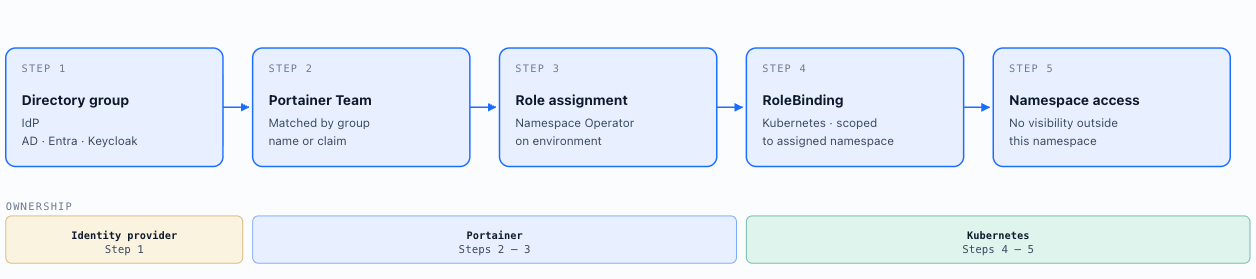
End-to-end namespace access chain: A directory group → maps to a Portainer Team (via IdP group claim or LDAP group DN) → the Team is assigned the Namespace Operator role on a specific environment → Portainer creates a Kubernetes RoleBinding scoped to the target namespace at login → the user can interact with resources in that namespace only, with no visibility into other namespaces on the same cluster. The directory group is the authoritative source; the Kubernetes RoleBinding is the enforced boundary; Portainer manages the translation between them automatically.
Portainer synchronises team membership from the upstream identity provider at every login event - not on a periodic schedule. When a user's directory group membership changes (role elevation, team transfer, offboarding), the change is reflected in Portainer at the user's next login without requiring administrator action. For LDAP environments, sync follows a 6-step process: bind → query user → resolve group membership → match to Portainer teams → update team assignments → issue session. For OIDC and SAML, Portainer uses configurable regex claim mapping to derive team assignments from the IdP-issued token. This means offboarding a user in the directory is sufficient to remove Portainer access - no separate Portainer cleanup is required.
Login-cycle dependency and API-driven use cases: Team membership changes in the external auth source take effect in Portainer only when the user re-authenticates - a full logout and login cycle is required. For browser-based users this is typically acceptable, as most role changes occur between working sessions. For API-driven use cases - automation pipelines, CI/CD systems, service accounts authenticating via API token, or users holding long-lived Portainer sessions - the change is not applied until explicit re-authentication. A user whose group membership has changed retains their previous access level for the duration of any active session. Platform teams granting or revoking elevated access via directory group changes must account for this: time the change to coincide with a natural re-authentication event, or implement session invalidation where immediate enforcement is required. For access revocation in high-stakes scenarios, deleting the user record in Portainer provides immediate effect without waiting for a login cycle.
4.5 Namespace Isolation and Tenancy
In multi-team Kubernetes environments, the namespace is the primary unit of tenancy. Namespace isolation is not automatic - it requires explicit configuration of three complementary controls: RBAC scoping, resource quotas, and network policies. All three must be present; any one in isolation is insufficient.
RBAC scoping: Portainer's RBAC model (section 4.3) supports namespace-scoped role assignments, allowing operators to give a team access to specific namespaces without cluster-wide access. Platform-level RBAC should ensure application teams cannot access namespaces belonging to other teams and cannot escalate their own permissions within a namespace.
Resource quotas and limit ranges: Without quotas, a single team can consume all cluster resources, starving other tenants. ResourceQuota objects define hard limits on CPU, memory, storage, and object counts per namespace. LimitRange objects set default resource requests and limits for containers that do not specify them, preventing unbounded workloads. Both should be applied to every tenant namespace as part of the cluster profile baseline.
Network policies : By default, Kubernetes allows unrestricted pod-to-pod communication across namespaces. Default-deny network policies - denying all ingress and egress except what is explicitly permitted - should be applied to all tenant namespaces as the baseline. Application teams add namespace-specific allow rules for their required traffic flows. CNI selection (Chapter 3, section 3.3) must support network policy enforcement; Flannel does not natively.
Portainer's environment hierarchy mirrors namespace isolation at the management-plane level. Team scoping within Portainer's RBAC model (section 4.3) ensures a team's access is bounded to the namespaces they own - both at the cluster level through Kubernetes RBAC and at the management-plane level through Portainer's team and environment assignments. The two layers are complementary: cluster-level RBAC prevents unauthorised API access, while Portainer's team scoping prevents unauthorised visibility and operational access through the management surface. Neither layer substitutes for the other.
Namespace provisioning should be a controlled, auditable process - not an ad-hoc kubectl operation. The recommended pattern is a GitOps-driven workflow: a namespace definition - including its ResourceQuota, LimitRange, and default-deny network policy - is submitted as a pull request to the platform configuration repository, reviewed by the platform team, and applied on merge. Portainer stack templates provide the mechanism for this at the management-plane level: the platform team defines a namespace bootstrap template, and new namespace requests are fulfilled by deploying that template, ensuring the full baseline control set is applied consistently without manual steps that can be missed or skipped.
Namespace isolation is logical, not physical. A container breakout, a privileged workload, or a kernel vulnerability can cross namespace boundaries in ways that Kubernetes RBAC and network policies cannot prevent. For scenarios requiring hard compliance-boundary isolation - separate regulatory domains, mutually untrusting tenants, or workloads that must be provably segregated - separate clusters are the correct architectural choice. Namespace isolation is appropriate for organisational multi-tenancy within a trusted environment; it is not a substitute for cluster-level separation when the threat model demands it.
Tenants as a first-class citizen in Kubernetes
Optional extension: Capsule for team-level multi-tenancy. The base architecture described above treats each namespace as an independent tenancy unit. This works well when each team owns a single namespace per cluster, but in practice teams frequently own multiple namespaces - separate namespaces for development, staging, and production environments, or functional separations within a larger team. Under the base model, the administrative surface (RBAC objects, resource quotas, network policies) scales with namespace count rather than team count, creating operational overhead at scale.
Capsule (a CNCF Sandbox project) addresses this by introducing a Tenant custom resource above the namespace level. A Capsule Tenant groups one or more namespaces under a named team identity, automatically labels all member namespaces via an admission webhook, and enforces team-level policies - resource quotas, network policies, naming conventions - across all member namespaces from a single CRD. The capsule.clastix.io/tenant label applied by the webhook is tamper-resistant from the tenant's perspective and consistent across clusters when Portainer deploys the same Tenant CRD to every managed environment. New namespaces added to a team's Tenant are automatically labelled and governed; GitOps-managed Tenant CRDs make team onboarding a pull request rather than a series of per-namespace imperative operations.
Capsule is an optional addition - nothing in the base architecture requires it. Add it when teams own multiple namespaces per cluster, when namespace count is growing faster than team count, or when consistent machine-readable team identity across clusters is a requirement. The key trade-off is that within-team namespace isolation shifts from a hard storage boundary to a soft policy boundary: logs and resources from all of a team's namespaces share one tenant partition, meaning a team member can see all their team's namespaces without an explicit namespace filter. For organisations where production logs must remain invisible to developers within the same team, Capsule should not be applied to those tenants - retain them as separate namespace-level tenants under the base model. Capsule components are deployed and managed via Portainer.
4.6 Access Inheritance via Environment Hierarchy
Portainer organises managed environments in a hierarchical tree - environments are registered within environment groups, which can be nested or organised by geography, business unit, or compliance boundary. Role assignments propagate downward through this hierarchy: a Team assigned a role at the environment group level holds that role on every environment within the group without requiring per-environment configuration. This is the mechanism that makes fleet-scale RBAC manageable without per-cluster access administration.
A Team assigned Environment Administrator on a “Production - EMEA” group automatically holds that role on every cluster within that group. Adding a new cluster to the group immediately grants the Team access - no additional RBAC steps are required. Removing a cluster from the group revokes the inherited access.
Compliance boundary isolation is implemented through group structure. Separate environment groups for production, non-production, PCI scope, and regulated workloads carry different Team-to-role assignments per boundary. A security audit team holds Read-only access on the production group; application teams hold Standard User only on non-production groups with no assignment on production. The group hierarchy is the primary governance control for separating access domains across the fleet.
Geography-based and business-unit access follows the same model. A business unit platform team holds Environment Administrator on their own group while remaining unable to see or affect adjacent business units’ environments. Central IT holds Administrator globally, enabling federated governance - each business unit manages its own scope while fleet-wide visibility and audit remain centralised.
Scope of inheritance: Group-level role assignments cascade to all environments currently in the group and to any environments subsequently added. Role assignments made directly on an individual environment apply only to that environment and do not propagate upward. A user’s effective role on a given environment is the most permissive role they hold across all applicable assignments - group-level, individual environment, or both. Review effective permissions at the environment level rather than relying solely on group-level assignments when auditing access.
Multiple team membership and role conflicts: When a user belongs to multiple Portainer Teams that hold different roles on the same environment, Portainer applies the most permissive role across all applicable assignments. A user who is a member of both platform-eng (Environment Administrator on a production cluster group) and sre-team (Operator on the same group) receives Environment Administrator - the higher of the two. This applies across group-level assignments, individual environment assignments, and direct user assignments. Audit team membership combinations to detect unintended privilege escalation caused by overlapping team role assignments on the same environment scope.
In Microsoft AD environments where the recursive membership filter has been manually applied in the AD configuration (section 4.2.2), this risk is compounded by recursive group traversal: a user nested inside a privileged AD group - even through several levels of sub-group membership - is placed into that group’s corresponding Portainer Team and inherits its role. A developer whose AD account is indirectly a member of a platform-admin group through nested group membership will receive the platform-admin team’s role in Portainer. With the default direct-membership filter, only direct group members are evaluated and this escalation path does not apply. Where the recursive filter is in use, audit the full transitive membership of all AD groups mapped to high-privilege Portainer Teams as part of every access review cycle.
4.7 Non-Functional Considerations
Session tokens are held in memory only and invalidated on Portainer Server restart; the default session lifetime is 8 hours, configurable by administrators. Kubeconfig JWTs issued through Portainer persist across restarts. MFA enforcement is delegated entirely to the identity provider - Portainer has no native MFA capability; ensure MFA is mandatory at the IdP for all groups with Portainer access. Audit logging of authentication and authorisation events is covered by the Audit logging section below and the SIEM integration architecture in Chapter 10.
Access review and recertification: Portainer’s built-in Effective Access Viewer - accessible under Users → Roles in the Portainer menu - shows the complete effective role assignments for any selected user across every environment in the fleet. It surfaces all roles a user holds, whether assigned directly at the environment level or inherited from a group-level assignment, in a single view. Use this as the primary audit tool for periodic access reviews. Conduct reviews on a defined schedule - quarterly at minimum for production environments, and immediately following any personnel change on the platform team. Cross-reference the Effective Access Viewer output against the IdP group membership report to confirm that Portainer’s view of access matches the directory’s current state. Divergences indicate either stale manual assignments in Portainer or group membership changes in the directory that have not yet been reflected at login.
Fleet Governance RBAC policy limitation: Portainer’s Fleet Governance RBAC Policies (Chapter 7, section 7.4) propagate role assignments fleet-wide via group attachment. A current known limitation: these policies create non-conflicting role bindings rather than overriding existing environment or group-level role assignments. A user with an existing Environment Administrator grant may retain that higher privilege even when an RBAC policy attaches a more restrictive role to the group. Use the Effective Access Viewer immediately after attaching any Fleet Governance RBAC policy to verify that the intended role restrictions are in force.
Namespace-scoped access alignment: Portainer’s namespace-level role assignments (section 4.5) should be reflected in the identity model - directory groups should map to namespace-scoped Portainer roles, not just cluster-wide roles, to enforce the namespace-as-tenancy construct at the access control layer.
Brute force protection: There is no per-account lockout mechanism within Portainer itself. Per-account lockout must be configured at the identity provider. For OIDC, SAML, and LDAP deployments, brute force protection is therefore delegated entirely to the IdP; leverage IdP-level controls such as adaptive MFA policies, geo-based conditional access, and account lockout thresholds to fill this gap. Ensure these controls are enforced at the IdP for all user groups with Portainer access.
Break-glass local account (user ID 1): Portainer’s initial administrator account (internal user ID 1) is a local account independent of all IdP integrations. This is the break-glass credential for scenarios where the IdP is unavailable. It must be treated with the same controls as break-glass access (section 4.9): credentials held in a secure vault, dual-authorisation required for access, mandatory post-use rotation, and all access forwarded to SIEM.
SSO enforcement: When an SSO integration (OIDC, SAML, or LDAP) is configured in Portainer, all user accounts - except the break-glass local account (user ID 1) - are forced to authenticate via the external provider . Internal credential authentication is disabled for all other users at the platform level. This ensures the IdP's MFA, conditional access, and account lockout policies apply uniformly, with no bypass path for non-admin accounts.
Audit logging: Portainer provides comprehensive audit logging of user actions and system events across all managed environments. Every deployment, configuration change, permission update, and authentication event is recorded, creating a complete audit trail. These logs can be exported to external SIEM or logging platforms. See Chapter 10 (SIEM Integration) for the full audit log architecture, log stream types, forwarding configuration, sensitive field redaction, and detection use cases built on this data.
4.8 RBAC Design Patterns
Portainer's RBAC model supports several organisational deployment patterns. The choice of pattern depends on team structure, compliance requirements, and the degree of centralisation versus autonomy.
Centralised Governance Model
A central platform team holds Environment Administrator or Administrator roles across all clusters and environments. Application teams hold Standard User or Read-only User roles, with no ability to modify infrastructure configuration, RBAC assignments, or environment settings. All access changes are mediated by the platform team. This pattern suits regulated industries (financial services, healthcare, government) where a single team must maintain accountability for all platform operations and audit trails. Environment groups are aligned to compliance boundaries (production, non-production, PCI scope) rather than to application teams. The cost is operational throughput - teams depend on the platform team for environment changes, which must be offset by self-service deployment capabilities within the Standard User role.
Delegated Namespace Administration
A platform team owns cluster-level administration. Application teams are granted Namespace Operator roles on their assigned namespaces, giving them operational control (deploy, scale, restart, view logs) within their namespace without cluster-level visibility. Namespace ownership maps to directory groups - as developers join or leave teams, namespace access adjusts automatically at next login. This is the recommended pattern for multi-team Kubernetes environments: it enforces namespace-as-tenancy (section 4.5) at the access control layer without per-user, per-cluster RBAC configuration. The platform team retains break-glass cluster-admin access; application teams never require it.
Environment-per-Team Model
Each application team is assigned a dedicated environment (or environment group) in Portainer. The team holds Environment Administrator role within their environment, giving them full control of deployments, configuration, and resource management within that scope, while remaining isolated from other teams' environments. A central platform team holds Administrator globally and is responsible for provisioning environments, enforcing cluster-level baselines, and SIEM integration. This pattern grants application teams high autonomy while maintaining fleet-level governance visibility. Most suitable for product teams or subsidiaries that operate independently but share underlying infrastructure.
Cluster-per-Business-Unit Model
Each business unit or subsidiary operates its own cluster (or cluster group), registered as a distinct environment group in Portainer. Business unit platform leads hold Environment Administrator on their cluster group; central IT holds Administrator globally. RBAC group-to-team mappings are segmented by business unit - cross-unit access requires explicit central IT authorisation. This pattern is common in conglomerates, holding companies, or organisations where business units have separate compliance obligations or data residency requirements. It maximises isolation between units while retaining a single governance pane for fleet-wide visibility and audit.
Edge-Specific RBAC
Edge deployments introduce constraints that standard cluster RBAC does not address: environments may be intermittently connected, operators may be physically co-located with the edge device rather than centrally located, and break-glass access may need to occur locally. Portainer's Edge Administrator role scopes access to edge environments specifically. For Async edge environments (Chapter 2, section 2.2), interactive session access is not available - operators manage edge workloads through scheduled jobs and GitOps, which limits the blast radius of any credential compromise. Edge environment groups should be kept separate from core cluster environment groups in the Portainer hierarchy, with different RBAC assignments and separate audit log forwarding paths. For field operators who require local break-glass access, document a physical access procedure that does not depend on Portainer connectivity.
4.9 Break-Glass Access
Robust RBAC and least-privilege enforcement are essential - but any access control system can fail. Identity providers go offline, RBAC configurations can be corrupted, and genuine emergencies sometimes require immediate privileged action before the normal authorisation pipeline can respond. Every enterprise deployment must have a documented, controlled break-glass procedure: a path to elevated access that bypasses normal controls, is strictly audited, and is reviewed after every use.
The initial admin user that was created when you first installed Portainer is able to log in using internal authentication when an external authentication provider is enabled, and is intended as an emergency "break glass" method of accessing Portainer if you have issues with your external authentication provider or configuration. No other internal users, even those that are admins, will be able to log in using internal authentication when an external authentication provider is enabled.
Break-glass access is not a gap in the access model - it is a designed and deliberately narrow feature of it.
Scope and form: Break-glass credentials for Portainer-managed clusters take the form of emergency kubeconfigs providing direct Kubernetes API access, held separately from the normal secret management system. They are issued to a minimum set of named individuals (typically senior platform engineers and security personnel) or stored in a physical secure location (a hardware security vault or sealed physical envelope). They must not depend on the identity provider or the secrets infrastructure that may itself be unavailable during the scenario that requires break-glass access.
Time-limited and rotation-bound: Break-glass credentials should be time-limited where technically feasible. Where long-lived credentials cannot be avoided (because the issuance infrastructure may be unavailable in an emergency), mandatory post-use rotation is a hard requirement - not a recommendation. Any use of break-glass credentials must trigger a rotation before the next scheduled review period.
Four-eyes principle: The retrieval and use of break-glass credentials should require involvement of at least two authorised individuals - one to authorise access and one to execute. This prevents unilateral privileged action and creates an approval record. The authorisation event should be logged outside the system being accessed.
Strict audit trail: Every instance of break-glass access must generate an audit record forwarded to the SIEM (Chapter 10) independently of the system being accessed. Portainer’s audit log captures Control Plane events; for direct Kubernetes API access via emergency kubeconfig, Kubernetes audit logging must be enabled on all clusters and forwarded to the SIEM as a non-negotiable baseline. The SIEM record for break-glass events should trigger an automatic security review alert.
Periodic testing and review: A break-glass procedure that has never been tested is a procedure that will fail under pressure. The complete break-glass workflow - credential retrieval, authorisation, execution, and post-use rotation - must be tested at least annually, with results documented. Access lists must be reviewed following any personnel change and at each annual review.
Scenarios and Maturity Levels
The scenarios for each chapter are based on Portainer's maturity levels. See Appendix B for more details about the maturity levels and a link to the assessment. Scenario build on each other and are relative to each other. Find the scenario closest to your current environment; implement relevant improvements from there.
The starting point for any new Portainer deployment: local accounts created directly within Portainer, with passwords set and managed by the platform administrator. There are no external dependencies - no directory server, no OIDC provider, no network connectivity to an IdP. Install Portainer, create accounts, assign roles, and begin managing clusters. It is genuinely the easiest way to get started.
The operational cost reveals itself at scale. Every onboarding event requires a Portainer admin to create an account and assign team memberships manually. Every offboarding event requires the same admin to locate and disable or delete the account. Password resets are a manual help desk operation. There is no MFA enforcement path without an external proxy. Role assignments made when someone joins a team are not automatically cleaned up when they leave. In a team of three this is manageable; in a team of thirty it is an active governance risk.
Best practices for operating at this level: restrict the total number of local accounts to the minimum necessary for operations; assign roles at the Team level rather than per-environment to reduce management surface; treat the initial administrator account (user ID 1) as a break-glass credential kept under vault control at all times (Chapter 2, section 2.10); use Portainer’s API key model for any automation that requires machine-to-machine authentication.
The path forward is connecting to the corporate directory for authentication (Level 2). The Portainer Team and role configuration built at this level carries forward unchanged - adding an external authentication provider does not require rebuilding the access model.
Note: local-only accounts remain the appropriate model for one specific production scenario: fully air-gapped deployments with no external identity provider reachable within the network boundary (Chapter 2, Scenario E). In all other production deployments, local accounts should be treated as the break-glass exception, not the primary access model.
The first step out of local accounts: connect Portainer to the corporate directory so that users authenticate with their existing credentials. Users no longer need a separate Portainer password; the corporate SSO session, MFA policies, and account lockout controls all apply automatically to the Portainer login flow. This eliminates the most operationally painful aspect of Level 1 - password resets, credential sprawl, and the disconnect between a user’s corporate identity and their platform access.
What this level does not change is how access is controlled inside Portainer. Team assignments and role grants are still created manually by a Portainer administrator. When a new developer joins the payments team, someone must still open Portainer and assign them to the correct Team and environment group. When they leave, their directory account is disabled - which blocks authentication - but their Portainer Team memberships remain. This is an access ghost that persists until a Portainer admin manually cleans it up, and it will re-materialise if the account is ever re-enabled.
The value at this level is authentication centralisation: one set of credentials, one MFA policy, one account lifecycle managed at the corporate directory. Access control is still a manual Portainer operation, but at least identity is governed from a single authoritative source.
Technology flavours depend on which corporate directory your organisation is already running. Portainer has support for generic LDAP, Active Directory, Entra ID / Azure AD, Google, GitHub as well as Okta, Ping, Keycloak and Authentik.
At this level, the group mapping configuration, not the choice of provider, is the step up. The directory becomes the authoritative source for access control as well as authentication. Group membership in the IdP drives Portainer Team assignment automatically at login: a user in the payments-team group in the directory receives membership of the payments-team Portainer Team without any manual Portainer action. Onboarding is now purely a directory operation - add the user to the right group, and access flows through at their next login. Offboarding is equally clean - remove them from the group, and access is revoked at their next login.
This is the level where IAM stops being a manual operational burden and becomes a governance mechanism. The platform team defines which Portainer Teams exist and which roles they hold on which environment groups. Business owners manage group membership in the directory. Portainer enforces the policy at runtime. No Portainer administrator needs to be involved in routine access changes, reducing a potential attack surface further.
Configuration specifics for group mapping are covered in sections 4.2.2 (Active Directory: Group Search Path, nested group traversal) and 4.2.3 (OIDC: groups claim setup, provider-specific encoding). Once confirmed working, internal authentication is disabled. The maturity step is the group mapping configuration, not the choice of provider. See earlier in this chapter and the Portainer documentation for more information.
Authentication and group-to-team mapping are both in place. The focus at this level shifts from getting people in to governing access at fleet scale and making it auditable. The platform team now uses Portainer’s full RBAC model deliberately rather than reactively.
The key operational practices at this level: the environment group hierarchy is designed intentionally, with roles cascading from parent groups to child environments rather than being configured per cluster - onboarding a new cluster into a group means it automatically inherits all the role assignments of that group. Fleet Governance RBAC policies propagate access assignments fleet-wide: a single policy definition grants the payments-team Namespace Operator access to their assigned namespaces across every cluster in the fleet without per-cluster manual configuration. Namespace-level role scoping is used deliberately, with the Effective Access Viewer used to audit what a given user actually sees across all their environments before changes go live.
The break-glass procedure at this level is not just configured - it is documented, regularly tested and connected to the SIEM (Chapter 10) so that every use of the break-glass account generates an immediate alert to the SOC analyst on-call, not the platform engineering on-call. The OIDC group-to-Portainer-Team mapping is treated as versioned policy, documented in Git, and reviewed at each access recertification cycle.
The operational characteristic of this level: a new cluster onboarded to Portainer requires no access configuration work. The environment group model and Fleet Governance RBAC policies handle it automatically. The platform team’s role is to design and maintain the group model - not to execute per-cluster access grants.
Technology flavours: any IdP from Level 3 continues to work here. The maturity step is how thoroughly Portainer’s RBAC model is used, not which IdP sits behind it. It issues tokens containing a unified group claim set that downstream systems - Portainer, OneUptime, etc. - all consume from the same source. Because systems all consume the same IdP, a group membership change in the upstream directory propagates consistently across the full platform stack at the user’s next authentication event - group management happens once, at the source directory, and flows to every platform component automatically.
At this level, identity is a fully governed platform service with deep ties to the technology. Kubernetes is extended with so multi-tenancy, enforced by the IdP, becomes a first-class citizen, and namespaces become an expression of an organisation’s multi-tenancy strategy.
Additionally, Just-in-Time, time-bounded access is enforced for privileged operations, and a complete audit chain connecting every identity event to the SIEM.
Capsule is deployed where teams own multiple namespaces per cluster, grouping them under a single Tenant CRD and reducing management surface from namespace-count to team-count.
Just-in-time access: Persistent elevated access - permanent Administrator role grants, standing cluster-admin ClusterRoleBindings - is replaced by time-bounded grants. Where the IdP supports time-bounded group membership (Entra ID Privileged Identity Management for time-bounded activation of the platform-admin group; Keycloak with time-scoped role assignments), high-privilege Portainer roles are granted on request with an explicit expiry. No permanent cluster-admin access exists outside the break-glass credential.
Full PAM audit chain: Every privileged action - break-glass account use, exec sessions into production containers, Administrator role assignments, RBAC changes outside change windows - is forwarded from Portainer’s audit log to the SIEM (Chapter 10) as a PAM event, routing to the SOC analyst on-call. Access recertification is automated: OIDC group membership expires without active renewal, ensuring no access persists beyond its justified period.
Key Decisions Addressed
- Ch4-D-01 - Namespace Isolation and Tenancy: The namespace is the primary unit of tenancy in all multi-team clusters. All tenant namespaces must have RBAC scoping, ResourceQuota, LimitRange, and default-deny network policies applied at creation time - enforced via the cluster profile baseline. The absence of any one of these controls is a compliance gap that must be remediated. - see section 4.5
- Ch4-D-02 - Team-Level Multi-Tenancy (Capsule): The base architecture uses the namespace as the primary unit of tenancy - sufficient when each team owns a single namespace per cluster. Where teams own multiple namespaces per cluster, adopt Capsule as an optional extension: it introduces a Tenant CRD above the namespace level, automatically labels and governs all member namespaces, and reduces administrative overhead to team count rather than namespace count. The trade-off is that within-team namespace isolation becomes a soft policy boundary rather than a hard one; accept this trade-off explicitly before adoption, and retain namespace-level tenancy for any tenant where production and non-production log separation must be enforced as a hard boundary. Capsule is deployed and managed via Portainer. - see section 4.5
- Ch4-D-03 - Authentication Provider: All production Portainer deployments must use an external corporate authentication provider - internal authentication must not be the primary mechanism in production. Select based on IdP infrastructure: LDAP for generic directory services; Active Directory for Microsoft AD environments, with Kerberos binding where required by policy; OAuth for cloud-adjacent, SSO-capable, or OIDC-compliant providers (Entra ID, Okta, Keycloak, Google, GitHub). The break-glass initial admin account (user ID 1) is retained as the sole internal authentication exception in all deployments. Portainer Teams must be created and named to match provider group names before authentication is configured. - see section 4.2
- Ch4-D-04 - Group Search as the Default Team Membership Mechanism: Group search must be configured as the default mechanism for resolving Portainer Team membership in all LDAP and Active Directory deployments. OAuth deployments must enable Automatic team membership with claim-based mapping. Under this model, a user’s group membership in the enterprise directory is automatically translated to Portainer Team assignment at login - the directory becomes the authoritative source for team membership without per-user manual configuration in Portainer. Onboarding and offboarding a user from a team requires only a group change in the IdP; no corresponding action in Portainer is needed. Manual Team assignment within Portainer is permitted only as an exception for accounts that cannot be managed through the directory, such as service accounts or break-glass users, and must be documented. Note that all group-driven team membership changes - including onboarding and offboarding - take effect at the user’s next login only; for API-driven use cases, the user or service account must re-authenticate for updated team membership to apply. - see sections 4.2 and 4.4
- Ch4-D-05 - Kubernetes Secret Visibility (RestrictSecrets): Enable RestrictSecrets on all production Portainer environments to prevent the Control Plane from becoming an indirect Kubernetes Secret exfiltration path. RestrictSecrets restricts UI visibility only - the portainer-view namespace role grants read access to Kubernetes Secrets at the API level regardless of this setting. Governance of direct cluster API access must be addressed as a complementary control. - see section 4.3
- Ch4-D-06 - SSO Enforcement and Internal Auth Suppression: When external authentication is configured, hide the internal authentication prompt for all non-break-glass accounts. This ensures the identity provider’s MFA, conditional access, and account lockout policies apply uniformly to all Portainer access, with no credential bypass path except the designated break-glass account (user ID 1). - see sections 4.2 and 4.9
- Ch4-D-07 - MFA Enforcement at the Identity Provider: Multi-factor authentication must be enforced at the identity provider level for all groups with Portainer access. Portainer has no native MFA capability - the IdP is the sole enforcement point. IP-based rate limiting at the Portainer authentication endpoint is not a substitute for account-level MFA at the IdP. - see section 4.7
- Ch4-D-08 - Break-Glass Access Procedure: Every production Portainer deployment must have a documented, controlled break-glass procedure. Minimum requirements: credentials stored outside the normal secrets infrastructure and independent of the IdP; four-eyes authorisation required for use; mandatory post-use credential rotation; every use generates an audit record forwarded to the SIEM independently of the system being accessed; the complete workflow is tested at least annually and access lists reviewed after every personnel change. - see section 4.9
- Ch4-D-09 - Cluster Separation for Hard Compliance Isolation: Namespace isolation is the appropriate model for organisational multi-tenancy within a trusted environment. Where hard compliance-boundary isolation is required - separate regulatory domains, mutually untrusting tenants, or workloads that must be provably segregated - separate clusters are the correct architectural choice. Namespace isolation is not a substitute for cluster-level separation when the threat model demands it. - see section 4.5